
Add Item Dialogue Component
UI ComponentUI Component overview
Changed on:
23 July 2024
Overview
This article describes adding the 'Add item' button (OpenDataModalButton) to a drawer and displaying the 'Add Item' dialogue in a modal window. This allows users to easily review product items in an order before submitting.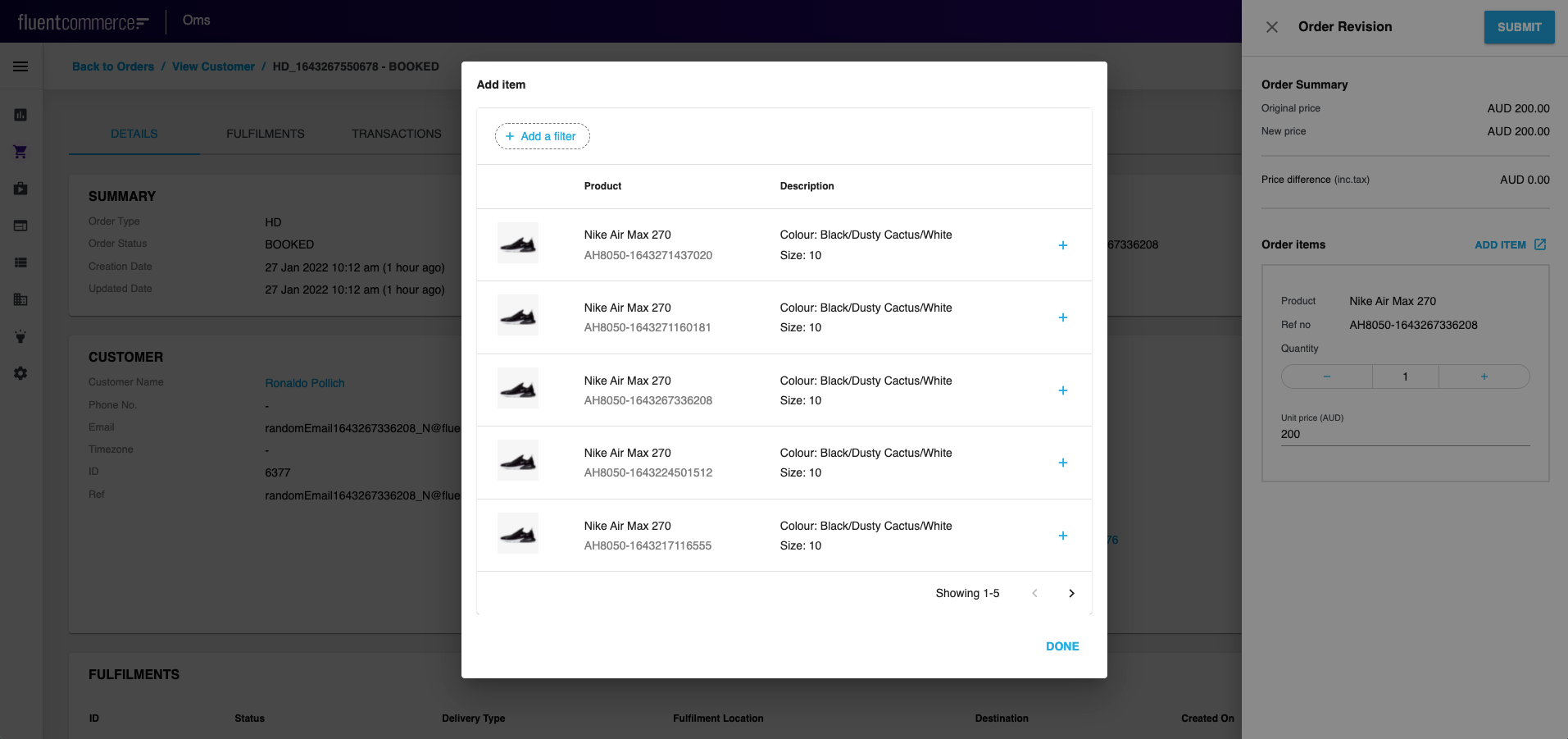
| Plugin Name | Core |
|---|
Alias
fc.modal.button
Detailed technical description
Add Item Button Configuration
To add`OpenDataModalButton` to a form, call it from Mystique core and add the configuration (query, modal window title and content, button label, label colour, and icon (before/after button label)). See the Sample Configuration belowThus, the drawer will contain a button, clicking on which the ‘Add Item’ dialogue appears. The dialogue contains `fc.list` component displaying product items.Sample Configuration
This is an example configuration`OpenDataModalButton` from mystique-coreThus, the drawer will contain a button, clicking on which ‘Add Item’ dialogue appears. The dialogue contains fc.list component displaying product items.Properties
| Name | Type | Description |
| label | `String` | The label is shown on the add item dialogue |
| endIcon | `IoMdOpen` | Icon to open each row of the list |
| color | `String` | Color of the icon |
| query | `String` | query with which the list is shown |
| title | `String` | To translate the label into the desired language |
Version History
Recommended Placement
None