
Add Item Dialogue Component
UI ComponentUI Component overview
Changed on:
2 Dec 2024
Overview
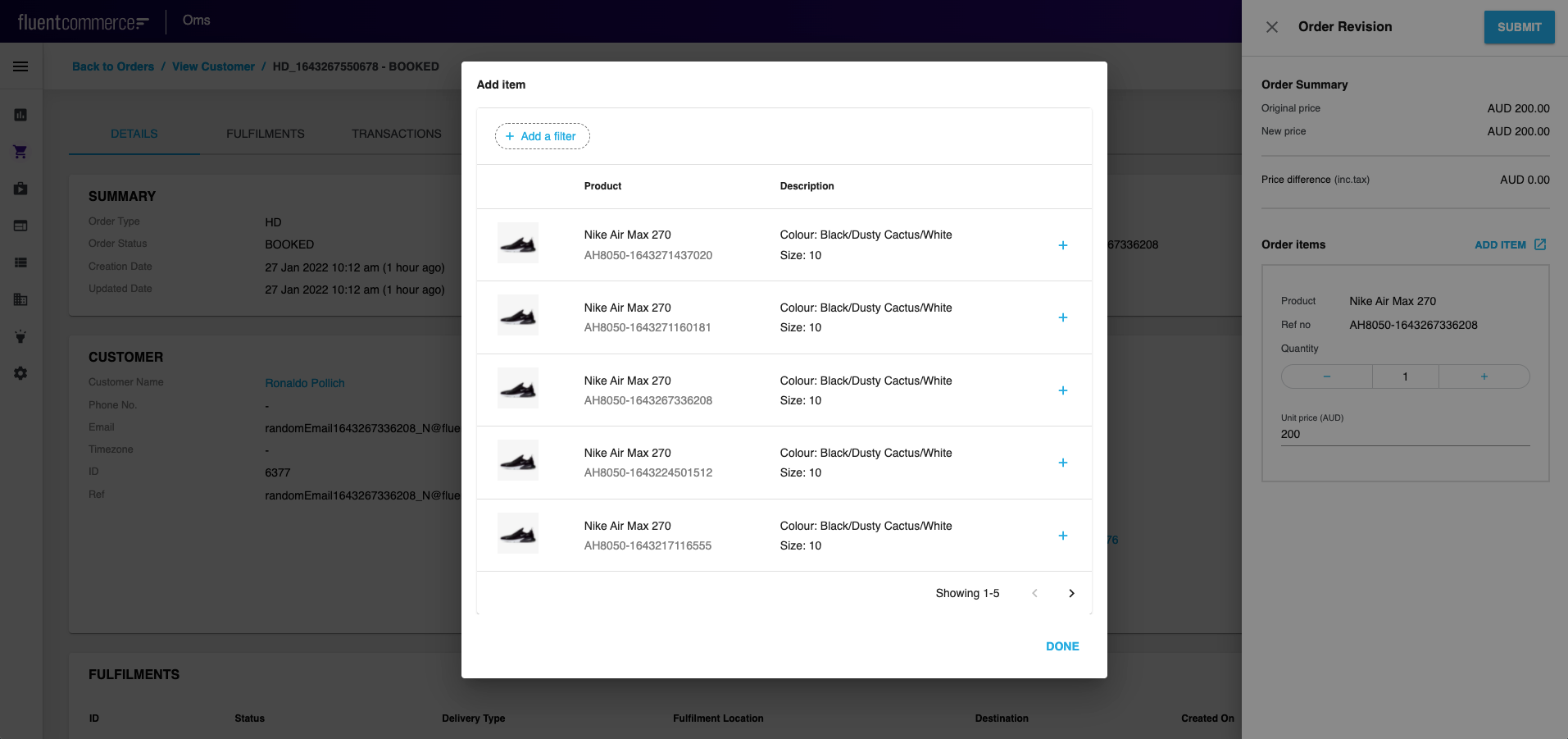
- This article describes how to add Add item button (
`OpenDataModalButton`) to the drawer and display the list of product items in a modal window ('Add Item' dialogue).
| Plugin Name | Core |
|---|
Alias
fc.modal.button
Detailed technical description
Add Item Button Configuration
- To add
`OpenDataModalButton`to a form, call it from Mystique core and add the configuration (query, modal window title and content, button label, label color and icon (before/after button label)). See the Sample Configuration below. - Thus, the drawer will contain a button, clicking on which the ‘Add Item’ dialogue appears. The dialogue contains the
`fc.list`component displaying product items.
- The drawer will contain a button, clicking on which ‘Add Item’ dialogue appears. The dialogue contains
`fc.list`component displaying product items.
Properties
| Name | Type | Description |
| label | `String` | The label is shown on the add item dialogue |
| endIcon | `IoMdOpen` | Icon to open each row of the list |
| color | `String` | Color of the icon |
| query | `String` | query with which the list is shown |
| title | `String` | To translate the label into the desired language |
Configuration example
1const ProductSearchModal: FC<ProductSearchModalProps> = ({ onAddItem }) => {
2    const ProductSearchButton = ComponentRegistry.get('fc.modal.button');
3    const { translate } = useI18n();
4    const setting = useSettings({ list: SEARCH_PRODUCT_LIST });
5    const descendants =
6        setting.list.result?.value || _.cloneDeep(defaultComponent);
7
8    useEffect(() => {
9        descendants.props.attributes.push({
10            type: 'component',
11            align: 'right',
12            options: {
13                component: 'fc.modal.button.addItem',
14                props: {
15                    onAddItem: (data: any) => {
16                        onAddItem(data);
17                    },
18                },
19            },
20        });
21    }, [descendants]);
22
23    return (
24        <ProductSearchButton
25            data={{
26                descendants: [descendants],
27                label: (
28                    <Typography variant="h5">
29                        {translate('fc.order.orderRevision.add.item')}
30                    </Typography>
31                ),
32                endIcon: <IoMdOpen />,
33                color: 'primary',
34                query: query,
35                title: translate('fc.order.orderRevision.add.item'),
36            }}
37        />
38    );
39};
40
41export default ProductSearchModal;Version History
Recommended Placement
N/A