
Virtual Catalog Workflow Templates
Workflow
Changed on:
13 June 2025
Overview
These are the reference Virtual Catalog workflows provided in the Inventory Reference Module. Fluent Commerce provides reference templates for Base and Aggregate Virtual Catalog workflows that can be imported directly into any Retailer setup. The Inventory Module Getting Started Guide defines configuration capabilities for the reference Inventory workflows.It is also possible to update and configure workflows to fit your specific client requirements using our OMX Workflow Framework.| Domain Area: | Inventory |
|---|
Interface Contract
Package
Diagram
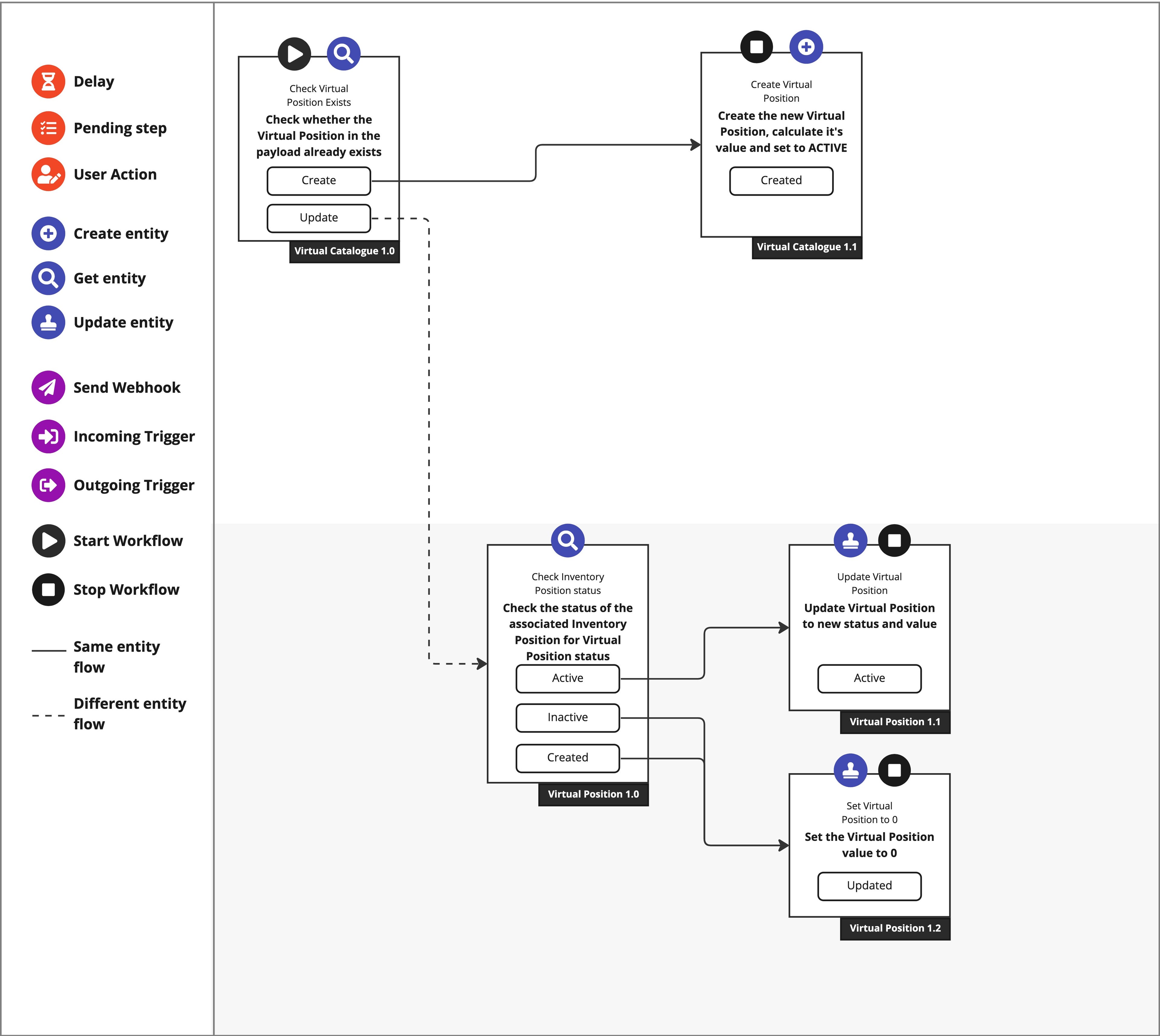
Detailed Technical Description
The below artefacts are what make up the reference Virtual Catalog workflows:Templates
Fluent Commerce provides`fc-workflow-virtual-catalogue-base.json` and `fc-workflow-virtual-catalogue-aggregate.json` files that can be imported directly into any Account to use the Reference Workflow templates.| Artefact | Workflow name | Description |
`fc-workflow-virtual-catalogue-base.json` | `VIRTUAL_CATALOGUE::BASE` | The Base Virtual Catalog Workflow is responsible for managing Virtual Catalog entities and Base Virtual Positions calculations. |
`fc-workflow-virtual-catalogue-aggregate.json` | `VIRTUAL_CATALOGUE::AGGREGATE` | The Aggregate Virtual Catalog Workflow is responsible for managing Virtual Catalog entities and Aggregate Virtual Positions calculations. |
Workflow Entities, Stages, and Statuses
The data below is valid for both Base and Aggregate Virtual Catalog Workflows:| Entity | Workflow Stage (`category`) | Status |
`VIRTUAL_CATALOGUE`(Primary Entity) | `BOOKING` | `CREATED` |
`FULFILMENT` | `ACTIVE` | |
`DONE` | `INACTIVE` | |
`VIRTUAL_POSITION` | `BOOKING` | `CREATED` |
`FULFILMENT` | `ACTIVE` | |
`DONE` | `INACTIVE` |
Rulesets
Base Virtual Catalog Workflow
| Name | Type | Description |
| CREATE | VIRTUAL_CATALOGUE | Initial Event on Virtual Catalogue Creation |
| VirtualCatalogueEvent | VIRTUAL_CATALOGUE | Validate a VC event |
| DownToVirtualPosition | VIRTUAL_CATALOGUE | Kicks off the inline virtual position ruleset. |
| DeactivateVC | VIRTUAL_CATALOGUE | Make VC Status Inactive |
| CREATE | VIRTUAL_POSITION | Initial Event on Virtual Catalogue Creation |
| CheckInventoryPositionStatus | VIRTUAL_POSITION | Set the status of base virtual position to that of the inventory position |
| UpdateBaseVirtualPosition | VIRTUAL_POSITION | Create or update a virtual position |
| ResetBaseVirtualPosition | VIRTUAL_POSITION | Create or update a virtual position |
Aggregate Virtual Catalog Workflow
| Name | Type | Description |
| CREATE | VIRTUAL_CATALOGUE | Initial Event on Virtual Catalogue Creation |
| VirtualCatalogueEvent | VIRTUAL_CATALOGUE | Validate a VC event |
| CheckVirtualPositionExists | VIRTUAL_CATALOGUE | Validate a VC event |
| CreateAggregateVirtualPosition | VIRTUAL_CATALOGUE | Create or update a virtual position |
| DeactivateVC | VIRTUAL_CATALOGUE | Make VC Status Inactive |
| CREATE | VIRTUAL_POSITION | Initial Event on Virtual Catalogue Creation |
| UpdateAggregateVirtualPosition | VIRTUAL_POSITION | Create or update a virtual position |
