The attribute Column component (`fc.attribute.column`) is a content component that allows displaying configured coloured dots in the cell depending on incoming values.Coloured dots can be added to any cell in the table. The possibility to display coloured dots near the order status is available out of the box for the Order List page. By default, dots are not shown, but after adding the setting `fc.order.list.status.column` on the Account level, they will appear.
Setting Example
This is an example for `fc.order.list.status.column`.
Defining the Dot for Each Value in the Cell
It is possible to define the dot colour for each value in the cell. The default Grey colour will be applied for values not defined in the setting. You can find available colours with their code values in the Status Colour Palette.As was mentioned above, it is also possible to display coloured dots in a table other than on the Order List page.Example:We would like to display coloured dots in the Status column on the Billing Account List page.
Step 1: Go Admin → Settings and search for fc.mystique.manifest.oms.fragment.ordermanagement setting.
Open the fragment and click edit.
Step 2: Add the following text below "manifestVersion":"2.0", as it is displayed in the example below:
This configuration allows preloading settings in the cache to prevent making more and more queries as more of these settings are added.
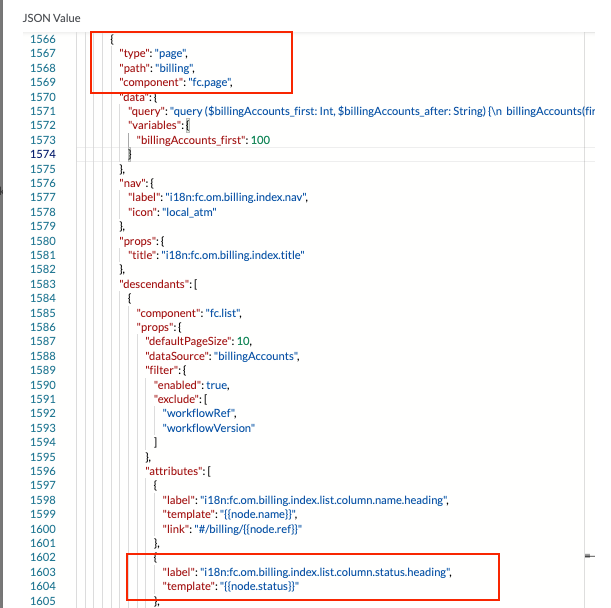
Step 3: While in edit mode, search the page to find the billing path and column Status: (See below)
Step 4. Replace code in lines 1603-1604 in the example above with:
Note The text `"fc.billingaccount.list.status.column"` below denotes the new setting which contains the colour settings.
Step 5: Create a new setting fc.billingaccount.list.status.column on the Account level and define colors for statuses like on the example below:
Step 6 (Optional). While in edit mode of fc.mystique.manifest.oms.fragment.ordermanagement setting, search the page to find the orders path and column Status: (See below)
Note The text `"fc.order.list.status.column"` below denotes the new setting which contains the color settings.
Setting Naming Convention
We suggest the following template for naming settings for coloured dots configuration:`fc.{table location}.{entity}.{column name}.column``{table location}` - table location in format `{entity}.{list/details}`, e.g., return.list; billingaccount.details.`{entity}` - entity name, used in cases when coloured dots are added to the tables on the details page, e.g., tables Fulfilment or Order Items on the Order Details page.`{column name}` - name of the column to which `fc.attribute.column` component is applied.Examples:fc.order.list.status.columnfc.return.list.status.columnfc.order.details.fulfilment.status.columnfc.order.details.orderitem.status.column


 Setting Example