
Commercetools Category Sync
FeatureFeature overview
Changed on:
17 June 2026
Overview
The Category Sync is responsible for synchronizing categories from commercetools to Fluent.Key features- Manually synchronize the entire categories at any time
- Automatic detection and synchronization of modified category
How it Works
Data Pipeline Execution
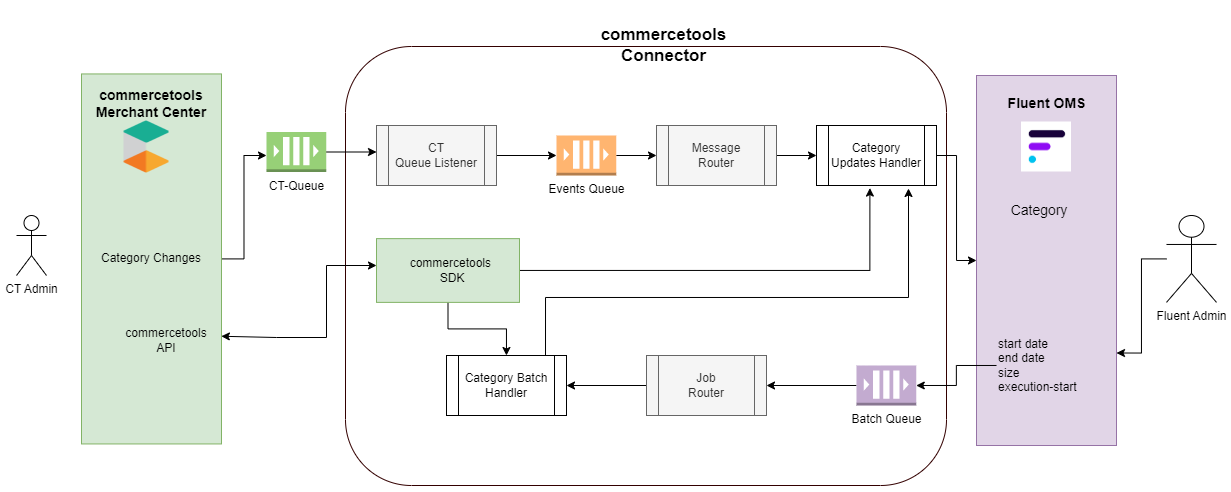
1. Storefront Trigger (Subscription/External Queue)
Category record exports can be initiated via two distinct operational trigger paths:- Manual Batch Job: Triggered with the help of an external job scheduler. The number of records pushed depends on the date windows configured within
`Fluent Settings > Product Catalog Sync`. The extension pulls items modified from that designated date until the synchronization starts, implicitly adding categories mapped against those products. - Automatic Delta Sync: An automated background synchronization driven by commercetools subscriptions. Any category creation, modification, or removal pushes messages (supporting
`ResourceCreated`and`ResourceUpdated`variants) directly to the external`ct-queue`. More details on commercetools Subscription.
2. Route Filtering & Message Routing
- Stage 2 (Ingestion & Listening): For automated deltas, the
`CT Queue Listener`reads messages from the`ct-queue`and forwards them to the internal Event Queue. - Stage 3 (Routing Evaluation): The Message Router reads the message name from the Event Queue and routes it to the designated handler. In the case of category updates, the message name resolves to
`category`, which routes to`commercetools.connect.category.upsert`. Bulk requests instead route from a Batch Queue down onto a dedicated Category Batch Handler.
3. Fluent API Delivery (GraphQL Mutation)
- Stage 4 (Payload Delivery): The Category Updates Handler reads message data from the internal queue. Based on the target identifier, it extracts deep category structures from the Commercetools-SDK, transforms the parameters to align with the Fluent data model, and streams the finished configuration outbound to Fluent OMS.
Data Storage & Schema Mapping
Core commercetools Category API Endpoints
The connector queries the following endpoints to pull structural data during processing:`GET: {{host}}/{{project-key}}/categories``GET: {{host}}/{{project-key}}/categories/{{category-id}}`
Developer Extension Points
For more details on how to extend, please refer to the extend guidelines.Message Routing Configuration (`application-connector.yml`)
Please refer to commercetools Category Messages for more information on supported messages from CT.Custom Message Handler Implementation
Custom data transformation strategies can be introduced by creating a class extending`MessageHandler` registered under the main SDK package directory: