Docs
Search
Search
Help & Feedback
Get Started
Functionality
Learning
Extension
Dev Tooling
APIs
Releases
Total Revenue Metric
Home
/
By Type
How-to Guide
Step-by-step guides to achieve a specific scenario or setup.
Author:
Movyn John
Changed on:
13 Oct 2025
Key Points
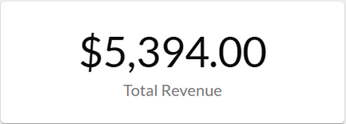
Total order revenue for the selected time period
Steps
Related content
Fluent Metrics Library Overview
The Fluent Metrics Library is a collection of metrics and dashboards available to Fluent customers. Delivered through the Fluent Analytics feature, it gives retailers real-time visibility into order, fulfillment, returns, and inventory operations to enable faster, smarter decisions.
Designed for retail operations managers, inventory analysts, business intelligence, and many other teams who need visibility across retail operations.
Total Orders Metric
Average Order Value Metric
Cancellation Rate Metric
Movyn John
What it measures
Total dollar value of all completed orders for the selected time period.
When to use this metric
Monitor daily, weekly, or monthly sales performance
Compare revenue across different time periods
Assess the financial impact of promotions or campaigns
Track progress toward revenue targets
How to interpret
Good performance: Steady growth or meeting revenue targets
Potential issues: Sudden drops may indicate operational problems, pricing issues, or market changes
Benchmark guidance: Compare to previous periods, seasonal trends, and business targets
Key considerations
Currency symbols may not be meaningful when viewing multiple retailers in different countries
Only includes completed orders (excludes pending, cancelled, or rejected orders)
Revenue timing is based on order completion, not payment processing
Technical details
Formula:
SUM(order.totalPrice) where order.status = {STATUS_COMPLETE} within the selected time period
Configuration:
STATUS_COMPLETE
: Status definitions for complete orders (default:
COMPLETE
)