
Availability
Essential knowledge
Authors:
Fluent Commerce, Esma Tuzovic
Changed on:
1 Nov 2024
Overview
[Warning: empty required content area]Key points
[Warning: empty required content area]Availability Module Overview and Key Concepts
In this course, we will explore the challenges faced by retailers in managing availability for e-commerce sites and other selling channels.Lesson Breakdown
- 1 Availability Module — Overview and key concepts
- 2 Imagine this scenario 💭
- 3 Key features
- 4 How does it work?
- What is available?
- When can I get it?
- How can I get it?
- How much do I pay in total?
- Where is it available?
 What availability helps to calculate?Availability calculates inventory availability based on:
- product
- customer location, and
- delivery method.
Where Availability sits within Fluent Order Management
A diagram of the main layers of the Fluent platform is shown below. As you can see, Availability is one of the core Modules of the platform providing capabilities relevant to product availability: Web Apps provide user-friendly access to modules, including Availability. Users can either configure out-of-the-box (or Reference) capabilities or extend each feature using SDKs to match their business needs.Fluent OMS Web AppFluent OMS is a web app of the Fluent platform used for managing all aspects of the Availability module. You can explore the features and capabilities of Fluent OMS and watch a product demo of the app here.Next, let's recap some fundamental concepts related to Availability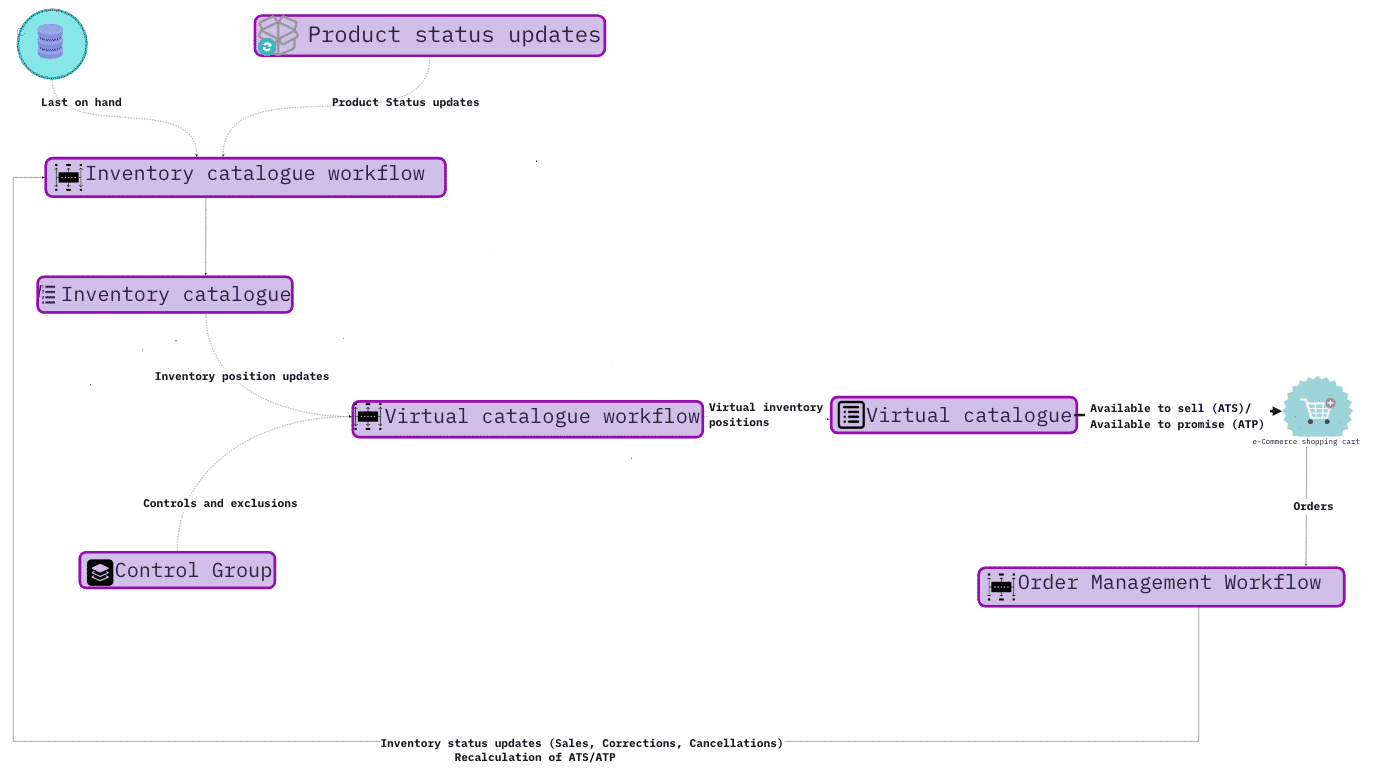
| Network | A network is a set of one or more locations, grouped together for the purpose of fulfilment optimisation. Example: As a retailer, you can have a network of locations fulfilling Home delivery orders only and another network of locations that can offer curbside pickup. |
| Product Catalogue | Consists of Category / Product / SKU / Price. It is a collection of products, variant SKUs (size, colour, etc.), price, and other details. Products can be organised into Categories. Data is imported from Product Information Master (PIM) via Create/ Update GQL API calls. |
| Inventory Catalogue | Inventory Catalogue consists of SKU / Location / Inventory Position. It serves as the Inventory master maintaining current stock on hand for each product or variant.It receives inventory updates from one or more inventory systems (ERP, WMS, POS, etc.) and the Order Management Workflows. |
| ATP / ATP |
|
| Virtual Catalogue (VC) | A Virtual Catalog (VC) provides a segmented view of quantities available to sell for different selling channels, such as an e-commerce website. A VC can be a subset of the entire pool of inventory thanks to control groups, networks and buffer rules that apply. |
| Control Groups | Controls Groups include buffers and exclusions. Go to Fluent Commerce Docs(opens in a new tab) for more information.Controls can be used to:
|
Imagine this scenario
Laura begins her online search
She enters the website of an online shoe retailer, searches the size and style and adjusts the price filter to match only those shoes within her price range....she then hits the SEARCH button The search returns multiple pages showing shoes matching her search criteria — this page is referred to as the 'Product Listing Page' or PLP.PLP is an essential element of the eCommerce experience as it funnels site visitors to product detail pages and closer to conversion.
 After a few minutes of browsing through the PLP, Laura comes across a pair of shoes that catches her attention. ...She CLICKS on the Image to view more details.
 On this particular page (referred to as the 'Product display page' or PDP), Laura is able to view availability information about this specific product to hopefully assist her in making a buying decision.⚠️ But she encounters a problem. Laura is not sure whether the item in her size is in stock or whether she can get it in time!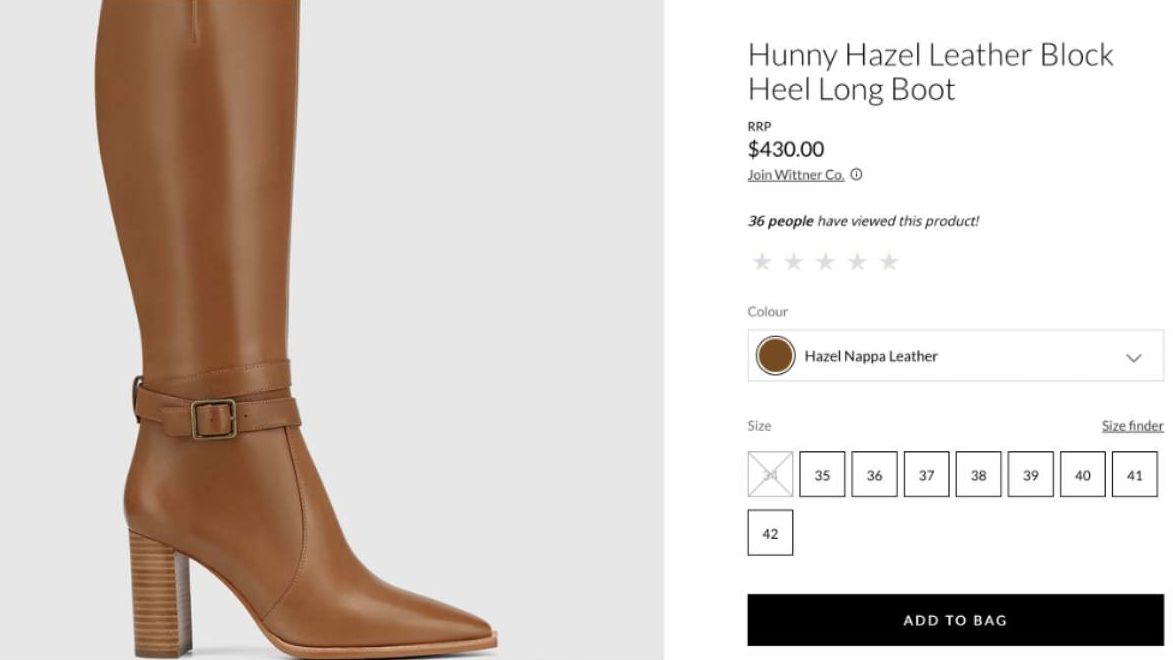
At this stage of the customer journey e-commerce site should ideally want to showcase:
- If the product is in stock.
- Shipping details are calculated depending on where the customer lives and the types of postal services available to the customer.
- If there is an option to get the product quickly.
- If there is only limited stock available — this will help entice the customer into making a buying decision and progressing to the checkout page
Knowledge Check
What information should be displayed on PDP and PLP pages regarding product availability when shopping on an e-commerce website? PDP: Synchronous Availability calls, Delivery options, Detailed item description, Accurate quantityPLP: Quantity cached in E-commerce website, Asynchronous availability calls, Approximate quantityBoth PDP & PLP: item image, PriceIn the upcoming topic, you will discover the key features and benefits provided by Fluent's Availability Module.
Availability Module Features
Recall the challenge Laura faced during her search for shoes? The features and capabilities provided by Fluent's Availability Module help solve these challenges, and many more.Availability module helps provide detailed and accurate stock information & fulfilment options
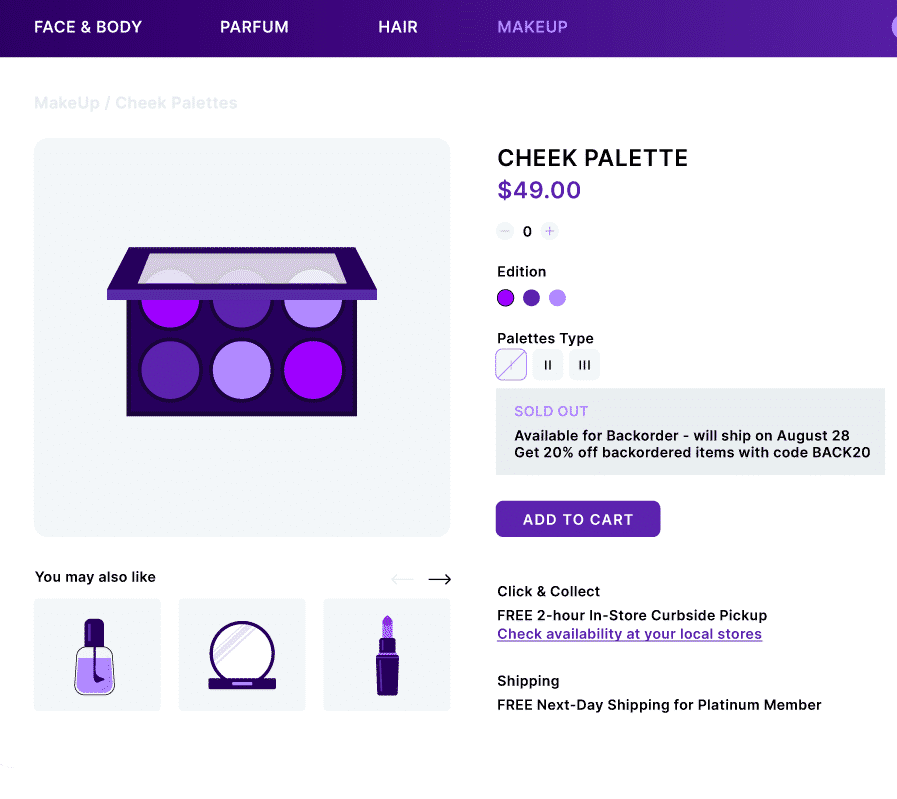
✅ Allows customers to obtain all possible fulfilment options on the PDP reducing the chances of cart abandonment. ✅ Provides accurate available stock information — customers are shown up-to-date availability on the PDP and checkout page using the Fulfilment Options call. Note: Stock information on the PLP is achieved by refreshing the inventory cache on a regular basis (e.g. every 15 minutes).A product detail page (PDP) for a cosmetics retailer is shown below
| N° | Control Ref | Description |
| 1 | Display information on product variants | Display information for any products and their variants on the PDP (or checkout page) based on underlying inventory data — this increases cart conversion rates. |
| 2 | Backorders | Allow backorders for an item that is temporarily out-of-stock Note: This is a capability possible through extension with SDKs. |
| 3 | Provide ETAs per delivery or pickup options | Providing delivery ETA's and pickup options upfront to the customer (e.g. 24 hours click and collect) enhances customer satisfaction and retention. |
| 4 | Show nearest locations with stock | Allow customers to see what’s in stock at local stores nearby — this provides convenience and flexibility for the customer. |
| 5 | Show availability of related recommended products | Showing availability of related recommended products increases the chance of customers purchasing add-on products and ultimately spending more. |
- When multiple items are in the cart — show if there are splits in the fulfilment plan
- Show aggregated in stock, low stock, or out of stock on the PLP
- Preorder information
- Soft reserves
How does it work?
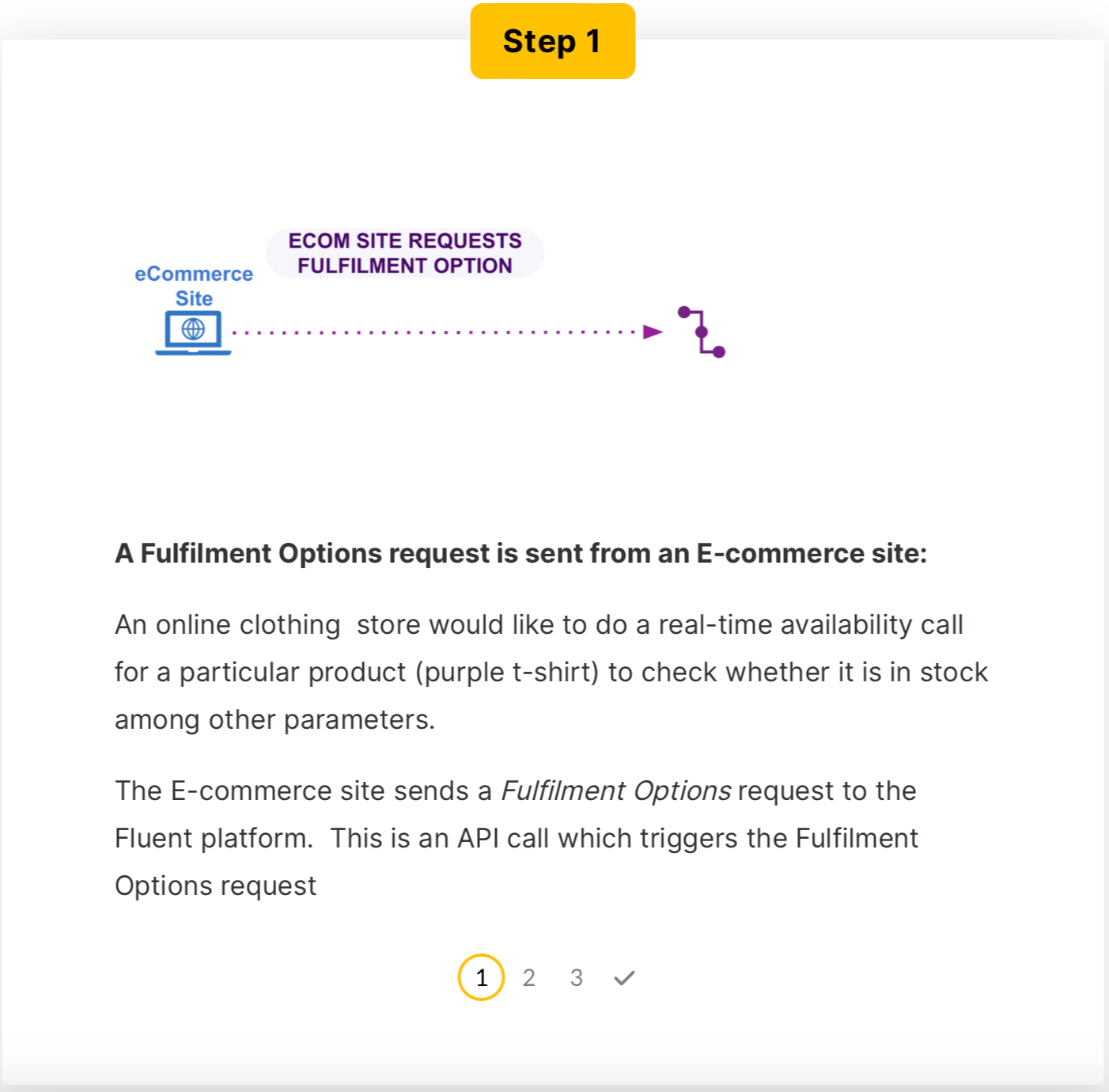
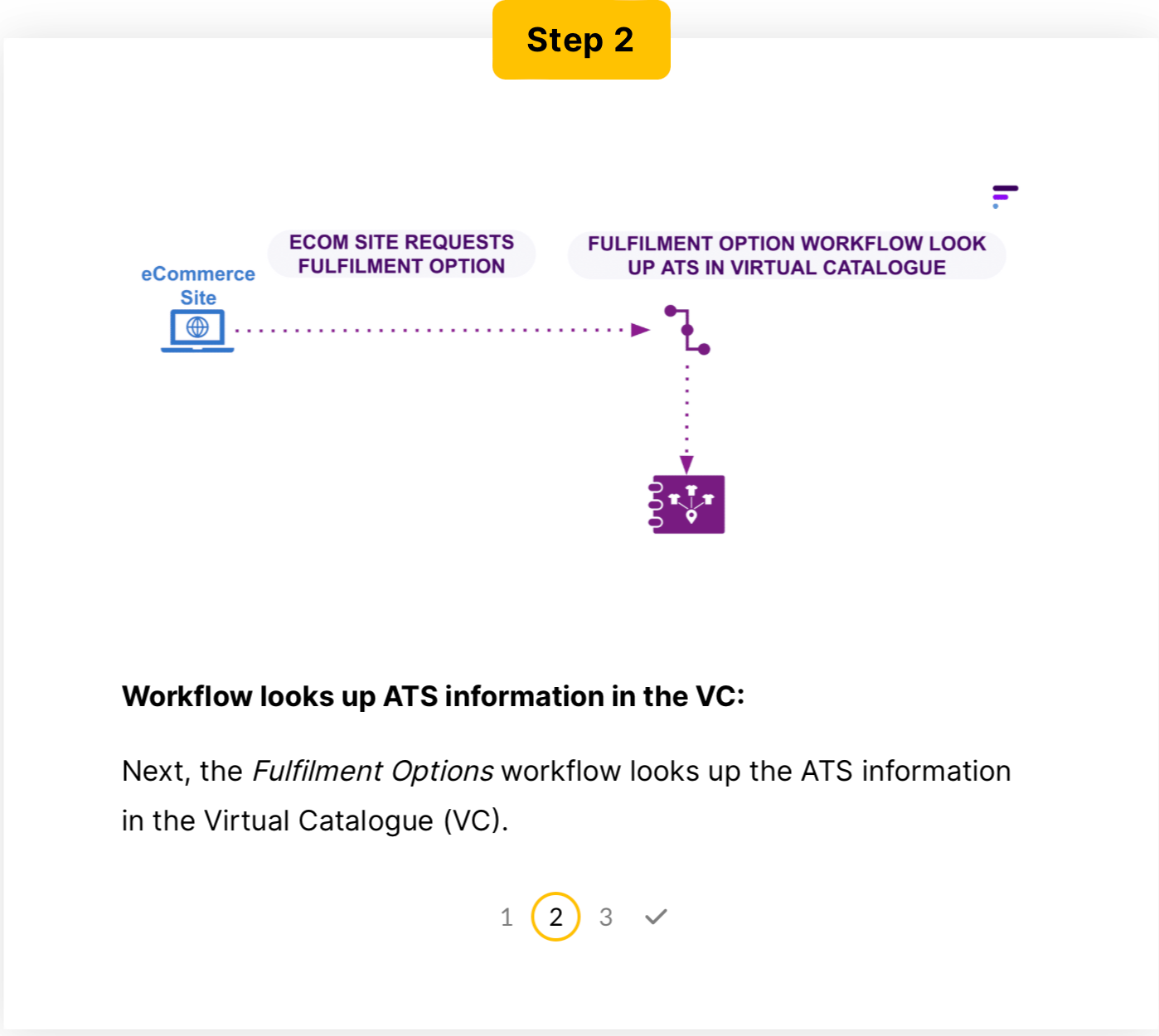
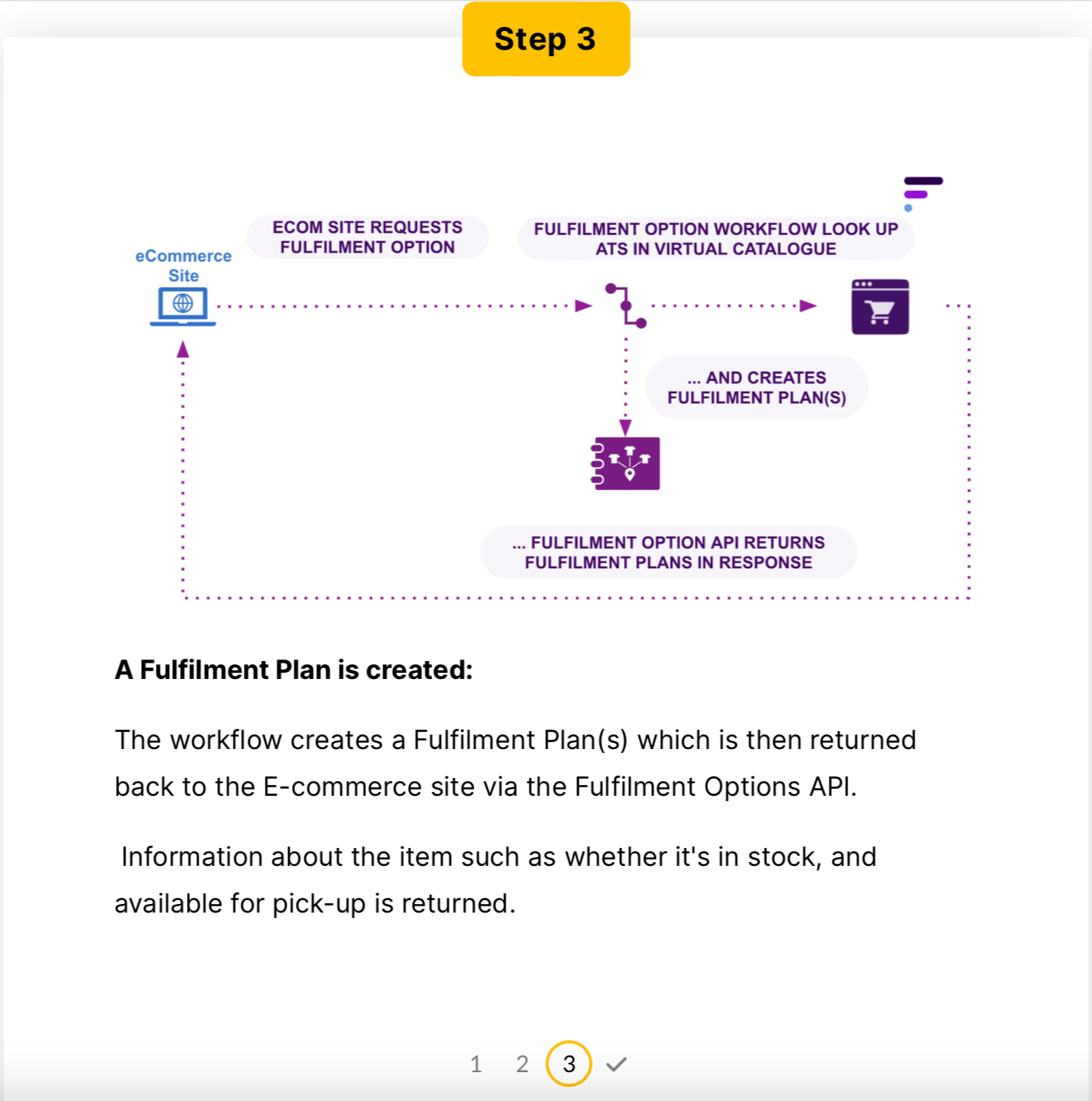
The Availability Module uses a workflow called Fulfilment Options to generate Fulfilment Plans based on the requested items. This workflow interacts with the Inventory module and uses a sourcing logic to produce plans from a selected Virtual Catalogue for that channel.A Quick Recap
Availability provides a range of availability information for different products. This information is provided by considering custom attributes defined in a business workflow.Entities that exist in this Domain include:- Fulfilment Option: Retrieves and identifies the Fulfilment option for the proposed order. A Fulfilment Options call will return multiple plans for how an order might be fulfilled, such as ETA and pricing information.
- Fulfilment Plan: The Fulfillment plan identifies the strategy to be used to fulfil an order. A fulfilment plan may identify multiple fulfillments to complete an order.
Knowledge CheckThe default order fulfilment process requires specifying the order type, item SKU, and requested quantity. However, adjustments may be necessary to customize the process for additional factors such as delivery method, postal code, and VIP customers.Question:Which of the following components would undergo changes as a result?
- Payload of the fulfillment options call
- Workflow rules and triggers
- Ecom and OMS integration interface
Congratulations, you've reached the end of this course!


