commercetools Connector - Order Sync
Essential knowledgeCore knowledge to understand Fluent Commerce
Intended Audience:
Technical User
Author:
Fluent Commerce
Changed on:
23 Feb 2026
Overview
The Order Sync is responsible for exporting orders from commercetools to Fluent and receiving order updates.Key points
- Triggers customer export when an order is placed
- Exports new orders to Fluent
- It opens a webhook to receive Fluent order-related updates. Other extensions like fulfilment and consignment will leverage this webhook
- Updates order status based on Fluent updates
Limitations
- Does not sync old orders created before the extension is installed
- Out-of-the-box(OOTB) connector supports order creation, and the order update/changes handler needs to be customized specifically to the implementation need
- Currently, HD and CC types are supported OOTB. The relevant order create handler can be overridden or a new one written to add for other order types and send in more order attributes
Technical Details
The CT-Queue message queue is used to export orders. Once an order is saved in commercetools, the system triggers the relevant event to the external queue (ct-queue), which the queue listener observes. The queue listener triggers message routes using the message name and handler. The message handler will push the order data to Fluent OMS.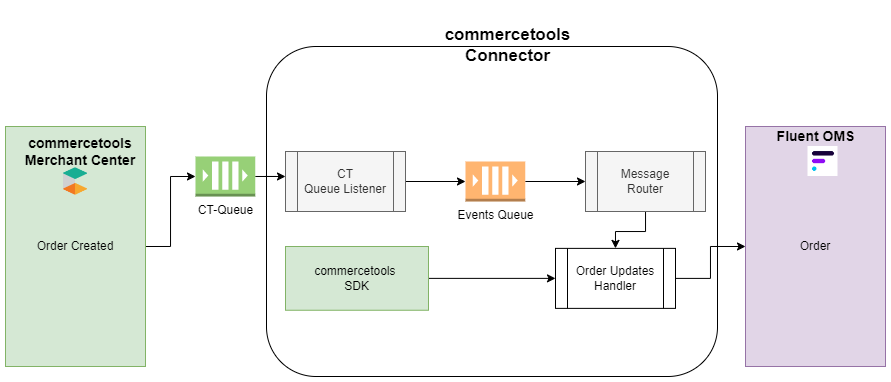 CT Queue: Any order creation will be pushed to ct-queue using commercetools subscriptions. Out-of-the-box(OOTB) connector uses AWS Event Bridge and can be implemented with other queues/subscriptions supported by commercetools. More details on commercetools subscription. CT Queue Listener: This class reads the message from CT-Queue and pushes it to the Event queue.Event Queue: The event queue is responsible for holding the event message to be processed further.Message Router: It will read the message name from the Event queue and pass it to the appropriate handler. In case of order changes, the message name will be mapped against route properties named “
`order`“, and the route will be the “`commercetools.connect.order.create`“. The inclusion filter will be responsible for filtering out the message type.Order Create Handler: This will be a class that reads message data from the internal queue and, based on the order identifier, fetches more information from commercetools-SDK ( The core commercetools SDK, which interacts with commercetools APIs ) and maps them with Fluent data model and pushes it to Fluent OMS.The message handlers are fully extensible. Partners can make the changes as per their requirements. The commercetools-connector allows message routing with flexible message handlers to process and transform data moving from a source to a destination. Partners can change the message names and override the classes. It is fully expected the order create handler will be overridden to send in more attributes specific to the implementation.Out-of-the-box(OOTB) commercetools-connector provides the ability to create auto-generated order numbers based on order type. Fluent supports two order types HD(Home Delivery) and CC (Click and Collect); hence the order number gets generated with a specific pattern for their types, as shown below:CC Order: “order-” (order-CC201022133420)HD Order: “order-” (order-HD201022122149)The order type will be determined based on the shipping method, which is configured on Fluent Oms app > Admin > Settings >
`fc.connect.commerce-tools.order.shipping-method-mapping`, refer Fluent Setting for more details.Customers will be created with the order creation process. It checks if the customer first exists in the fluent retailer and, if not, will create a new customer by using fluent customer Graphql mutation.Example to extend the functionality
Partners can override existing handlers using the application-connector.yml and Handler class. To change the logic of the Order Create handler, first go to`commercetools-modules/commercetools-connector/src/main/resources/application-connector.yml` , replace the “handler” under routes > name > handler node.New handlers can also be added directly to the above `application-connector.yml`Create a new Handler that extends `MessageHandler` and ensure that your package is under the main SDK package `com.fluentcommerce.connect`, for example: `com.fluentcommerce.connect.custom.commercetools.handler.message.<your-handler>.java` for more details on how to extend, please refer to the Extend Guidelines.Order Queries and Mutation
Below are the queries and mutations that come as an Out-of-the-box(OOTB) feature with the commercetools-connector and are fully flexible and can be overridden by the partners.Order mutation to create order on the Fluent OMS appOrder query to fetch order from Fluent OMS appQuery to fetch order from commercetools`fc-commercetools-module/src/main/graphql/mutations/order/GetOrder.graphql`Mutation to update order in commercetools