
Integrate and Connect
Essential knowledge
Author:
Fluent Commerce
Changed on:
1 Nov 2024
Overview
You will learn when, where and how the Fluent Platform interacts with external interfaces.Key points
- Gain an understanding of common interfaces and what information the Fluent Platform shares with them.
Introduction
Welcome! This course talks about the various Integrations and Connections of the Fluent Platform.During this course, we will look at:- Some common interfaces, and the information shared between these interfaces and the Fluent Platform
- GraphQL, and understand its benefits over REST APIs.
- Events API, Inventory Batches, Webhooks, and Connectors
- Some recommended practices around the use of these methods.
 The Fluent OMSThe Fluent Order Management System is a platform that drives the fulfillment of orders. Its main modules like Product Availability, Distributed Order Management, Global Inventory, and the Store Fulfillment functionalities are designed to be flexible in integrating with other APIs and Connectors. The Fluent OMS sits in the middle of the architecture and provides a realtime view of the Inventory to the Sales Channels, enables integration with Warehouse Management Systems, Carrier services, ERPs, etc.
 Integration LayersIt is important to note that all the integration payloads coming into and going out of the Fluent OMS need to follow a predefined structure. This is because the Fluent OMS is designed to accept and process payloads in a particular format only.Similarly, third-party systems may follow a payload structure of their own. Hence, in order for Fluent OMS to communicate with third-party systems, it will need to transform their payload structure to a format that Fluent Order Management understands, and vice versa. The Integration Layer, which sits between the Fluent OMS and the third-party systems, carries out this transformation.
 Next, we look at some common interfaces.Common InterfacesThere are many interfaces that you may come across in your projects, below we talk about some of the more common ones, and the information that's shared between them and the Fluent Order Management System.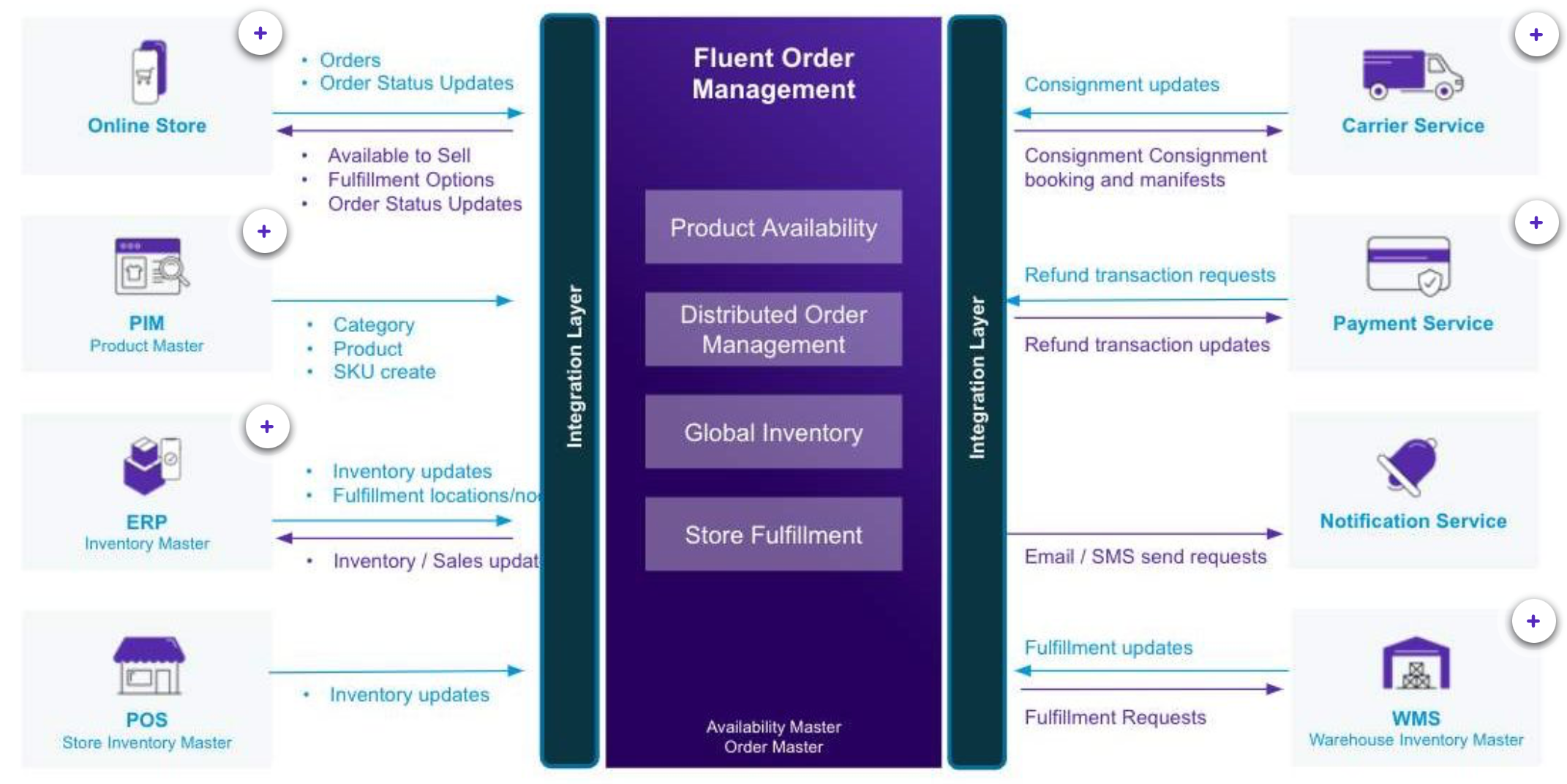
| Online Store | Source of orders can come from:
|
| PIM | Product information management systems share the following data with Fluent:
|
| Inventory Master |
|
| Carrier Service | The Carrier Service may:
|
| Payment Service | Can be used for
|
| WMS | The Warehouse Management System or a Drop Ship Vendor may:
|
| Platform (REST) | Fluent's Platform APIs are REST based and deal with platform related activities such as:
|
| Domain (GraphQL) | Fluent's Domain related APIs are GraphQL based, and used for activities such as:
|
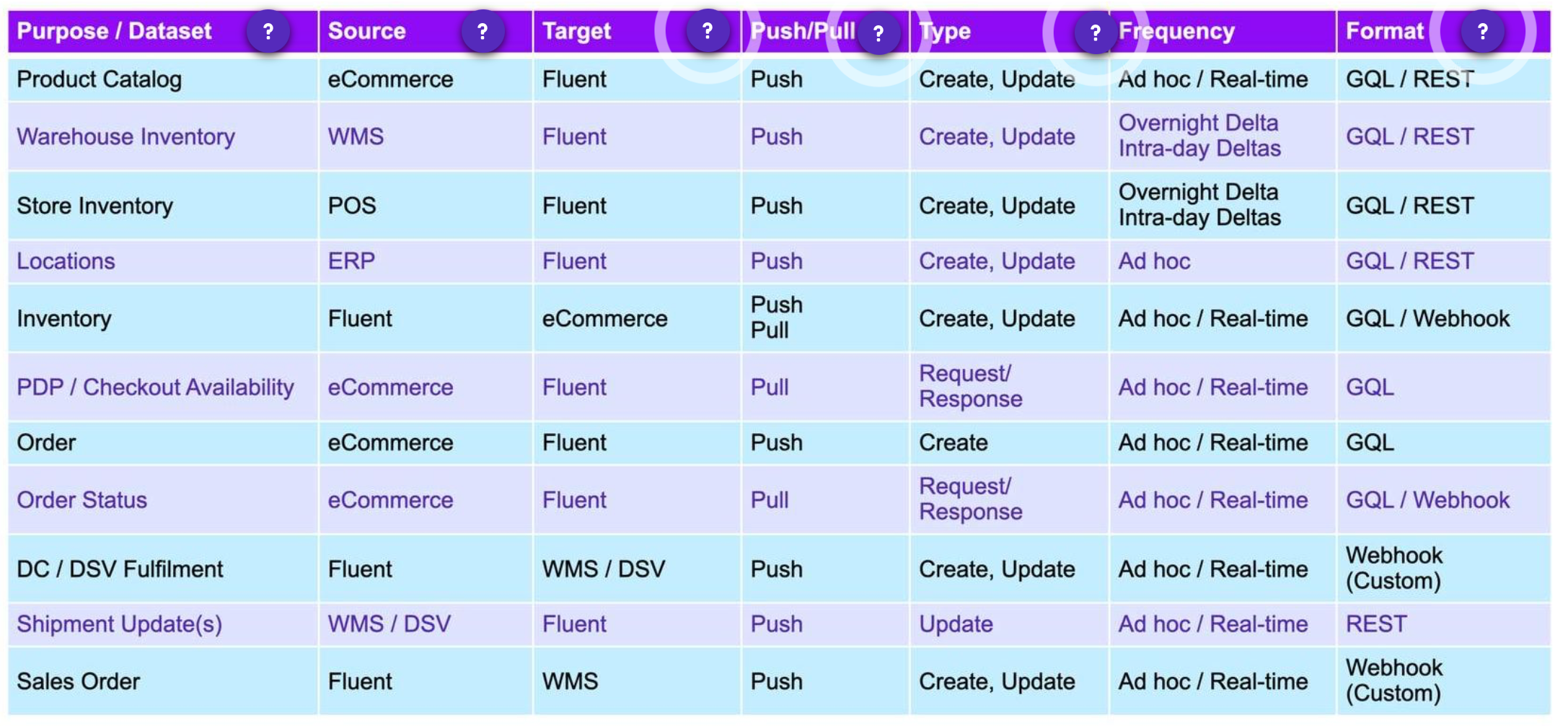
| API Purpose/Dataset | This column states some typical datasets / purpose for an API. |
| API Application Source | This column represents the source application for the respective dataset/purpose. |
| API Integration | This column lists the target API for the respective dataset/purpose. |
| Push / Pull | Push refers to the Source system pushing data to the Target.Pull refers to the Target system pulling data from the Source system. |
| Type & Frequency | These columns show the type and frequency for each integration. |
| API Types | The items listed in this column represent the types of API (e.g. Create, Update) for their respective purpose/dataset (e.g. Product Catalog). |
GraphQL
In this lesson, we'll look at the benefits of using GraphQL, as well as explore the differences between GraphQL and REST based APIs. We will also look at some examples of a GraphQL query and a GraphQL mutation. Topics in this lesson include:- Introduction to GraphQL
- Differences to REST
- Benefits of using GraphQL
- Basic structure of a query
- A GraphQL mutation
- Types of common integrations that use GraphQL
- GraphQL is an open-source data query and manipulation language for APIs, and a runtime for fulfilling queries with existing data. It was developed by Facebook and released to the public in 2015.
- The objective of GraphQL is to reduce the amount of data that's going over the wire and for the calls that are made, to be as-specific-as possible.
 For developers who've used REST based APIs in the past, here are some key differences to note:
- GraphQL is always a POST HTTP Method.
- GraphQL returns 200 OK HTTP Status, even if errors occur. Errors will be in the Response body.
- GraphQL queries that do not find any result, respond as 200 OK, and a data object with null or empty entity field.
- GraphQL schema provides strongly typed validation and includes documentation.
- GraphQL allows querying multiple entities in a single HTTP request.
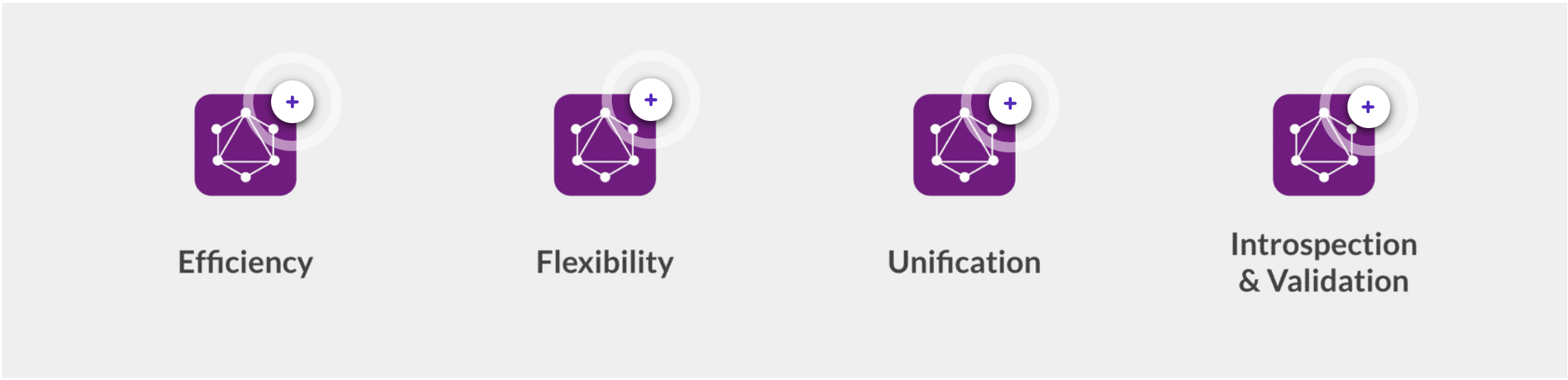
| Efficiency | GraphQL allows the API client to send multiple queries or mutations within a single HTTP request. This reduces network latency and chattiness, and allows developers to retrieve or write the specific data they need at once, if it makes optimal and logical sense to do so. |
| Flexibility | Retrieving data from the server can be done in a Query Language like approach, where the API client defines which fields and objects they would like to receive, rather than being forced to retrieve predefined Data Transfer Objects, as is typical with REST based APIs. |
| Unification | In addition to being highly efficient, GraphQL provides the ability to query multiple data objects, and declare the fields to be returned for each data object, allowing developers to work with unified data objects on the client side. |
| Introspection & Validation | GraphQL APIs provide a schema that allow clients to introspect and validate their queries, mutations, and overall interaction with the API on the client side, prior to executing or sending the HTTP request. |
- Get: To retrieve an entity with a unique identifier and display results
- Search: To search and display a list of results, while applying some filters
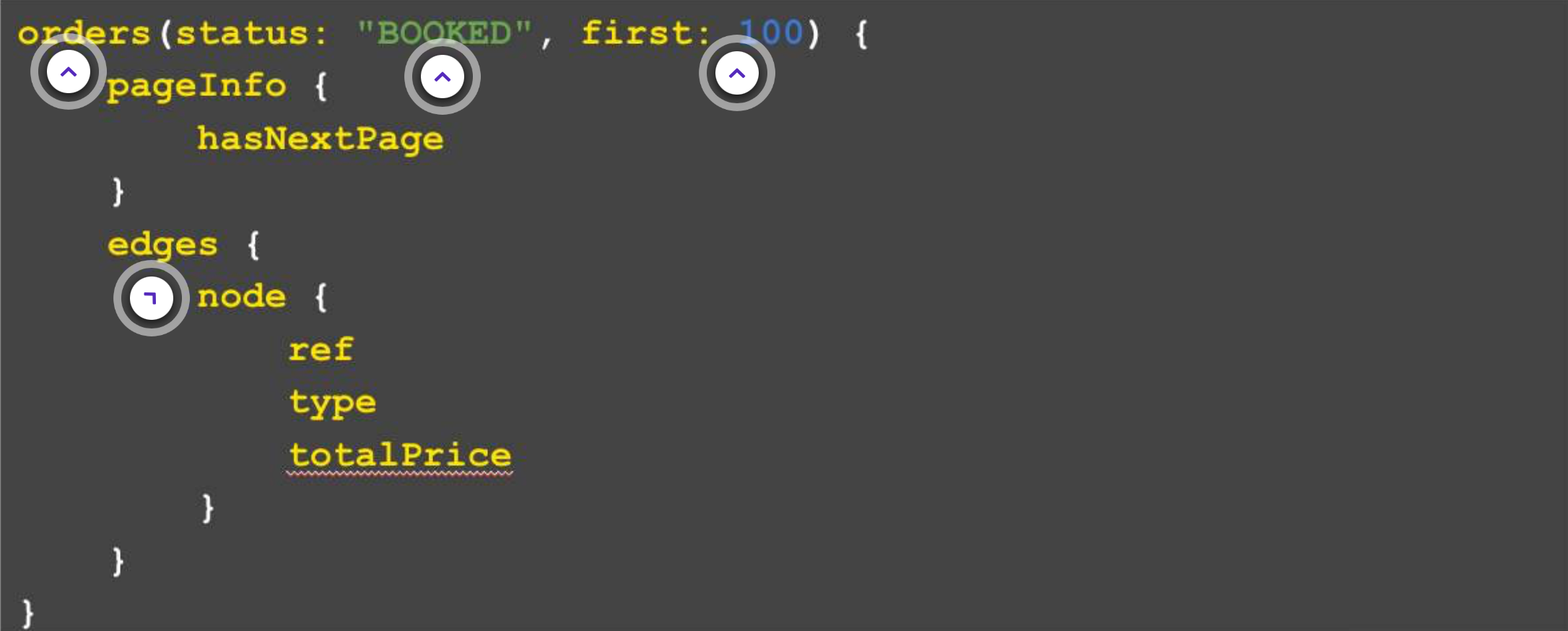
| order vs orders | For a Get command, we would say Order. And, a Search will always end with an S in our schema. Here 'orders' is used as we're searching through the orders. |
| status: "BOOKED" | This is an example of a GraphQL query which retrieves all orders that are currently under the status "BOOKED". |
| First 100 records | "first: 100" means that it will retrieve the first 100 orders. So, if there's more than a 100 orders, then it would only get the first 100. This is one of the paging based parameters, GraphQL uses cursor based paging, and you can also use 'last'. |
| Edges and Nodes | When searching though records, we will always get edges and nodes, where each node represents a result of that Search. But, for the Get command, there wouldn't be edges and nodes, instead the specified fields will be returned. |
 Create: Create mutations are used to create new data.
- Input types for Create mutations have mandatory parameters that are used to define the entity to be created uniquely.
- All entities of orchestrate-able types fire orchestration events on creation. This can be used to trigger workflows.
- Every create mutation creates the entity in the “CREATED” status. This enables the clients to trigger orchestrations for that entity, if the client wishes to change the status of that entity after creation.
- Input types for update mutations have mandatory parameters that are used to identify the object to be updated uniquely.
1mutation {
2 createOrder(input:{
3     ref:"HD_2341"
4     type:"HD"
5     retailer:{id:1}
6     customer:{id:34}
7     items:{
8         ref:"VPRD_13"
9         productRef:"VPRD_13"
10         quantity:2
11     }
12 }){
13     id
14     createdOn
15 }
16}1mutation {
2 updateOrder(input:{
3 id:5432
4 status:"BOOKED"
5 }){
6 id
7 createdOn
8 }
9}- Order Create:
Order creation from the Sales Channels - Product Availability:
Extracting Virtual Positions to be used for PLP pages or Search results - Reporting:
Extracting orders / fulfillments for reporting purpose - Light Webhooks:
In order to achieve light weight webhooks, the Webhook should only contain the entityID, but then the system to be integrated will need to extract the entity details using a GraphQL query
Events API
In this lesson, we'll look at Event APIs, learn more about Event Contracts and the role of Events in the Workflow Framework, as well as look at some common integrations that use the Events API. Topics in this lesson include:- Intro / Recap on what Event is
- Events API
- Event Structure
- Event Contracts & relationship to Workflow
- Types of common integrations that use Events
- Events best practices
| order vs orders | /event/{eventId} Get an Event by IdReturns the Event identified by the <eventId> parameter. Returns a 404 HTTP Status code if not found.Authentication: Required |
| status: "BOOKED" | /event Finds all events for the given criteriaReturns a page of events filtered by the given combination of parameters. If no parameters are provided, the default page size, date range, and sort order will be applied, and the events for which your authenticated user is authorised for will be returned.Authentication: Required |
| First 100 records | /event/async Creates a new Event in the Fluent PlatformCreates a new Event within the Fluent Platform to trigger a part or whole of a workflow.Authentication: Required |
Sample Event to Trigger a Ruleset
 Following are the main fields of an event
- name: This is the name of the event which matches with the ruleset in the respective workflow.
- retailerId: This is the Fluent OMS's retailer ID.
- entityType: The entity against which the event is triggered. Example: FULFILMENT, LOCATION, INVENTORY_POSITION, etc.
- entityId: The ID of the entity against which the event is triggered. Example: fulfilmentId, locationId, etc.
- entityRef: The ref of the entity against which the event is triggered. Example: inventoryPositionRef, etc.
- rootEntityType: The root entity against which the event is triggered. Example: ORDER, INVENTORY_CATALOGUE, etc.
- rootEntityId: The ID of the root entity against which the event is triggered. Example: orderId, etc.
- rootEntityRef:The ref of the root entity against which the event is triggered. Example: orderRef, inventoryCatalogueRef, etc.
- attributes: The event attributes passed to the ruleset handling the event, these attributes are used by the rules of the ruleset.
Event Contracts & Relationship to WorkflowAn Event Contract is defined by the Rulesets in a Workflow. And, within that Ruleset, all the rules that define event attributes, combine to form the Event Contract for that Ruleset.Example: if you have a Ruleset that is expecting a certain set of values, such as the brand name, product reference, expected category, etc. then the Rules within that Ruleset validating those incoming attributes, is what's referred to as the Event Contract.Recommended Practice: Use Async integration (https://<ACCOUNTID>.sandbox.api.fluentretail.com/api/v4.1/event/async), unless there is a realtime action (user interaction, fulfilment options) in it. Common Integrations: Some common integrations that use the Events API are:Custom Inventory Integration: Events are used if the Batch API cannot satisfy the client's inventory mechanism or requirement. For eg: Delta Inventory EventProduct Master Integration: External events from the Product Master (PIM) can be passed to the Fluent OMS to create Categories, Standard and Variant Products. WMS Integration-Inbound (Pick / Ship Confirmation): Any fulfilment updates, like Pick / Ship Confirmation are sent to the Fluent OMS using events.Carrier Integration: Any updates from the Carrier provider around Consignment, Tracking Details are sent to the Fluent OMS through events.
Webhooks
In this lesson, we'll look at what Webhooks are, their structure, features and some recommended practices around using Webhooks. Topics in this lesson include:- Introduction/Recap on what Webhooks are
- Webhook Structure
- Webhook Features
- Types of integrations for Webhooks
- Webhook best practices
- Order status updates hook
- Email/SMS provider hook
- Carrier aggregator hook
 Webhook structureAll webhooks posted by the Fluent platform use the standard Event Model. This is the same as the Event API payload.Here you can see a Sample Payload for Webhooks.
1{
2"id": "b34281d0-ada4-11e9-a1a7-5da7a83b9sd97cd" ,
3"name": "OrderStatusChange"
4"accountId": "ACME",
5"retailerId": "1",
6"rootEntityId": "123",
7"rootEntityRef": "0_123",
8"rootEntityType" : "ORDER",
9"entityId": "123"
10"entityRef": "0_123",
11"entityType": "ORDER",
12"entityStatus": "SHIPPED",
13"type": "NORMAL"
14"attributes": {
15"ShippingPartner": "Awesome Shipping Co."
16"TrackingNumber": "TRACKING123" ,
17"TrackingURL": "http://awesomeshippingco.test/track/q=TRACKING123"
18 }
19}1"rules" : [
2 {
3"name": "FLUENTRETAIL. base .SendWebhook",
4"props": { "url": "https://testwebhook.fluentretail.com/clicksend" }
5}
6] Webhook RetriesAt times, the external parties may be unreachable due to connectivity issues; in these cases, if the Webhook request fails due to a connection timeout, the orchestration engine will automatically reattempt the Webhook request three times. More information about Webhook Retries (opens in a new tab).Next, we look at Webhook Signature Validation.Webhook Signature Validation-Why is a Webhook Signature needed? For security purposes, Fluent Commerce cryptographically signs each Webhook request with a private key before sending to the target endpoint.-How is the request validated? To validate if the request came from Fluent Commerce and has not been tampered with or replaced by another third party, a public key is provided so that clients can verify that the signatures match the request.-What does each request contain? Every Webhook request from the Fluent OMS contains two custom headers.
- flex.signature
- fluent-signature
Inventory Batches
In this lesson, we'll talk about Batches, and the data that can be loaded using Batches. Topics in this lesson include:- Intro/Recap on what Batches are
- Loading Inventory data via Batch
 Loading Inventory-data via Batch Fluent recommends that inventory be loaded to Fluent OMS using the Batch API.As a first step in the process, the user must first create a Job, before creating a Batch.
 Recommended Practice: It is recommend to use the same job for all the batches created throughout the day, create a new job only when the last job is closed.What you can do with Inventory BatchWith the Inventory Batch, you can:
- Create a Batch: Create a Batch in the Fluent Order Management
- View a Batch: Retrieve details of the Batch
| jobId |
|
| action |
|
| entityType |
{ "inventoryId" : "56470" } { "skuRef" : "29SPM0020X96-1-8" } { "locationRef" : "158" } { "qty" : "10" } { "correctedQty" : "2" } { "reservedQty" : "2" } An array of InventoryPost records
|
| status | Type: StringDescription:{ "status" : "RUNNING" }The state of the batch:
|
Connectors
In this lesson, we'll talk about Connector Contracts, and the out-of-the-box connectors that are provided with the Fluent OMS. Topics in this lesson include:- Intro to Connectors
- Out-of-the-box connectors
- Salesforce Service Cloud
- Salesforce Commerce Cloud
- Adobe Commerce Cloud
 ConnectorsA connector is a middle layer, that allows Fluent OM to integrate with certain external systems. Fluent Commerce provides connectors for Salesforce and Adobe. It reduces time to market by reducing the time to integrate with those systems.In the following section, we'll take a closer look at each of these connectors. We begin by looking at the Salesforce Connectors.
 Salesforce ConnectorsThe Salesforce connectors enable integration between the Salesforce Commerce Cloud (SFCC) storefront, or Salesforce Service Cloud (SFSC) customer service application, and Fluent Order Management.Fluent Commerce provides two types of connectors for Salesforce:
- Salesforce Commerce Cloud (SFCC)
- Salesforce Service Cloud (SFSC)
 Salesforce Commerce Cloud (SFCC)This connector provides the following functionality and integration points between SFCC and Fluent Order Management:SALESFORCE COMMERCE CLOUD CONNECTOR V1
- Real-time order synchronization between order data passed from the storefront to Fluent Order Management
- Order History views with real-time updates from Fluent Order Management.
- Fluent Store Locator Widget integrated as part of the checkout process for pickup of in-store orders.
- Store data pulled from Fluent Order Management to the Storefront through the scheduled job.
- Product and Categories passed to Fluent Order Management through a scheduled job.
- Live inventory check on PDP via Fluent APIs, including click and collect store inventory.
- Features that are toggled and configurable via the Business Manager Site Preferences.
- Compatibility with GraphQL and Global Inventory(GI). For more information about GI, see Global Inventory Overview.
- The Fluent Store Locator Widget (FSLC) integrated as part of checkout for pickup in-store orders is now replaced with the native functionality provided by the SFCC platform.
- The reference Fluent rules to demonstrate the Product Availability (PA) inventory check on Product Details Page (PDP) and checkout via Fluent Fulfilment Options APIs are provided in the SDK.
- Reduce call time - Customer service staff can manage orders from just one application, so they can resolve calls faster.
- Enhance customer experience - Shorter call times means happier customers.
- Reduce training time - Using the familiar Salesforce UI to manage orders requires less training. This makes it easier to ramp up staff for peak season.
- Access powerful business logic - Order updates are processed by the powerful business rules stored in Fluent Order Management.
 The key features provided by the connector, required to make the Adobe Commerce Fluent integration valuable to clients, partners, and developers include:
- Master data synchronisation
- Inventory synchronisation
- Customer order synchronisation & orchestration
- Order and fulfilment status synchronisation, shipment & invoice creation

