
Inventory Module
Essential knowledgeCore knowledge to understand Fluent Commerce
Authors:
Esma Tuzovic, Fluent Commerce
Changed on:
1 Nov 2024
Overview
Inventory is one of the core Modules of the Fluent platform. It provides reference capabilities relevant to the Inventory domain and oversees stock management and e-commerce availability.Key points
[Warning: empty required content area]Inventory Module Overview
Inventory Module Overview
A diagram of the main layers of the Fluent platform, 'Fluent Order Management' is shown below. As you can see, Inventory is one of the core Modules of the Fluent platform providing capabilities relevant to the Inventory domain: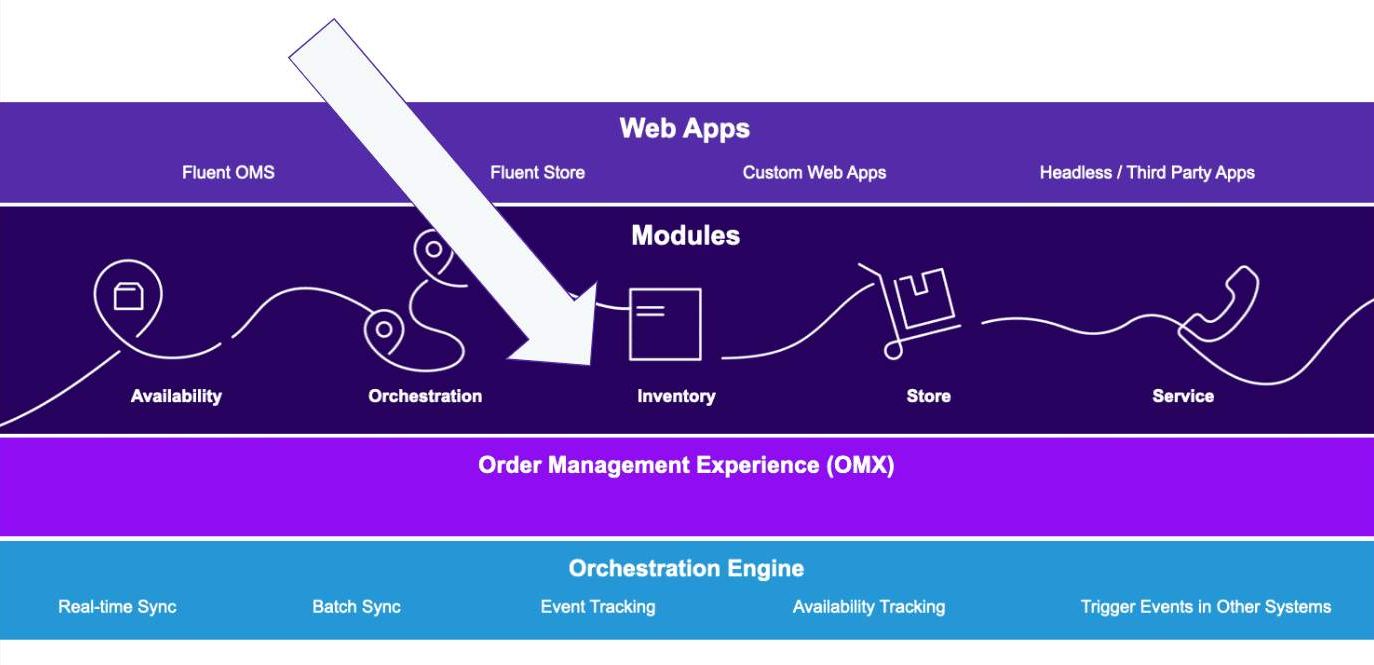
Inventory module reference features and capabilities:
- Create and update Standard and Variant products
- Category management
- Create and update Categories for standard and variant products e.g Mens Shoes
- Create and update Sub-Categories for standard and variant products. e.g Mens Formal Shoes
- Fulfilment reservation, confirmation and cancellation.
- Inventory Batch Process:
- Updates of last on hand (LOH) value which provides for all the given Inventory Positions to provide the latest values of Inventory that a retailer has in their locations — host systems usually include an ERP/POS/WMS
- Create and Update Virtual Catalogues e.g HD VC for Home Delivery Network
- Control Groups and Controls Management
- Category and Product Upsert (Note: Product Upsert is not currently enabled in Training accounts)
- The status of category / product determines whether the inventory at this category / product level can be used (or not) for order fulfilment purposes and can be changed as per the business requirements (ACTIVE to INACTIVE and vice versa).'
Extension of Inventory Module's capabilities is possible through Software Development Kits (SDKs)
Commonly observed capabilities:
- Soft Reservation refers to the temporary booking of an item to hold stock for a particular amount of time. Here, external systems query the inventory position of requested items, return an accurate count of available inventory, and temporarily reserve the requested items.
- Backorder is the process of selling inventory that is not in stock. This capability allows customers with an option to still purchase your products even when you don’t have enough in stock by creating back ordered items.
- Inventory segmentation is a capability that allows retailers to set aside a certain amount of inventory to cater to the needs of different channels or groups — this ensures that each channel has a sufficient amount of inventory to satisfy demand.
Benefits to retailers:
- Flexibility to use reference functionality and 'extend' capabilities when required leads to a reduction in implementation and maintenance costs.
- Provide accurate Available To Sell (ATS) and Available to Promise (ATP) inventory stock levels to reduce overselling and underselling of the products.
- Gain a unified version of inventory across all locations and maintain 'one version of the truth' across all inventory management systems
- Provide greater flexibility to retailers:
- Exclude products or categories from a virtual catalogue.
- Optimise safety stock by product, Category, Location
- Segment inventory to ensure that each channel has a sufficient amount of inventory to satisfy demand (Note: this is a capability)
- Expand what's Available to sell (ATS):
- Add or remove locations to-and-from networks.
- Deactivate or activate the product or location to exclude or include what's available to sell.
How it works
Review the table below of key concepts which will help you better understand how the Inventory module works:| Location | A physical place, whether that is a retail store, a warehouse, or even third-party vendor facilities from where fulfilments can take place. |
| Stock on Hand (SOH) | Refers to the total number of physical units that can be counted across all locations. |
| Last on Hand (LOH) stock positions | Represents the quantity received from inventory systems, such as ERP, warehouse management systems (WMS), point-of-sale, and other third-party vendors’ systems as part of the batch process for a particular Inventory position with location and product combination. |
| Inventory position updates | Updates of Inventory positions on order data such as (stock reservations confirmed sales, cancellations) are received from Fluent's order management workflows. |
| Delta Inventory | Refers to an inventory update typically for intra-day synchronisations, containing relative quantity increments and decrements. e.g. individual sale events captured in the Point of Sale |
| Batch inventory processing | This is the bulk processing of multiple inventory position updates that are sent to Fluent Order Management by another system- usually an ERP or Warehouse system. |
A diagram of a reference starting point is show below:
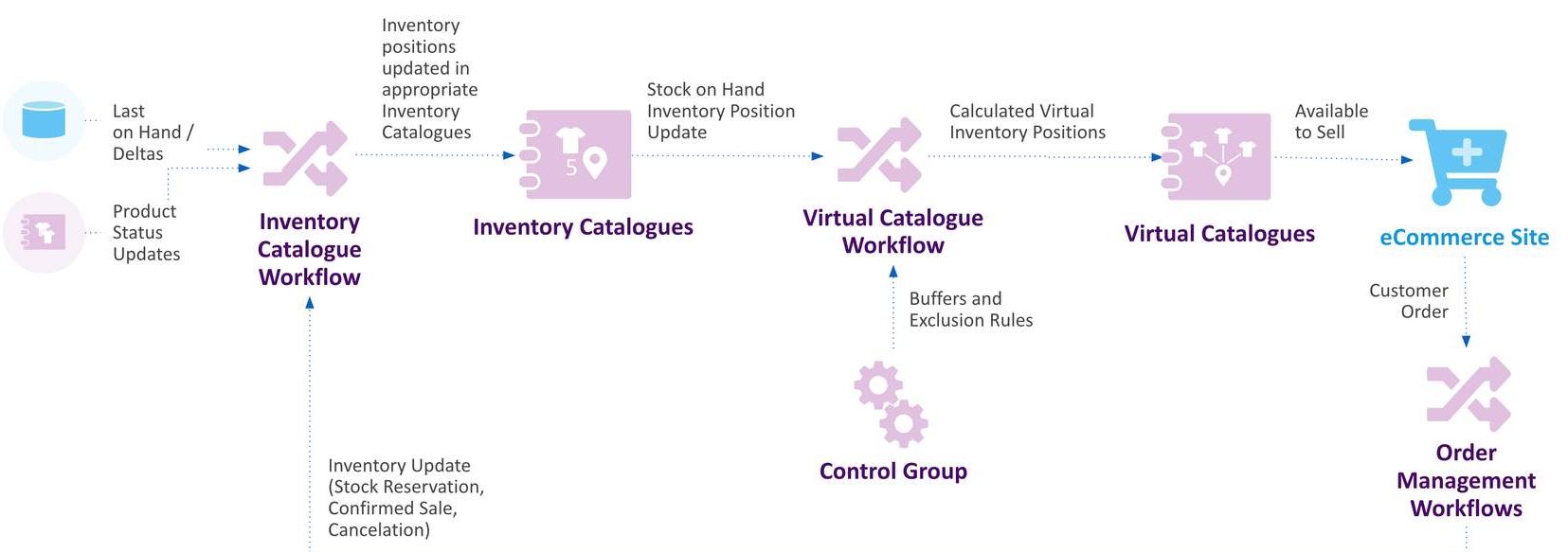
- The starting point process begins when the Last on Hand / Deltas quantity for all the given inventory positions which a retailer has at all their locations is sent as part of the batch process from the ERP / POS / WMS systems to the 'Inventory Catalogue Workflow'.
- Inventory Catalogue Workflow updates the inventory positions in the Inventory Catalogue.
- Virtual Catalogue uses data from two sources:
- Inventory Catalogue
- Control Group which provides buffers and exclusions. This data is processed by the Virtual Catalogue Workflow.
- Virtual Catalogue Workflow calculates virtual inventory positions and updates the Virtual Catalogue — virtual inventory positions provide sales channels (e.g. an eCommerce Site) with an accurate picture ATS inventory, preventing overselling or underselling.
- Product status updates from ERP/ PIM systems are then communicated back to the Inventory Catalogue Workflow e.g. for a particular product line that's no longer part of the sellable catalogue the status can be changed from an ACTIVE product to INACTIVE.
- Inventory updates are sent into the Inventory Catalogue Workflow from the 'Order Management Workflows'. These are inventory updates from in-flight orders, e.g. reserving the inventory, or cancelling the inventory reservation for a cancelled order.
Overview of the key components
Product Catalogue
A 'Product Catalogue' is used to store all of the product information a retailer wants to sell and contains information that helps to identify each product (e.g. name, colour, description, product code).A retailer can have one (or more) Product Catalogues that will contain all of their products. Each Product Catalogue type has a corresponding workflow, referred to as 'Product Catalogue Workflow' which is used to orchestrate products in the Product Catalogue. Workflows can be configured by the retailer to add their own specific business logic.Next, let's learn about the 'Entities' related to the Product CatalogueProduct Catalogue Entities:
- Standard Product
- A standard product entity. It includes:
- a sellable non-variant product
- a non-sellable base for a variant product
- a sellable or non-sellable component of a group product
- A standard product entity. It includes:
- Variant Product
- An entity that holds additional attributes for variation of a base product such as size, colour, volume, etc. The base product is non-sellable and stored as a Standard Product.
- Group Product
- An entity to model bundle products, which is a parent product to a number of standard and/or variant products.
- Categories and Sub-categories
- Products can be associated with categories and sub-categories.
A sellable non-variant:
A custom jewellery manufacturer sells once-off products with their own unique setting and stone options.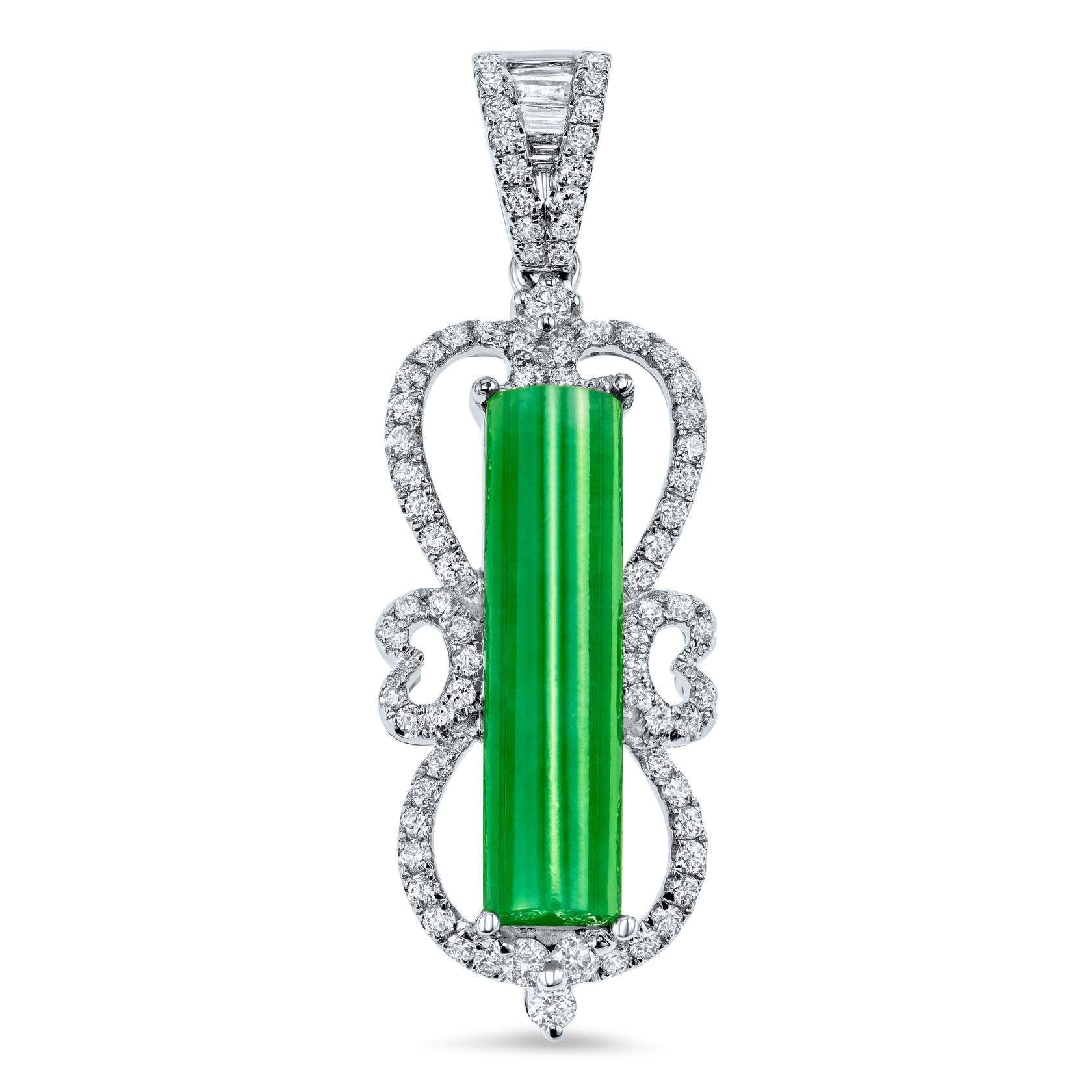
Base product / Variant product:
An outdoor adventure and sporting retailer stocks tents for alpine skiing.In this example, the 'Two-Person Alpine Spirit Tent' is available in blue, purple and green colours (Variant Products). The 'Two-Person Alpine Spirit Tent' (Base product) is stored as a Standard Product.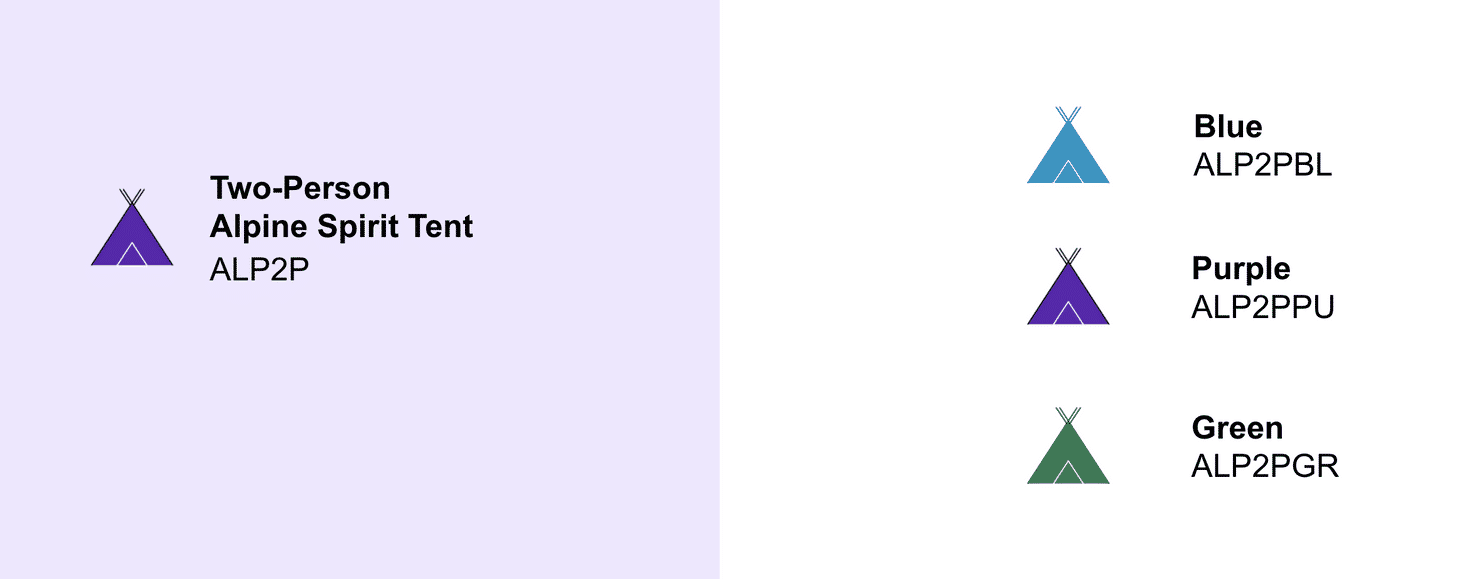
Category and Sub-category:
In this example, the retailer has organised the tents into categories > sub-categories e.g. Hiking and Camping > Tents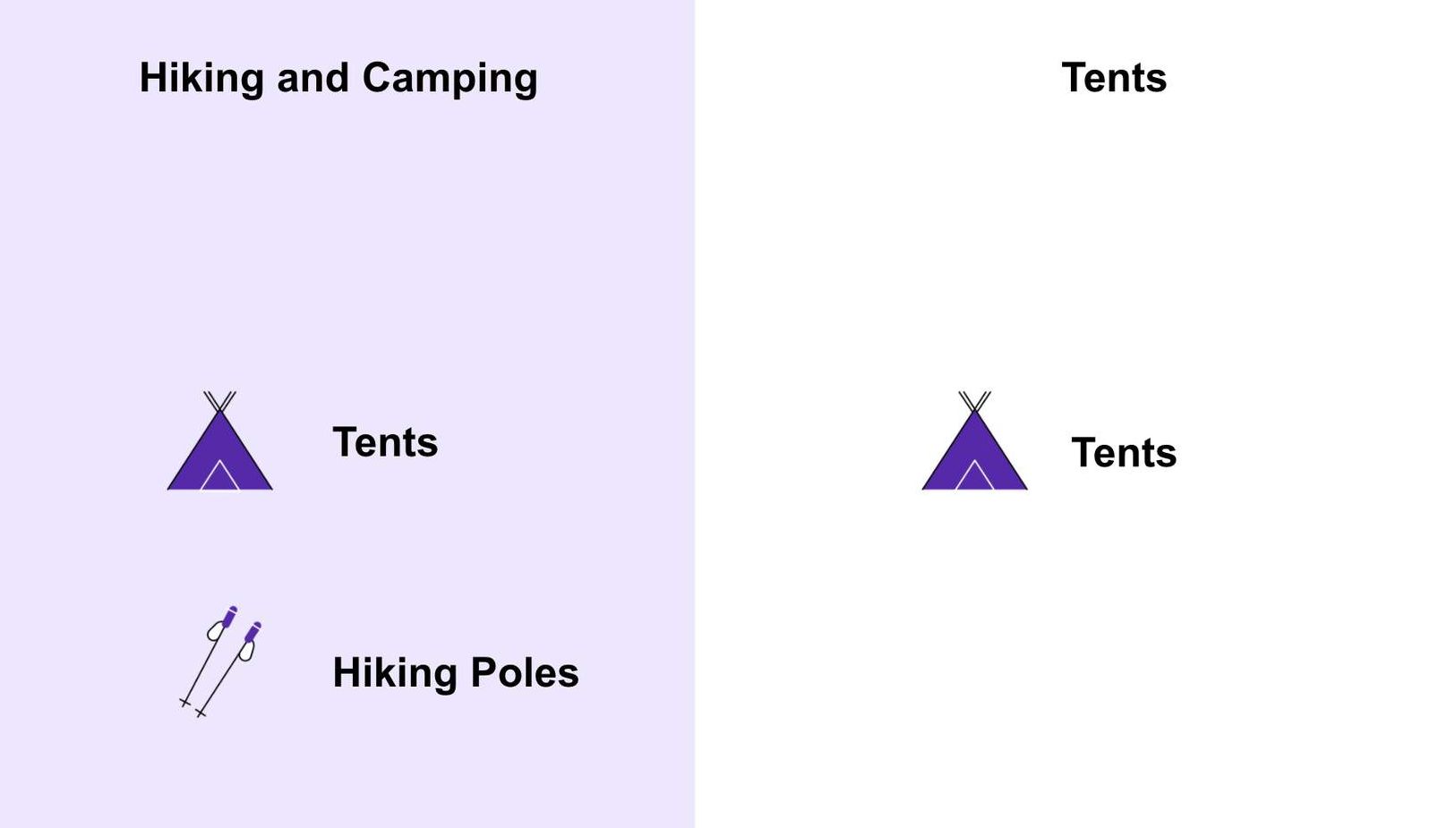
Group Products:
Another option is for the retailer to group related products together.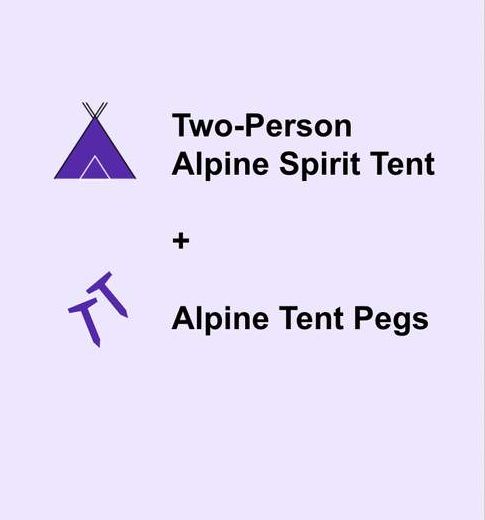
How do you know when to use Standard vs. Variant vs. Group?
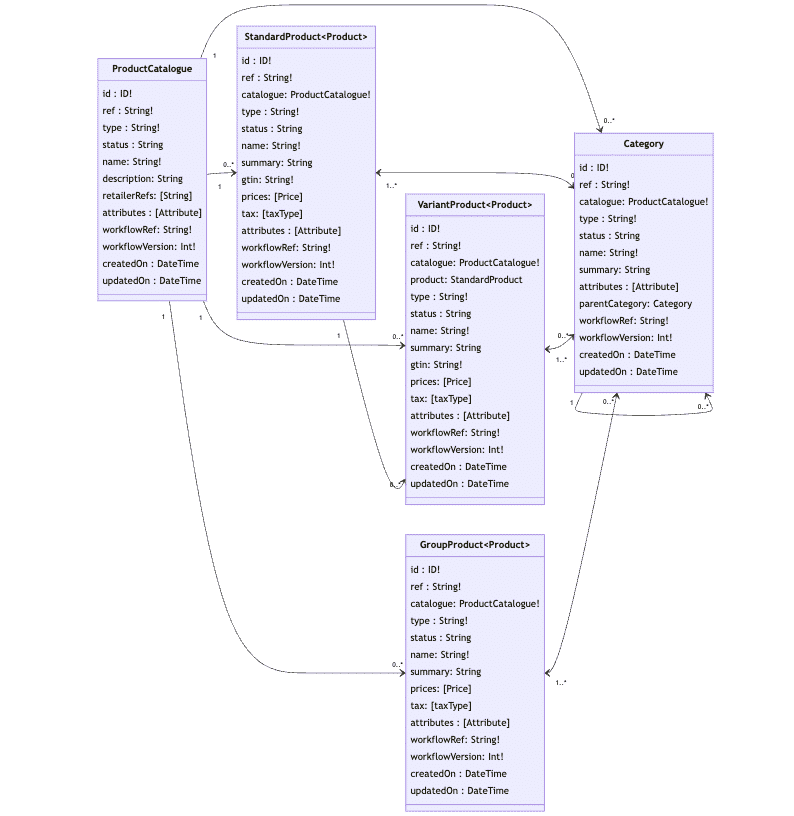
Every use case is different and is dependent on how the retailers model their data in their own source systems. Therefore, during the discovery session, there is a discussion on the retailer's model vs. Fluent's model.Typically, the most common scenarios involve 'Standard' and 'Variant' relationships, or 'variant only.' Currently, the reference workflows provided by the inventory module calculate ATS and reserve inventory based on Variant Products.Product Catalogue Data Model
Inventory Catalogue
An Inventory Catalogue serves as the Inventory master and is responsible for maintaining current Stock on Hand (SOH) across all locations. It receives inventory updates from one (or more) inventory systems (ERP, WMS, POS, etc.) and the Order Management Workflows. Each record is a Product, Location and Quantitycombination.A retailer may want to stock the same pair of shoes across all of its locations with various quantities and wants to be able to know the exact quantities across all of its locations at any given time. All of this information can be stored within the Inventory Catalogue — this can be used to determine the best location to fulfil an order for example.Next up, what's it used for in Fluent Order Management?
Each Inventory Catalogue has a workflow that contains all logic related to inventory stock positions.e.g. we can create inventory and reserve inventory. A retailer will typically have one Inventory Catalogue for all their inventory.The Inventory Catalogue Workflow is responsible for updating all inventory positions in near real-time so the catalogue is always kept up-to-date and provides an accurate view of inventory across the entire enterprise. Types of data received by the Inventory Catalogue include:- Last on Hand (LOH) stock positions at each location imported from the retailer's own inventory systems, such as ERP, warehouse management, point-of-sale, and other third-party vendors’ systems.
- Inventory Updates based on order data such as stock reservations confirmed sales, cancellations, and returns, are received from Fluent's order management workflows.
Up next, what are the different methods to send inventory data into Fluent?
It's possible to send Inventory data to the Inventory workflow using two methods:- Full Load
- 'Full load' refers to sending all inventory positions into the Inventory workflow regardless of what inventory positions have changed.
- Deltas
- Sending 'Deltas' involves the process of sending only the inventory positions that have changed.
Why use the “Full Loads" of Inventory?
Typical use cases for using 'Full Load' is when:- inventory data is first being created in Fluent Order Management, or
- any subsequent reconciliation processes that need to occur between Fluent Order Management and the source Inventory systems.
Why use inventory 'Deltas'?
Using inventory 'Deltas' helps to maximise efficiency and alignment between source inventory systems and the Inventory workflow by only conveying the inventory positions have changed on a more frequent basis, rather than all inventory positions, on a less frequent basis.e.g Overnight stock feed. This is a choice based on the retailer's preference, and what information is possible for source inventory systems to provide.Implementing Deltas within Fluent Order Management
Using the Batch API
In the sample Fluent Inventory workflows, it's possible to send 'full loads' of inventory, as well as 'deltas' using the Inventory Batch API. As the batch is being used for this process the Inventory type = LAST_ON_HANDIn a typical retailer, it may be decided that the source system will send inventory deltas via the Batch API into the Fluent Inventory workflow every 5 minutes for example.When using the Batch API the quantity that is sent in must always be an absolute whole number.Example Use Case
"As a Retailer with fast-moving products, I want to be able to send real-time sale updates into the order management system so that the Inventory Catalogue reflects the latest sales I've made in all my stores. It is important that Fluent is aligned with my source systems in order to keep high stock accuracy."Implementing the above use case requires enhancement to the standard (reference) workflow. This can be achieved through the configuration of the Inventory Workflow, and some aspects of customisation using Fluent SDKs (software development kits). In order to implement this use case, the retailer would use the following Inventory type:- Inventory type = DELTA (we reference this data type further below)
Inventory Module reference behaviours
Inventory Positions
If either the corresponding Product (Standard or Variant) or Location, for the Inventory Position, is INACTIVE, then the status of the Inventory Position will also become INACTIVE.- Only ACTIVE Inventory Quantities will be considered in the onHand calculation (i.e. RESERVE, CORRECTION, DELTA, SALE).
Inventory Quantity Types
RESERVEAn event is sent from the Order workflow, to the Inventory workflow. The standard Inventory Workflow creates an Inventory Reservation for the created Fulfilment. The Fulfilment ID is referenced in the Inventory Reservation record which can be seen against a specific Inventory Position in the Inventory Catalogue. The Inventory Reservation is for a specific inventory position (PRODUCT/LOCATION/QTY) for the Fulfilment quality and location we created. The Inventory Catalogue Workflow decrements the on-hand inventory quantity by the quantity that has been reserved — this will be reflected in the SOH figure which is recalculated, as is the ATS (available to sell) quantity for the corresponding Virtual Catalogue that a customer can see as ATS on the website for example. The TYPE column will show the type as RESERVED at this point.Status updates:- Created in ACTIVE status from the Order workflows when an order is created and fulfilment(s) have been created.
- Changed to INACTIVE status when one of the following occurs:
- Fulfilment to which the Inventory Position applies is fulfilled
- Order/Fulfilment is cancelled
- Created in ACTIVE Status when the Variant Product in the corresponding fulfilment is successfully fulfilled (I.e. picked and packed)
- Changed to INACTIVE status when an Inventory Batch is processed that contains the corresponding Inventory Position. Note: delta inventory events have no effect.
- Status updates:
- Created in ACTIVE status when the Variant Product in the corresponding fulfilment is rejected.
- Changed to INACTIVE status when the correctedQty of the corresponding Inventory Position is set to zero in an Inventory Batch. Note: delta inventory events have no effect.
- Status updates:
- Created in ACTIVE status when a delta event is processed that contains the corresponding Inventory Position. Note: a new Inventory Quantity is not created when a subsequent delta is processed. It will accumulate into the same Inventory Quantity.
- Changed to INACTIVE status when an Inventory Batch is processed that contains the corresponding Inventory Position.
Inventory updates workflow
 Inventory Catalogue Workflow receives LOH (last on-hand) quantities from inventory source systems.
- Inventory Catalogue workflow receives updates from the Product Catalogue for any active or inactive products and updates from the Order Management Workflow.
- Stock reservations, sales or cancellations for any inflight orders will be sent as Inventory Updates into the Inventory Catalogue Workflow
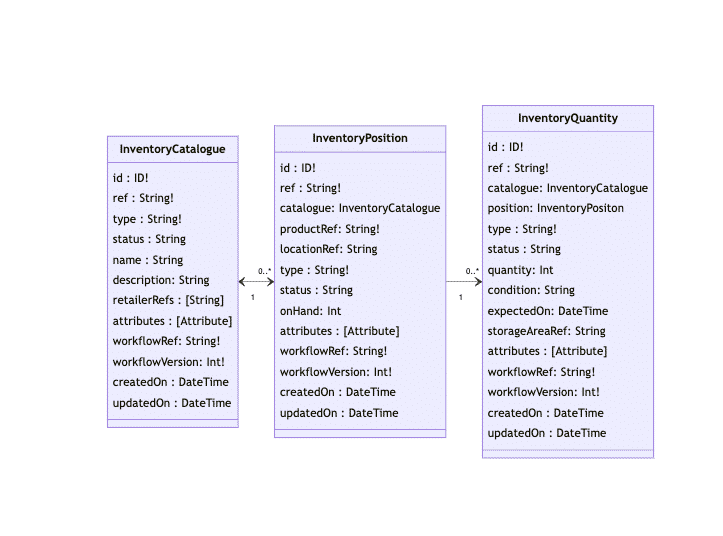
Inventory Catalogue Data Model
Virtual Catalogue
A Virtual Catalogue commonly consists of virtual positions based on products in a location, products in a network, and products in a category. It segments inventory so retailers can manage what inventory is exposed to different channels/markets. It also takes in 'Controls' to affect what amount of inventory is available to sell on any given channel.A Virtual Catalogue retrieves data from two sources:- Inventory Catalogue — provides inventory position updates.
- Control Groups — provides Buffers and Exclusions
An example of a Buffer
"A retailer may want a Home Delivery Virtual Catalogue to have a buffer of 3 quantities to apply at all the locations in order to prevent overselling"A Virtual Catalogue itself is linked to a Network which refers to a logical grouping of physical locations (e.g. store, warehouse) and can be used when grouping a set of locations together. Networks usually reflect the types or geography of certain locations that you want to use for sourcing.An example of a Network
"A retailer may want to group their store locations into a Click and Collect (CC) Network. When a Click and Collect order is placed, the workflow will perform an availability search in the Click and Collect (CC) Virtual Catalogue which is linked to a particular set of store locations in the network" Diagram showing an example of a click and collect Virtual Catalogue, F_CC which shows a group of store locations available for click and collect orders.Retailers can have one (or many) Virtual Catalogues, and use them to segment their inventory to give different views of availability to different channels or customer segments. This can be for several reasons such as segmentation by for example:
- geographical region
- order type (Click and Collect (CC) or Home Delivery (HD))
- by marketplace
Virtual Catalogue workflow
The Virtual Catalogue Workflow is responsible for calculating virtual inventory positions and updating the Virtual Catalogue. These virtual inventory positions provide selling channels (e.g. eCommerce site) with an accurate picture of inventory that’s available to sell (ATS) preventing overselling or underselling.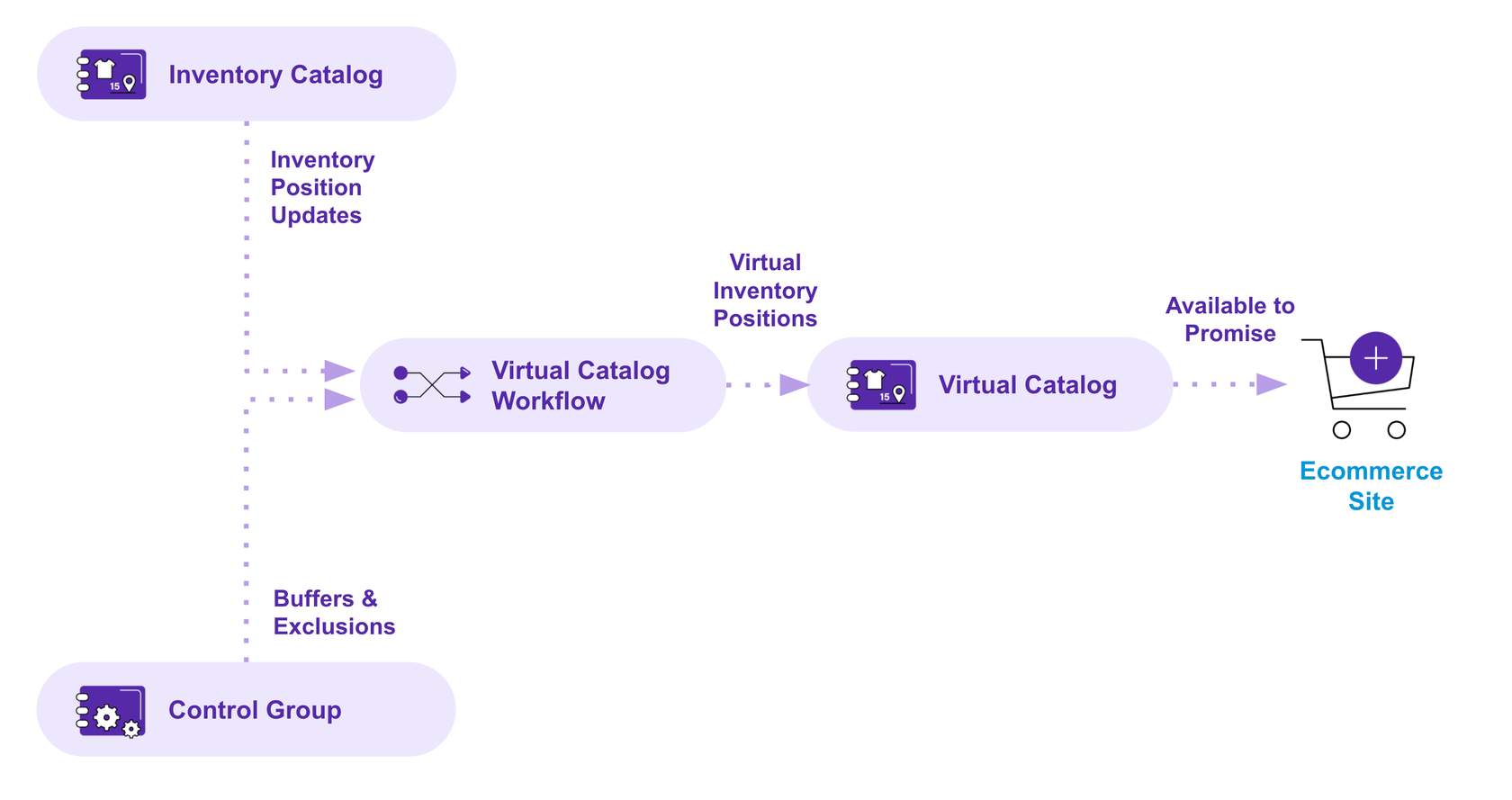
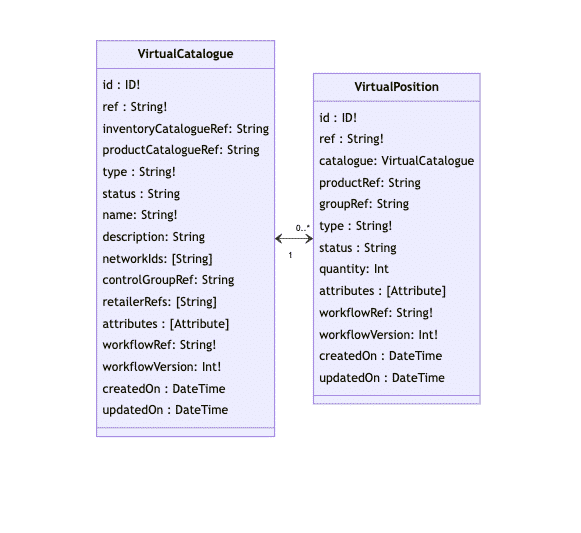
Virtual Catalogue Data Model
Control Groups & Controls
In this lesson we'll cover Control Groups and Controls in our current reference (starting point) Inventory module. Control Groups are 'containers' for Controls (buffers and exclusions). A Control Group can be associated with a Virtual Catalogue.Terms and abbreviations:- VC 'Virtual Catalogue'
- ATS 'Available-to-sell'
- SOH 'Stock-on-hand'
A quick recap of buffers and exclusions
- Buffer Stock refers to the number of units below which an item at a particular location will be unavailable for online orders. Example: Buffers can be set based on how quickly a certain item sells e.g. 'hot products' that sell fast would need a higher buffer than a slow-selling item.
- Exclusions let you specify which inventory positions should be excluded from a Virtual Catalog. They can be specified by product, product category, location, or network of locations. Examples:
- Limit the range of products you offer for sale on a marketplace.
- Expand into new geographic regions with a limited product range.
- Retailers may not want to show all ATS (available-to-sell) on their selling channels due for example In-store trading, or lack of confidence in their own stock counts
- QUANTITY_BUFFERS
- Used to configure safety stock in Fluent Order Management and typically represent SOH which is not included in the ATS calculations of a Virtual Catalogue.
- EXCLUSION
- lets you specify which inventory positions should be excluded from ATS completely (I.e. zero quantity available to sell). They can be specified by product, product category, location, or network of locations.
Next up, Controls
A Control represents a particular buffer or exclusion which help determine what inventory is available in a Virtual Catalogue. It is a mechanism for influencing and affecting inventory availability, priority, or calculation. Ways Controls can be applied:- Product buffer is applied for a particular Product across all locations
- Product- Location buffer is applied at a Poduct and location level
- Category buffers are applied against products that belong to a specific category
- Location buffers are applied for all products at a particular location only
- Product Exclusions are the highest specific control that can be applied to a Product
- Category Exclusions are the highest specific control that can be applied to a Category
Execution of reference Controls
Controls can be applied on multiple levels with a defined priority using integer values. Priority specifies the execution order of controls:- lowest value integer is determined as 'highest priority' and is the first eligible control to be applied (I.e. executed first).
- highest integer value as 'lowest priority and executed last.
| Control | Control Ref | Execution Order | Description |
| Category Exclusion | <CONTROL_GROUP_REF>:EXCLUSION:<CAT_REF> | 1 | Sets the quantity to 0 for all the virtual position(s) associated with the product under that category |
| Product Exclusion | <CONTROL_GROUP_REF>:EXCLUSION:<PRODUCT_REF> | 2 | Sets the quantity to 0 for all the virtual position(s)associated with the product |
| Product - Location Buffer | <VIRTUAL_CATALOGUE_REF>:QUANTITY_BUFFER:<PRODUCT_REF>:<LOCATION_REF> | 3 | Reduces the onHand by the value specified in the control for all the virtual position(s) associated with product and location. |
| Product buffer | <VIRTUAL_CATALOGUE_REF>:QUANTITY_BUFFER:<PRODUCT_REF> | 4 | Reduces the onHand by the value specified in the control for all the virtual position(s) associated with the product |
| Category buffer | <VIRTUAL_CATALOGUE_REF>:QUANTITY_BUFFER:<CAT_REF> | 5 | Reduces the onHand by the value specified in the control for all the virtual position(s) associated with the product under that category |
| Location buffer | <VIRTUAL_CATALOGUE_REF>:QUANTITY_BUFFER:<LOC_REF> | 6 | Reduces the onHand by the value specified in the control for all the virtual position(s) associated with the location |
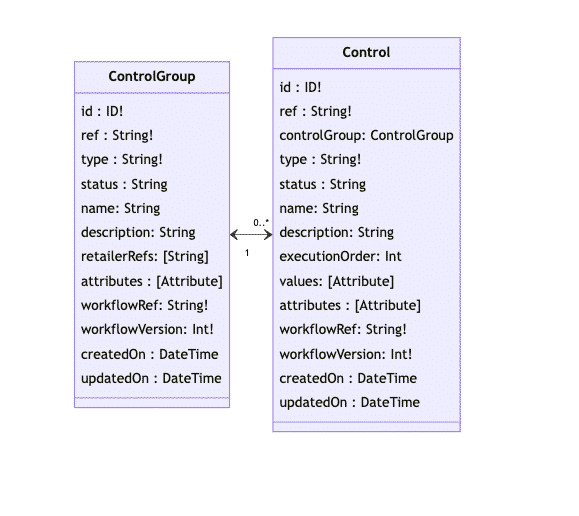
Control Group and Control Data Model
Calculations
How SOH is calculated
The Inventory Catalogue maintains a record of the Inventory position (stock on hand) for each product reference at each location. It can also be extended to track inventory that is not on hand to support pre-orders and backorders.Inventory Position Stock on Hand (SOH)
The Inventory Position SOH value can be calculated as the sum of all active Inventory quantities for that position. Certain Inventory quantity types may be included (or excluded) which is captured in the diagram belowLAST_ON_HAND- Last on Hand (LOH) represents the quantity received as part of the batch process for a particular Inventory position with location and product combination.
- Reserved quantities are created as part of the fulfilment reservation process and are not modified by either Deltas or Full loads and this is due to the assumption that only Fluent systems are aware of the inventory reservation until the locations complete the picking — then the assumption is that the location inventory systems will be updated.
- It’s also at that point that Fluent OMS reference workflows update the RESERVED quantity to status INACTIVE and create appropriate SALE and/or CORRECTION quantities instead.
- Sale quantities are created in Fluent Order Management when a user confirms the 'pick', using Fluent Store or Fluent OMS Web Apps or any other pick/pack tools integrated with Fluent OMS. In this case, a quantity of type SALE is created in Fluent Order Management as a value of the confirmed quantity by the store user for a related Inventory Position.
- Correction quantities are created in Fluent Order Management when a location rejects items, during picking using Fluent OMS or Fluent Store or any other pick/pack tools integrated with Fluent OMS.
- Quantity of type CORRECTION is created in Fluent Order Management with a value the same as the quantity rejected by the location for the related Inventory Position.
- Default behaviours are to reset that quantity (set status to INACTIVE) for any incoming Full load for which the “correctedQty” value passed in batch is set to '0' for the related position.
Stock-on-hand (SOH) calculation
 Fulfilment ReservationWhen orders are placed from an e-commerce platform and sent to Fluent OMS, inventory will be reserved for the ordered products based on designed orchestration logic. Both the Order workflow and the fulfilment entity send an event to the Inventory workflow to reserve the inventory.
- Inventory quantity of RESERVED will be created for the available quantity and STOCK_ON_HAND is re-calculated — this then sends the inline event to the Virtual Catalogue for AVAILABLE_TO_SELL calculation.
- Store Fulfillment module sends an inline event (UPDATE_INVENTORY) to Inventory Catalogue for confirmation of the ordered quantity.
- Inventory quantity of SALE will be created for the available quantity.
- STOCK_ON_HAND (SOH) is calculated which sends the inline event to the Virtual Catalogue for AVAILABLE_TO_SELL (ATS) calculation.
- If Fulfilment confirmation happens within Fluent Store there is a user action to confirm what was picked — this event is sent from the Location --> Store workflow --> Inventory Catalogue workflow.
- If Fulfilment Confirmation does not happen within Fluent Store, an external event, called a 'Pick Confirmation' is sent into the Order Workflow to confirm what has been picked — this then triggers an event to be sent to the Inventory Catalogue Workflow.
- The Store Fulfilment module sends a reference event (UPDATE_INVENTORY) to Inventory Catalogue for confirmation of the ordered quantity.
- The inventory quantity of RESERVED will be updated to INACTIVE for the entire or partial quantity and SALE will be created for the confirmed (partially fulfilled) quantity.
- STOCK_ON_HAND (SOH) is calculated which sends typically sends an event to notify the Virtual Catalogue(s) to recalculate the affected virtual positions, thereby updating the ATS.
How ATS is calculated
Recap of concepts and abbreviations:- Available-to-Sell (ATS)
- Stock-on-hand (SOH)
- 'Buffer Stock' refers to the number of units below which an item at a particular location will be unavailable for online orders.
 Example of an ATS calculationAn Inventory Catalog has the following stock on hand (SOH):
- 15 shirts in Location A
Modeling different scenarios
Inventory Segmentation
Inventory segmentation helps set aside a certain amount of inventory to cater to the needs of different channels or groups. It is a virtual division of inventory with the same facility based on logical groups which often signify different channels or a different medium in which a retailer can sell their products. This capability ensures that each channel has a sufficient amount of inventory to satisfy demand.To implement segmentation and distribute inventory among different channels such as EComm, Retail and Wholesale, a Virtual Catalogue can be created for each channel, for example:- VC_EComm
- VC_Retail
- VC_Wholesale
- 50% for EComm
- 20% for Retail
- 30% for Wholesale.
Overselling
Overselling can happen if there is a discrepancy with stock on hand (SOH) figures within the source systems. It can also happen if the stock is in a store location and someone buys one of the items and either:- Fluent Order Management is not aware of this.
- If an Item is damaged and has not been taken off sale
- A retailer has an unexpected increase in sales (or a flash sale)and more stock gets sold before the ATS has finished updating.

