Modules
Essential knowledge
Changed on:
12 Nov 2024
Overview
[Warning: empty required content area]Key points
[Warning: empty required content area]Availability Module
Availability calculates inventory availability based on product, customer location, and delivery method. Availability Capabilities- Get real-time available-to-sell stock for any product and its variants to show availability on an e-commerce product details page (PDP), cart and checkout pages, and Point-of-sales system (POS).
- Show different availability for home delivery, store pick-up, or another choice of fulfilment or delivery.
- Obtain all possible fulfillment options for an entire cart in real-time for given quantities, an address, or a pickup location.
- Provide ETA based on fulfilment times and delivery type on home delivery, click and collect, ship-to-store or ship-from-store.

 Request for fulfillment: Availability requests for fulfilment can come from any e-commerce site/external API. The Fulfilment Option is processed upon getting a request.Look up ATS: Upon getting a Fulfilment option request, the workflow will trigger a Lookup in the Virtual Catalogue to check the availability of the requested order.Fulfillment Plan: The Fulfilment Plan created is sent back to the eCommerce site in response to the Fulfilment Option.Check Location/Items: The Workflow will check the relevant Virtual Catalogue to find the best locations for the items requested. This will generate a Fulfilment Plan for the response.
Order Orchestration Module
The Order Orchestration Module is the foundation of one of the core value propositions of the Fluent Order Management SystemBenefits
For Retailers who need to optimize order routing and reduce the cost to serve their customers. Ship from the right location every time. Reduce delivery costs, optimize sourcing and allocation, and fulfil from anywhere.Key Capabilities
- Fulfil from Warehouses, Distribution Centres (DCs) and Stores.
- Fulfil from Drop Ship Vendors (DSVs)
- Fulfil from Third Party Logistics Companies (3PLs)
- Fulfil from the closest location
- Split Fulfilment and Partial Fulfilment
- Consolidate
- Handle Rejected Fulfilment Requests
- Manage Fulfilment SLAs
- Handle Fulfilment Exceptions
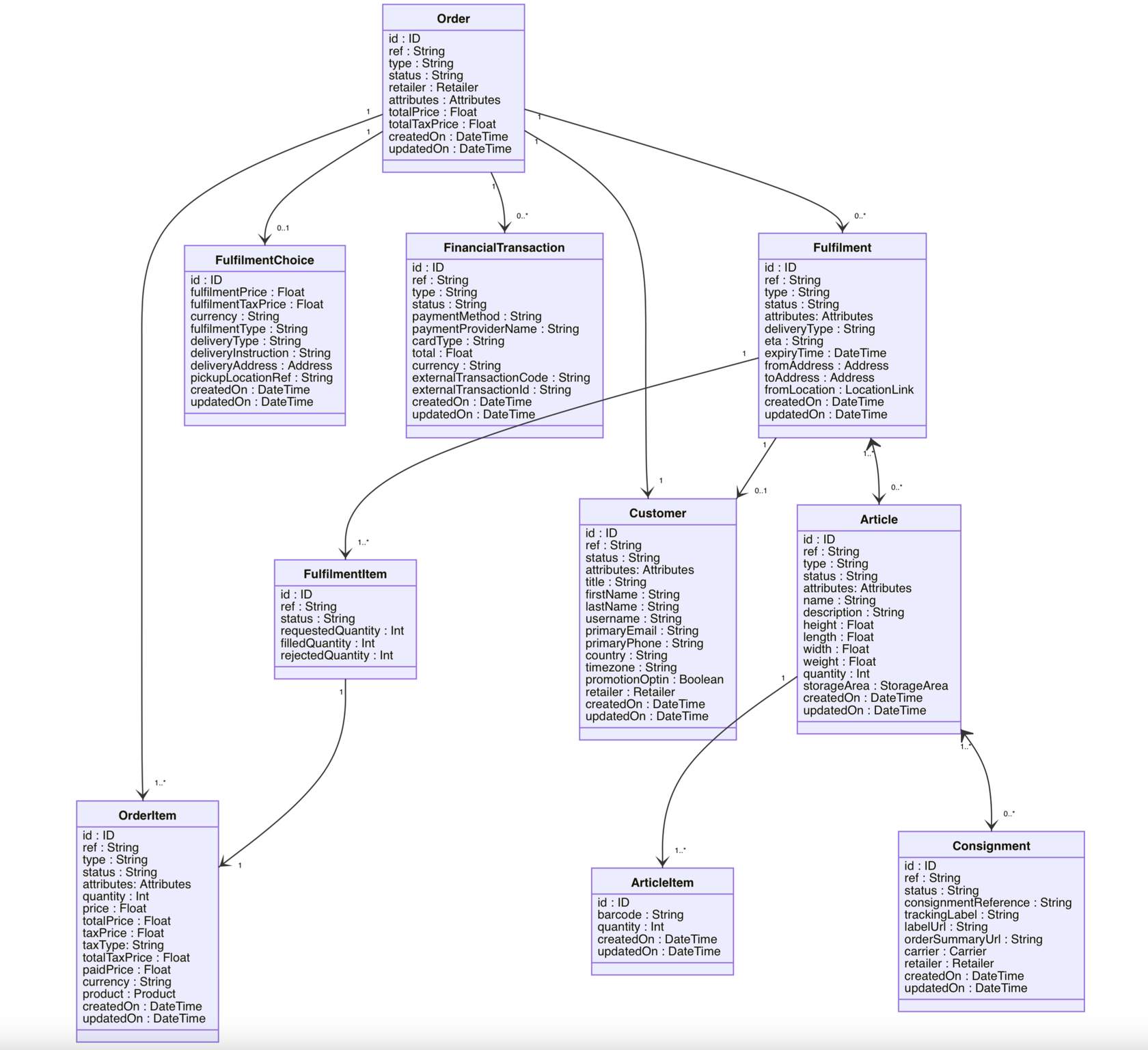
Data Model
Example 1 - Click & Collect Customer Journey
 Add Products to CartsThe journey begins with the customer adding products into the shopping cart and checking pick-up location ETAs.
- Fluent Order Management checks for the fulfilment option via the Availability module.
- Fulfilment Plan, retrieved from the Availability module) is confirmed.
- Fluent checks the inventory availability of all the items in the Order.
- Upon checking that inventory item are available, Fluent creates the relevant fulfilment and subsequently reserve those items at the Store.
- The fulfilment is then able to be viewed in Fluent Store and the store staff is then able to pick, pack and label the order.
- After the labeling process has been completed the customer is notified that their order is now ready for collection.
Example 2 - Ship from Store/Home Delivery Customer Journey
 Add Products to CartThe journey begins with the customer adding products into the shopping cart and checking delivery ETAs.Select Delivery LocationThe journey begins with the customer adding products into the shopping cart and checking delivery ETAs.Place OrderThe Home Delivery Order is placed from the Sales Channel (e.g. website) to Fluent and becomes available for viewing in the Console.After Order PlacementOnce the order has been placed:
- Fluent will check the inventory availability of all the items in the Order and creates the relevant Fulfilment(s) and subsequently reserves those items at the Locations (Warehouse and/or Store).
- The store Fulfilments are then able to be viewed in Fluent Store and the store staff is then able to pick, pack and label the Order.
- At the label stage, the relevant courier is booked via integration from within Fluent Store.
- After the labelling process has been completed, the Order is now ready for collection by the courier.
- The Courier collects the Order from the Store and/or Warehouse and the is marked as collected.
- This Collection process enables the Order to be marked as completed and also notifies the customer that the order has been dispatched with the relevant courier tracking number.
Inventory Module
Customers expect an easy-to-use, seamless experience where the products displayed are an accurate representation of the inventory that is available for purchase.Fluent's Inventory Module enables clients to:- Get a single view of inventory
- Upload full inventory via batch or use deltas.
- Real-time inventory updates from order processing
- Add or remove locations to-and-from networks.
- Deactivate or activate the product or location to exclude or include what's available to sell.
- Create networks and virtual catalogue to segment inventory.
- Exclude products or categories from a virtual catalog.
- Optimise safety stock by SKU, Category, Location
- A collection of products, variant SKUs (size, color, etc.), price, and other details.
- Products can be organized into Categories.
- Data is imported from Product Information Master (PIM)
- Serves as the Inventory Master.
- Maintains current Stock on Hand for each product or variant.
- Receives inventory updates from one or more inventory systems (ERP, WMS, POS, etc.) and the Order Management Workflows.
- Segments inventory so you can manage what inventory is exposed to different channels/markets.
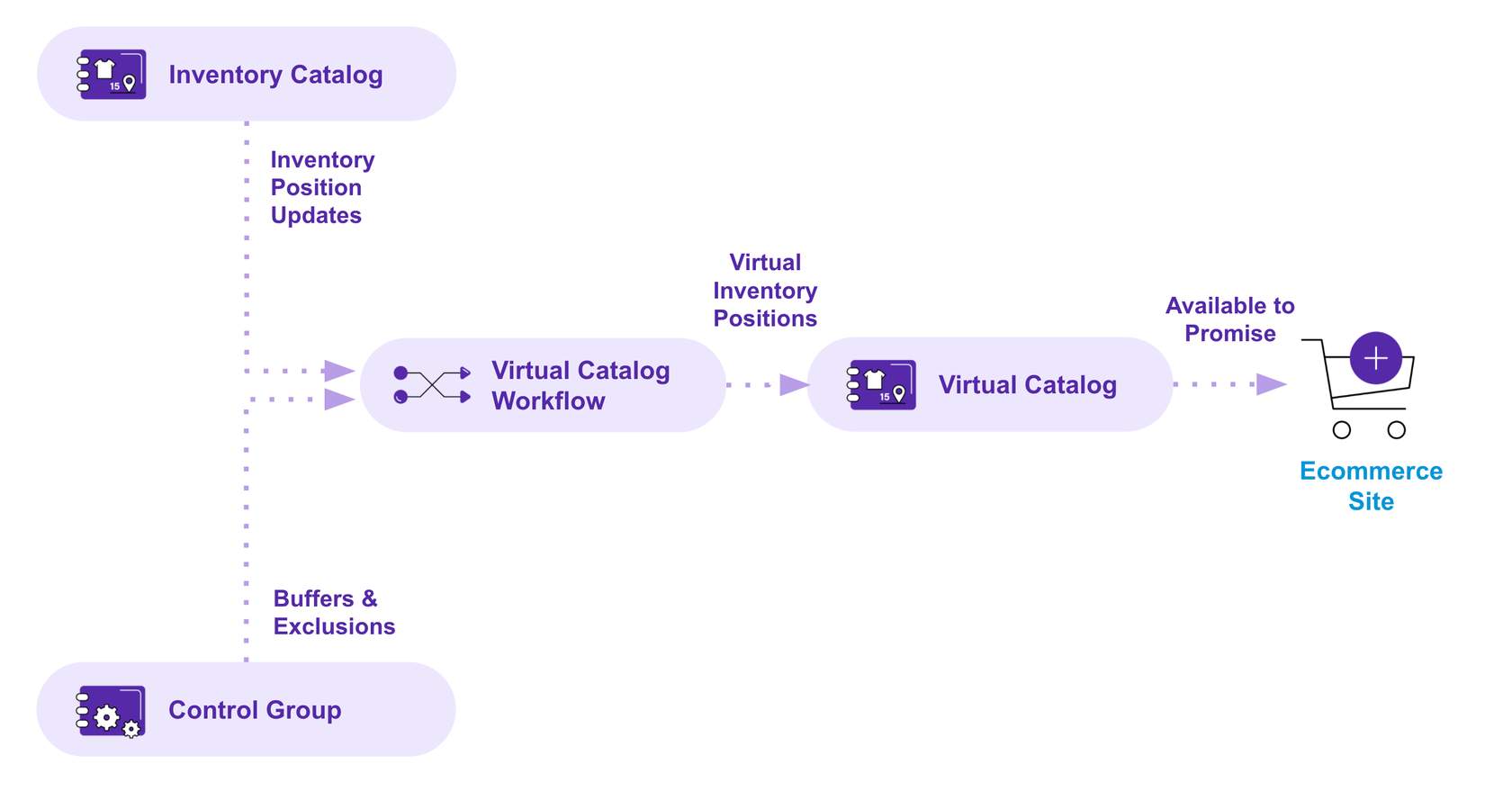
- Contains a list of calculated virtual inventory positions based on rules specified in a Control Group.
- Can use inventory positions from one or more inventory catalogs.
 Variant Product - Each Standard Product may also have one or more Variant Products. These are the individual SKUs, such as color and size.
 Categories and Sub-categories - Products also can be organised into categories and sub-categories.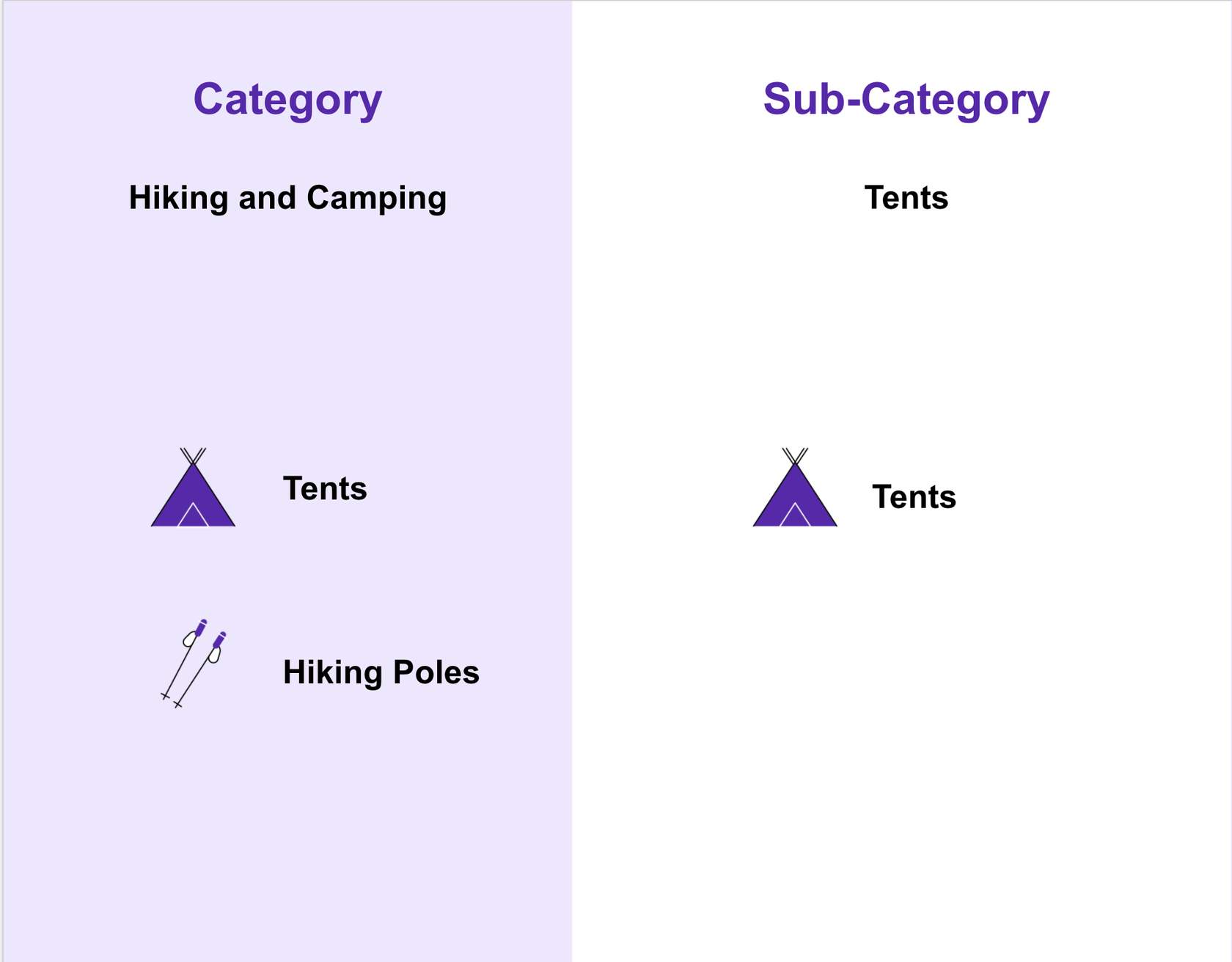
 Inventory Catalog maintains a record of the Inventory position (stock on hand) for each product reference at each location. It can also be extended to track inventory that is not on hand to support pre-orders and backorders.
 Data processing is achieved by the Inventory Catalogue Workflow responsible for updating all inventory positions in near real-time so the catalogue is always up to date and provides an accurate view of inventory across the entire enterprise. Following are three types of data received by the Inventory Module:
- Last on Hand stock positions at each location are imported from your other inventory systems, such as ERP, warehouse management, point-of-sale, and other third-party vendors’ systems.
- Product Updates, including product status updates and new products, are received from the Product Catalog.
- Inventory Updates based on order data such as stock reservations confirmed sales, cancellations, and returns, are received from Fluent's order management workflows.
 But what if you don't want to expose all of your inventory to every channel? ....This is where Control Groups and Virtual Catalogues come in.
Control Groups
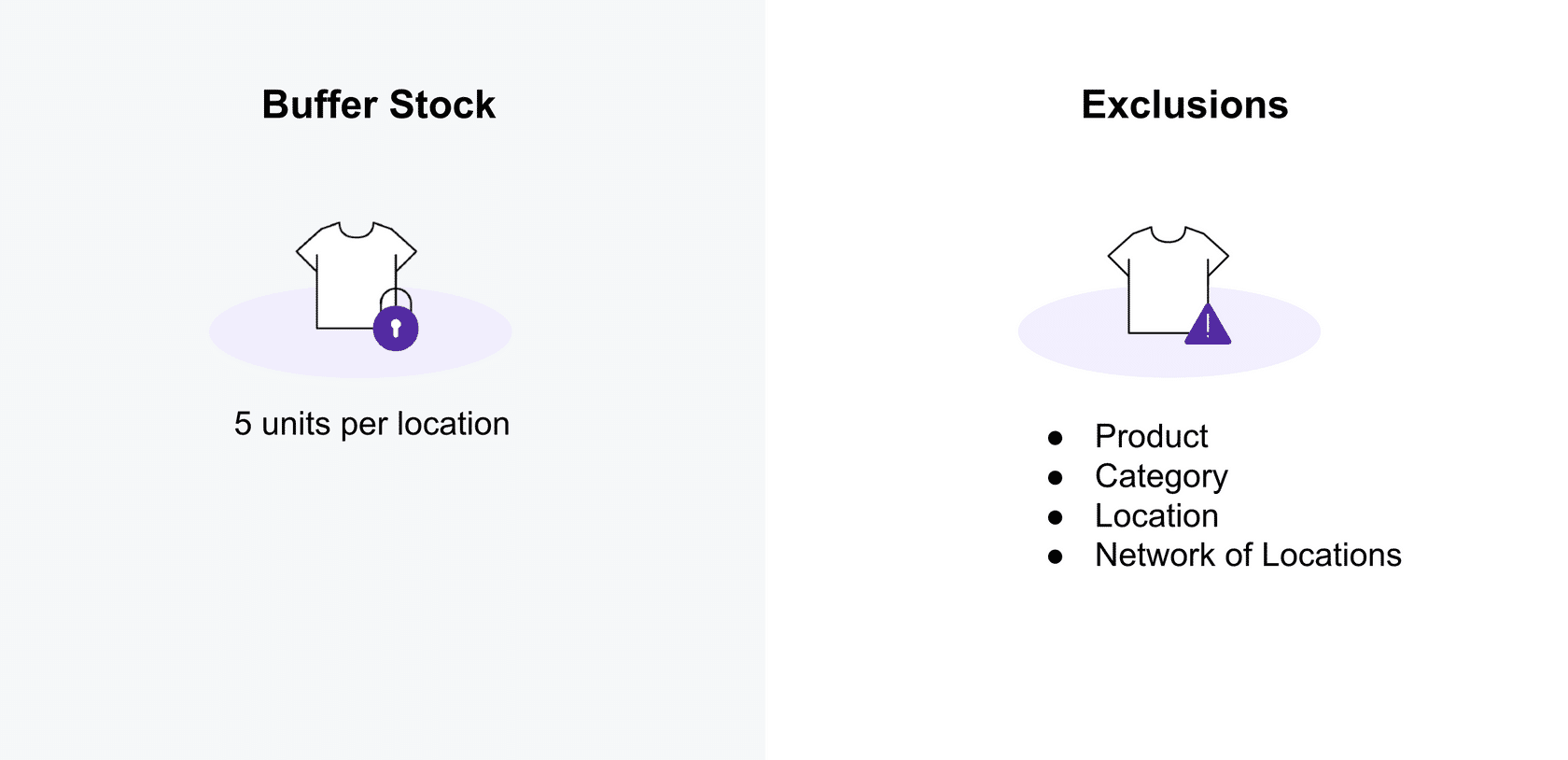
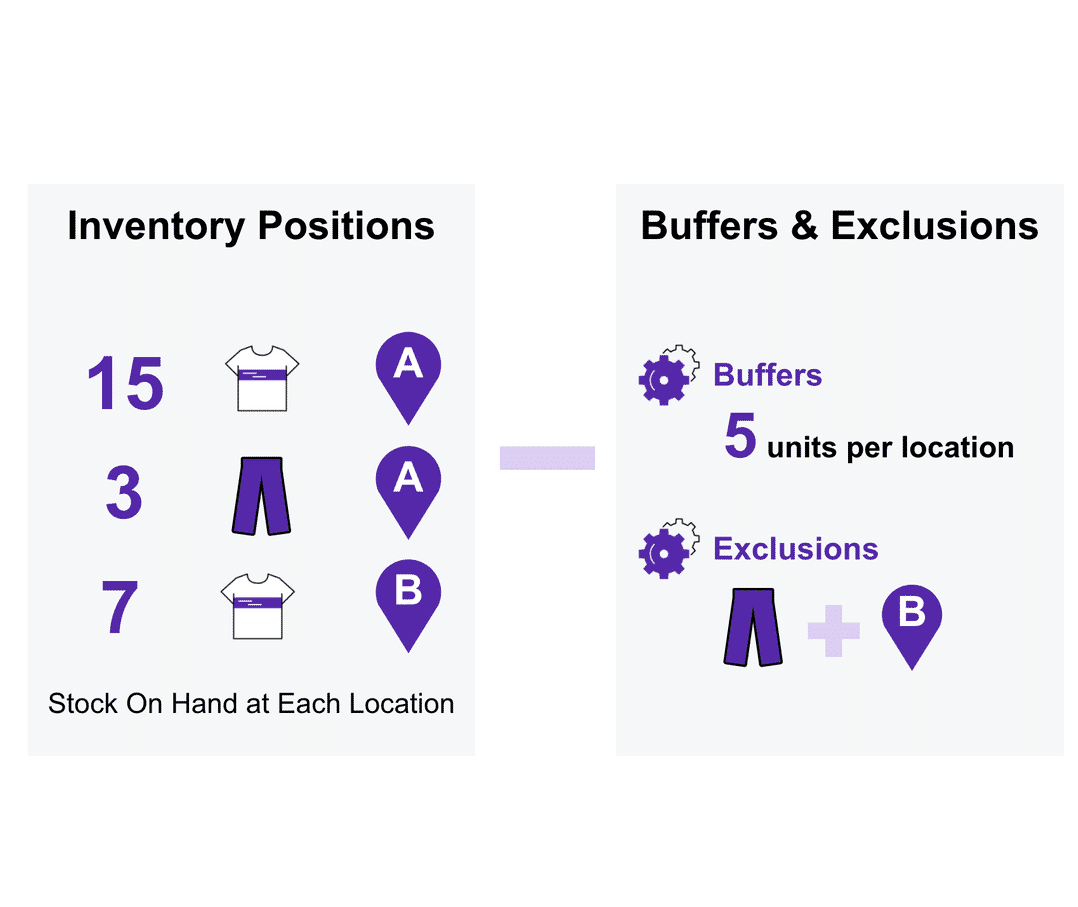
A Control Group provides Buffers and ExclusionsBuffer Stock refers to the number of units below which an item at a particular location will be unavailable for online orders. Example of how buffers can be used: Set buffer limit at 5 units per location.Exclusions let you specify which inventory positions should be excluded from a Virtual Catalog. They can be specified by product, product category, location, or network of locations. Example of how exclusions can be used:- Test the sale of new products in a single geographic location.
- Limit the range of products you offer for sale on a marketplace, or
- Expand into new geographic regions with a limited product range.
Virtual Catalog
The Virtual Catalog retrieves data from two sources:- 1 Inventory Catalog: provides inventory position updates.
- 2 Control Group: provides buffers and exclusions.
Inventory Calculation Example
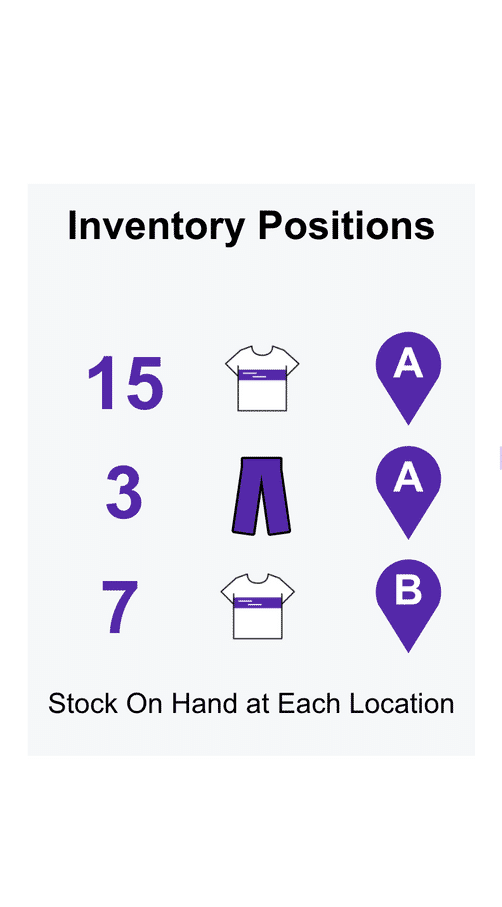
Inevntory Positions
Using a hypothetical scenario, let's say an Inventory Catalog has the following stock on hand:- 15 shirts in Location A
- 3 pairs of pants in Location A
- 7 shirts in Location B
Apply Buffer and Exclusions
Continuing with the scenario, we want to apply a Control Group in the Virtual Catalog that has a Buffer of 5 units per location.We want to also apply the following Exclusions:- Exclude the pants while we investigate a quality issue that has led to a high return rate.
- Exclude Location B because the location is offline due to a power outage.
Available to Sell
Once the buffers and exclusions are applied, the Virtual Catalog shows that Available to Sell (also referred to as 'Available to promise') is 10 shirts in Location A (Original 15 units in location A, minus (-) the 5 buffer stock.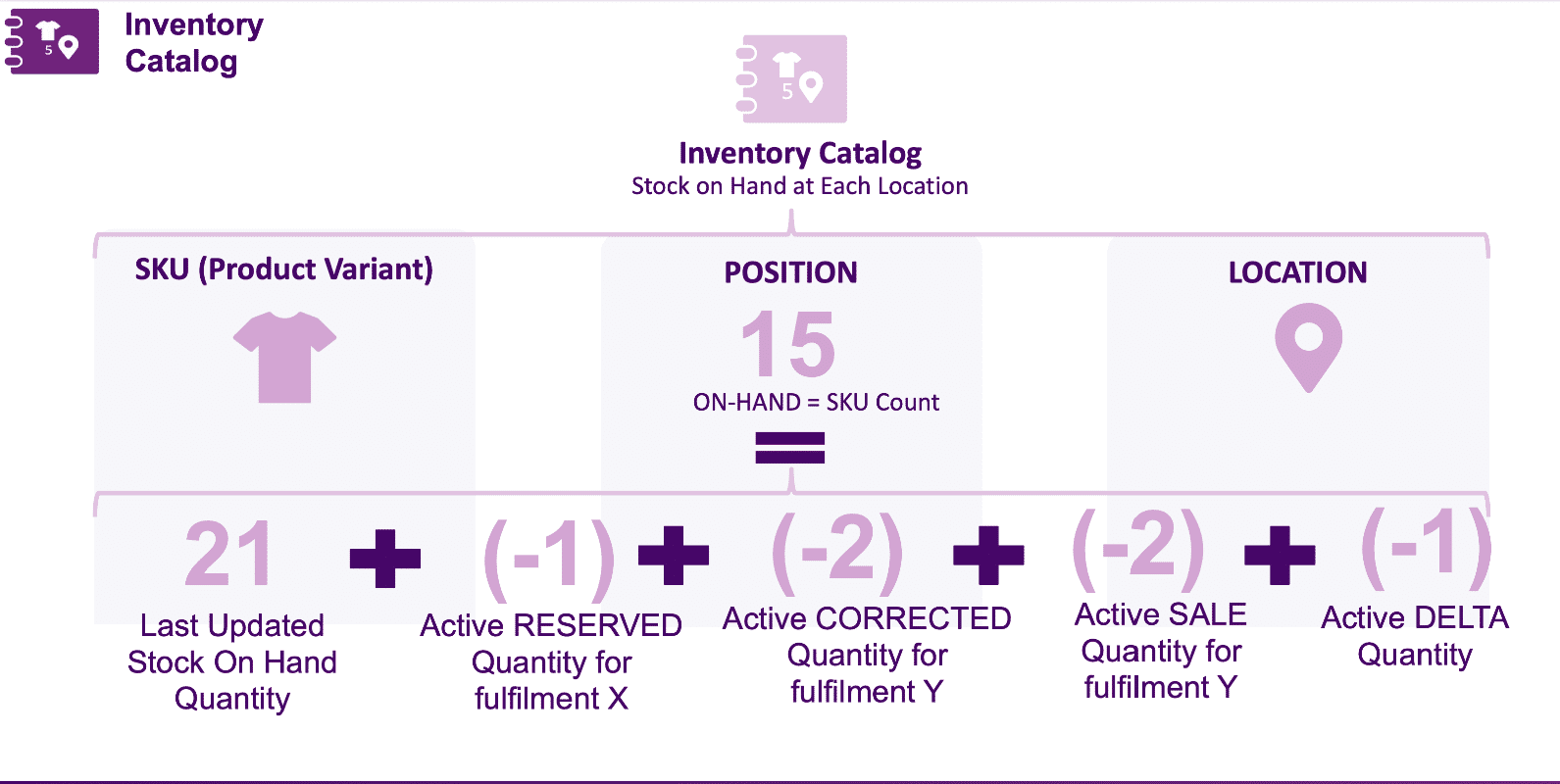
End-to-end inventory update process
Let's now take a look at how these four components come together in a simple end-to-end inventory update process: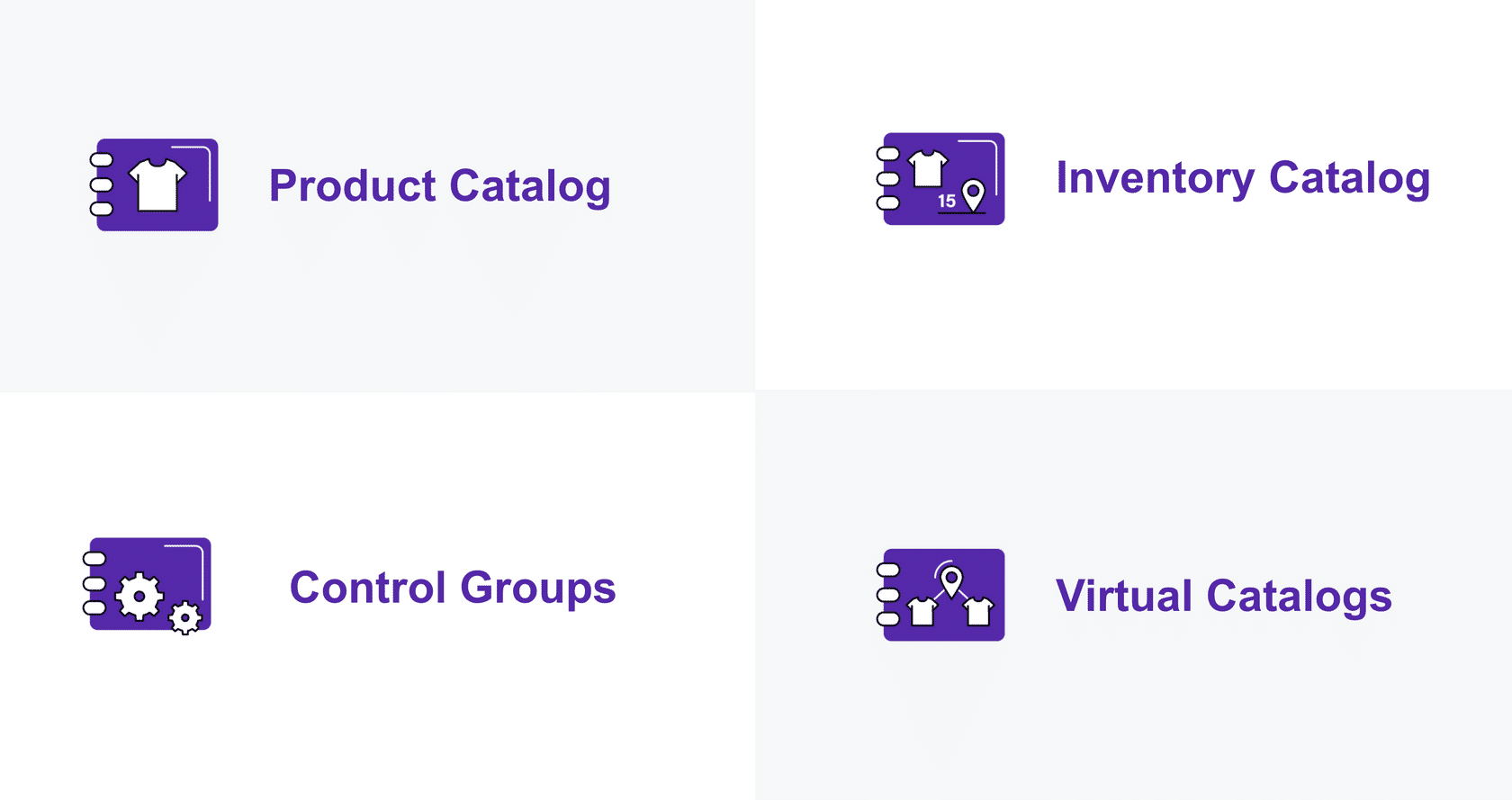
Step 1
When new Last on Hand data comes in from your Point of Sale, ERP or Warehouse Management Systems, or Product Updates are received from the Product Catalog, the Inventory Catalog Workflow updates all the inventory positions in the Inventory Catalog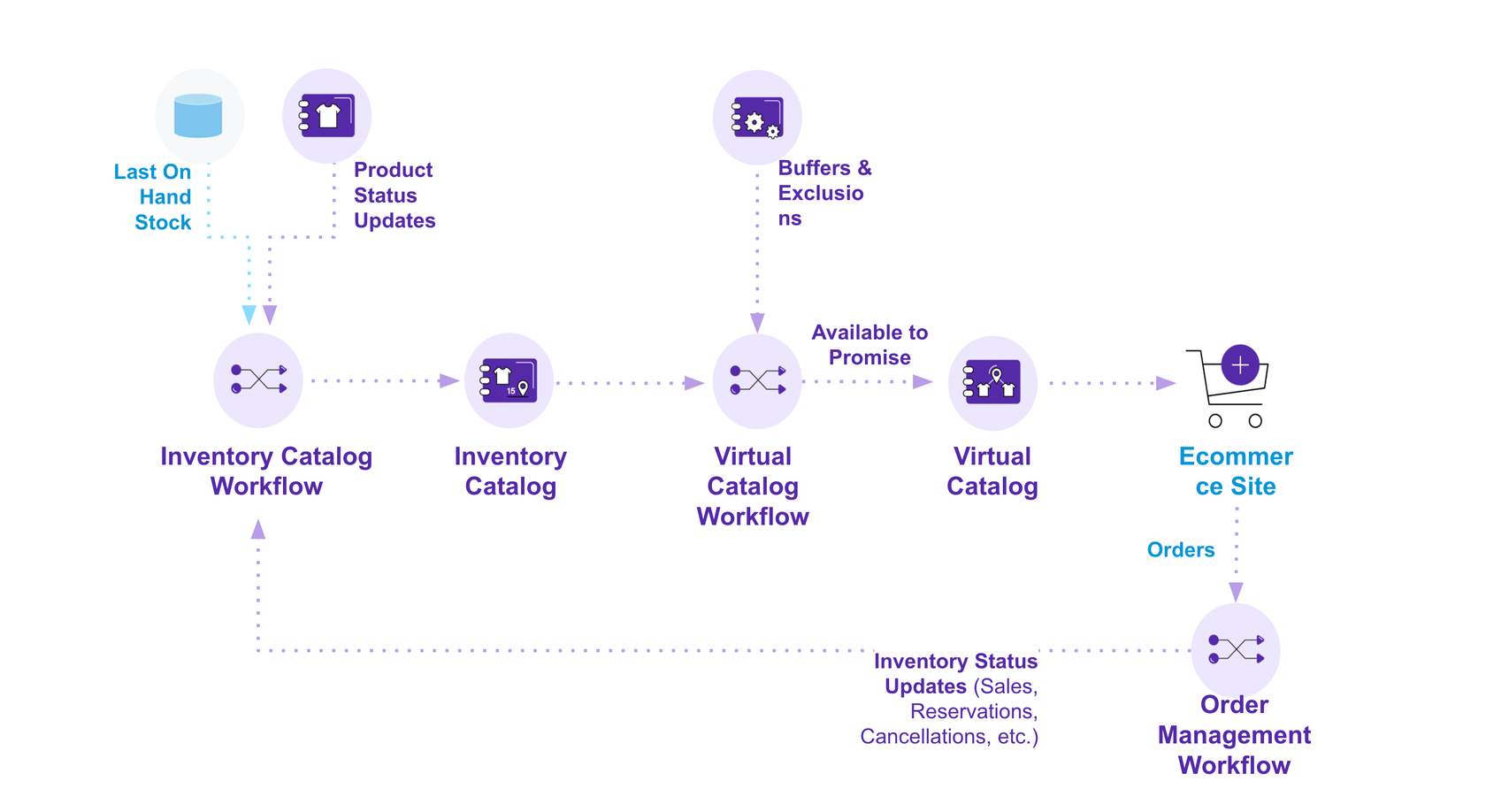
Step 2
Next, the Virtual Catalog Workflow takes each updated inventory position, and checks the linked Control Group for any buffers or exclusions.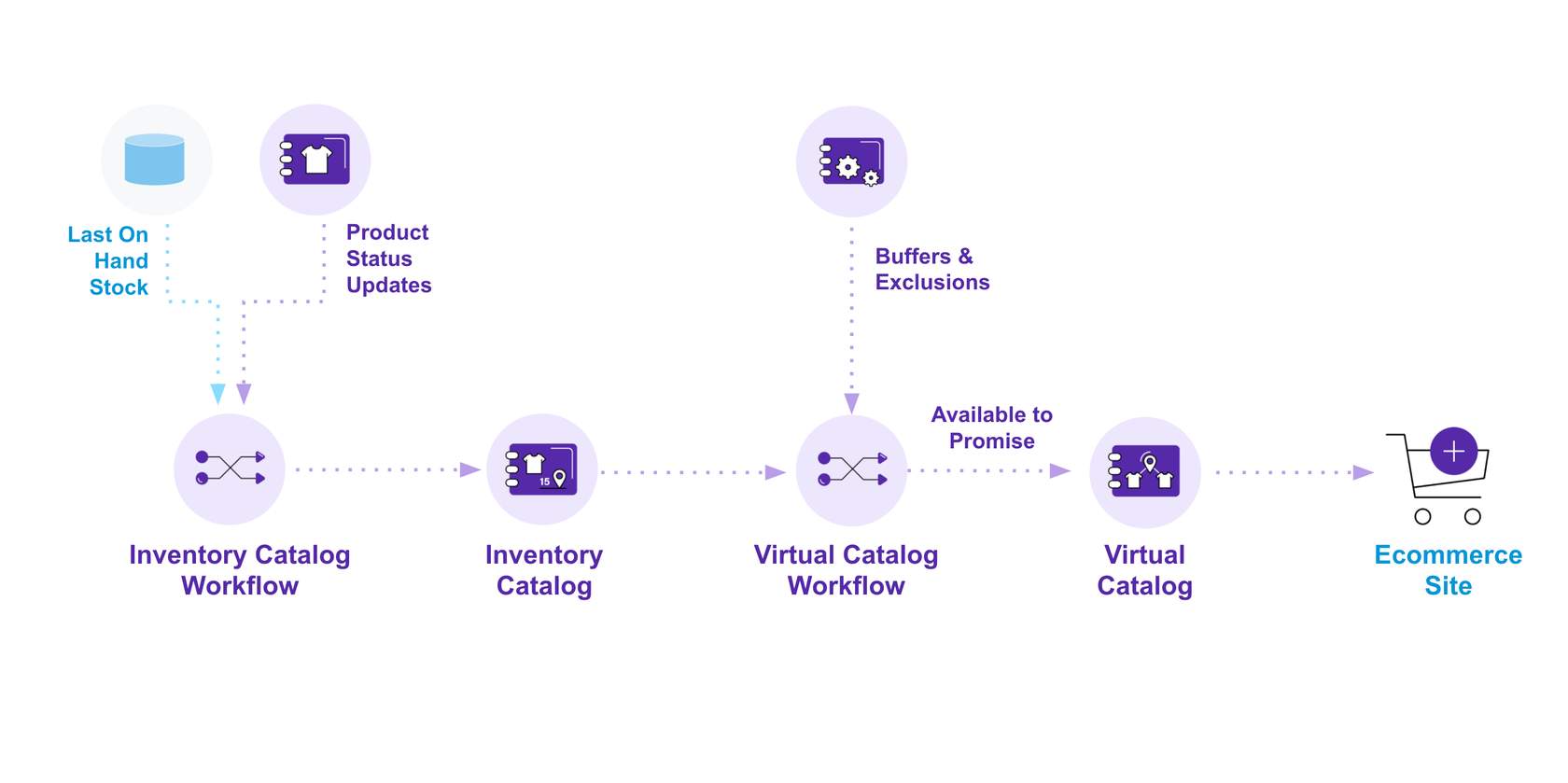
Step 3
It then recalculates the new Available to Sell for each virtual position and saves it to the Virtual Catalog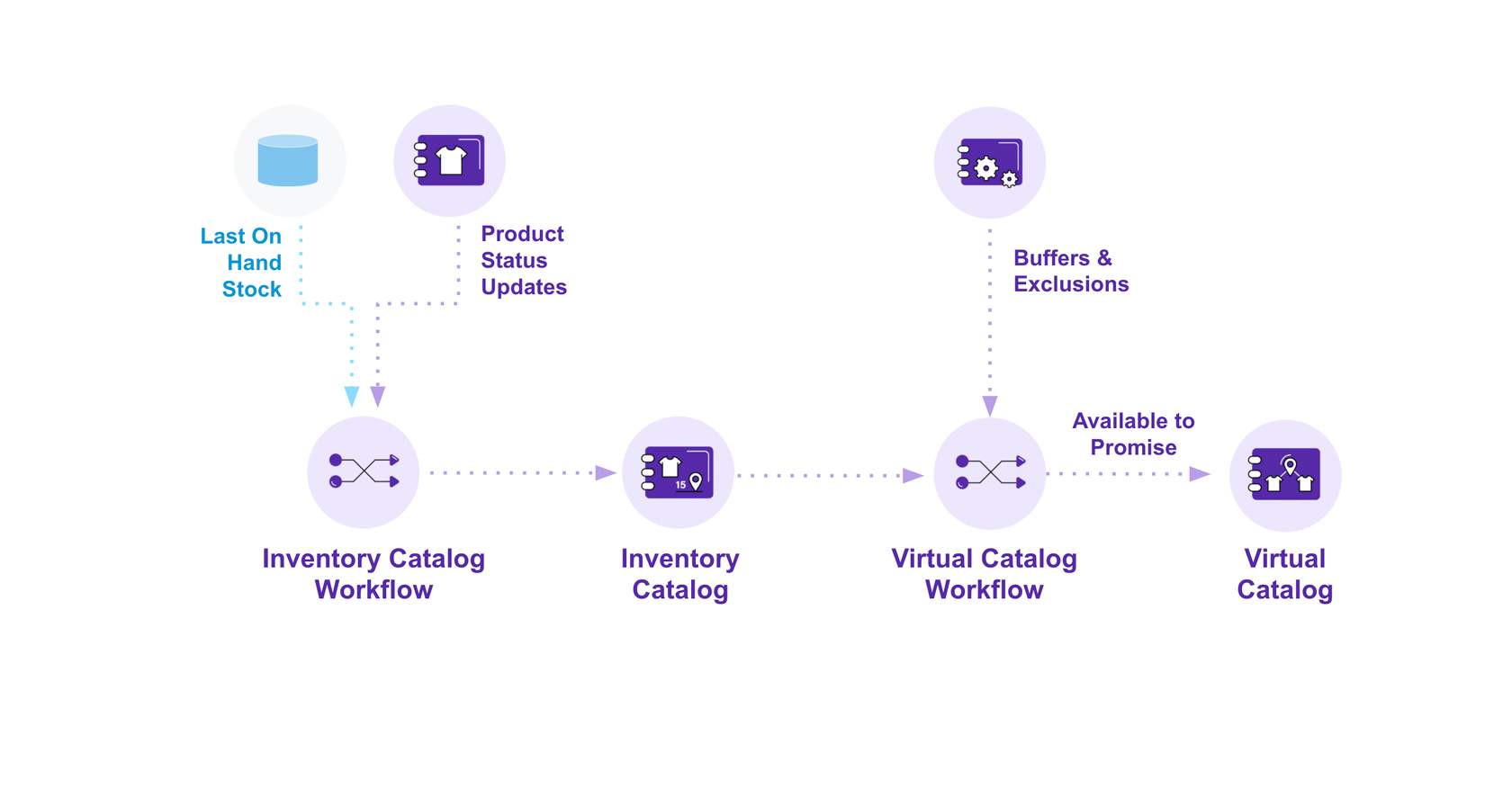
Step 4
As customers browse your eCommerce Site, the most up to date stock information from the Virtual Catalog is displayed online.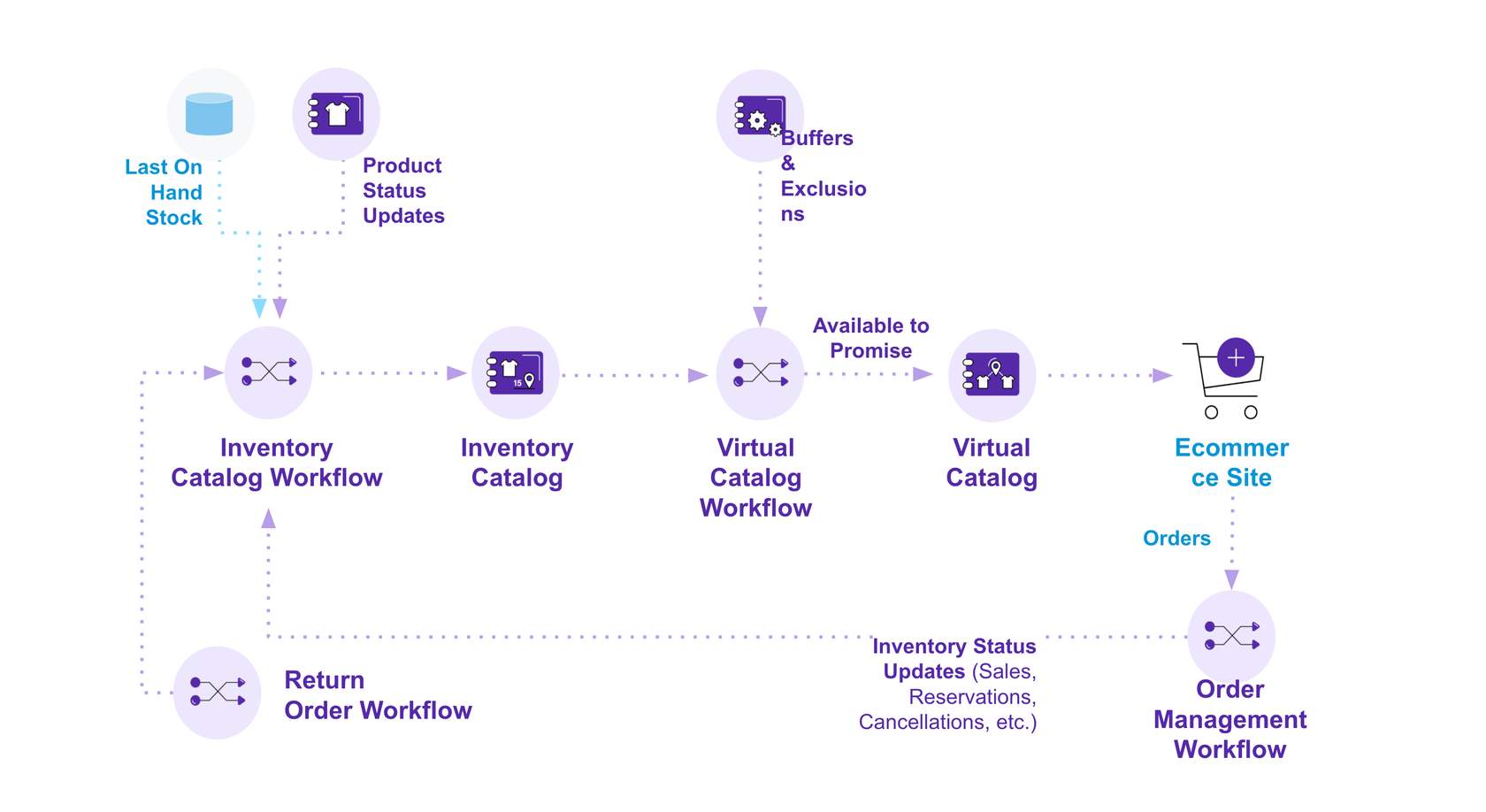
Step 5
When the customer places an order, the order is received by the Fluent Order Management Workflow.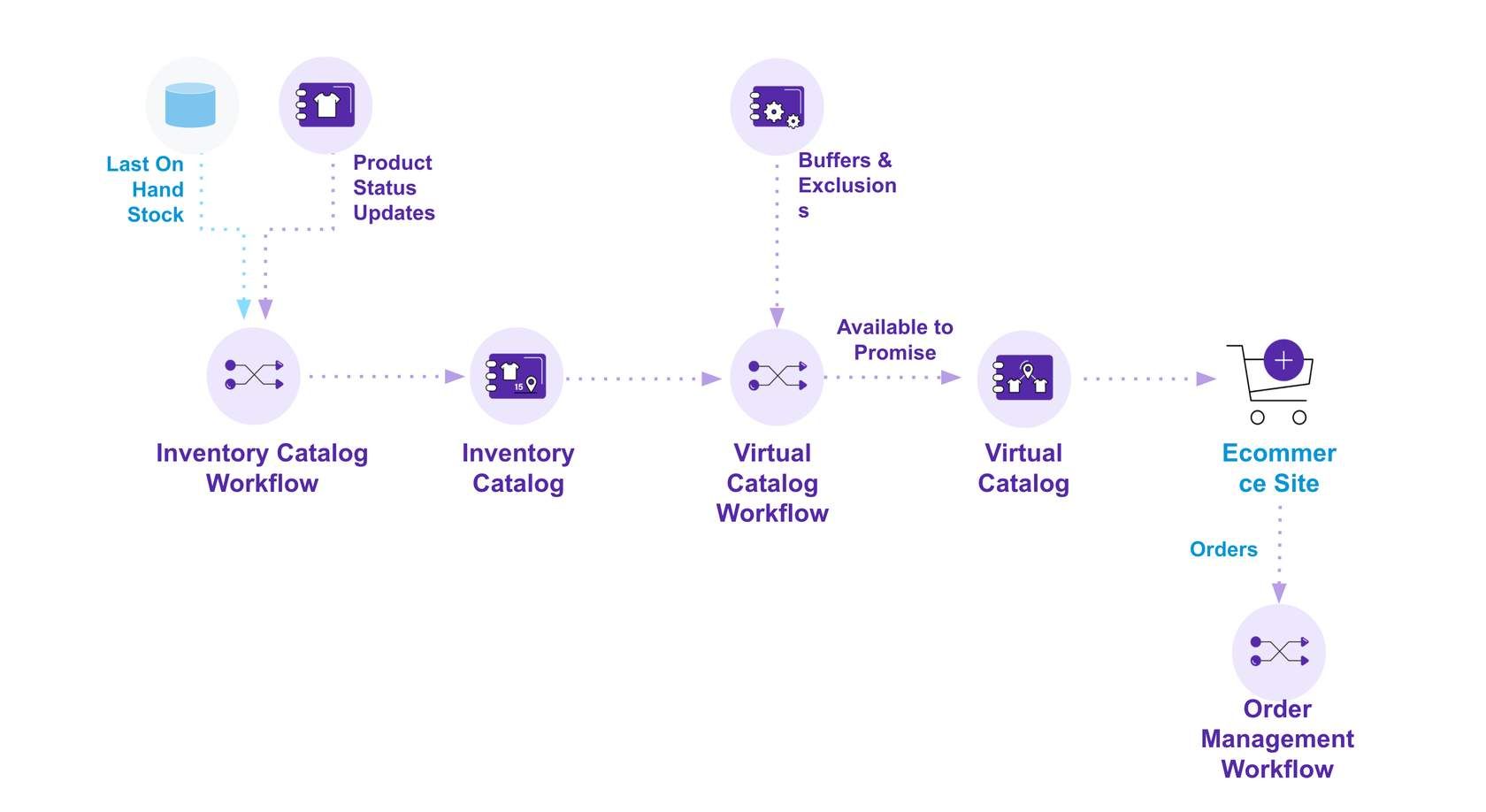
Step 6
The Fluent Order Management Workflow sends inventory status updates such as stock reservations, sale confirmations or cancellations back to the inventory catalog workflow, which updates the Inventory Catalog. Which once again sends an update to the Virtual Catalog Workflow, and the whole process is repeated.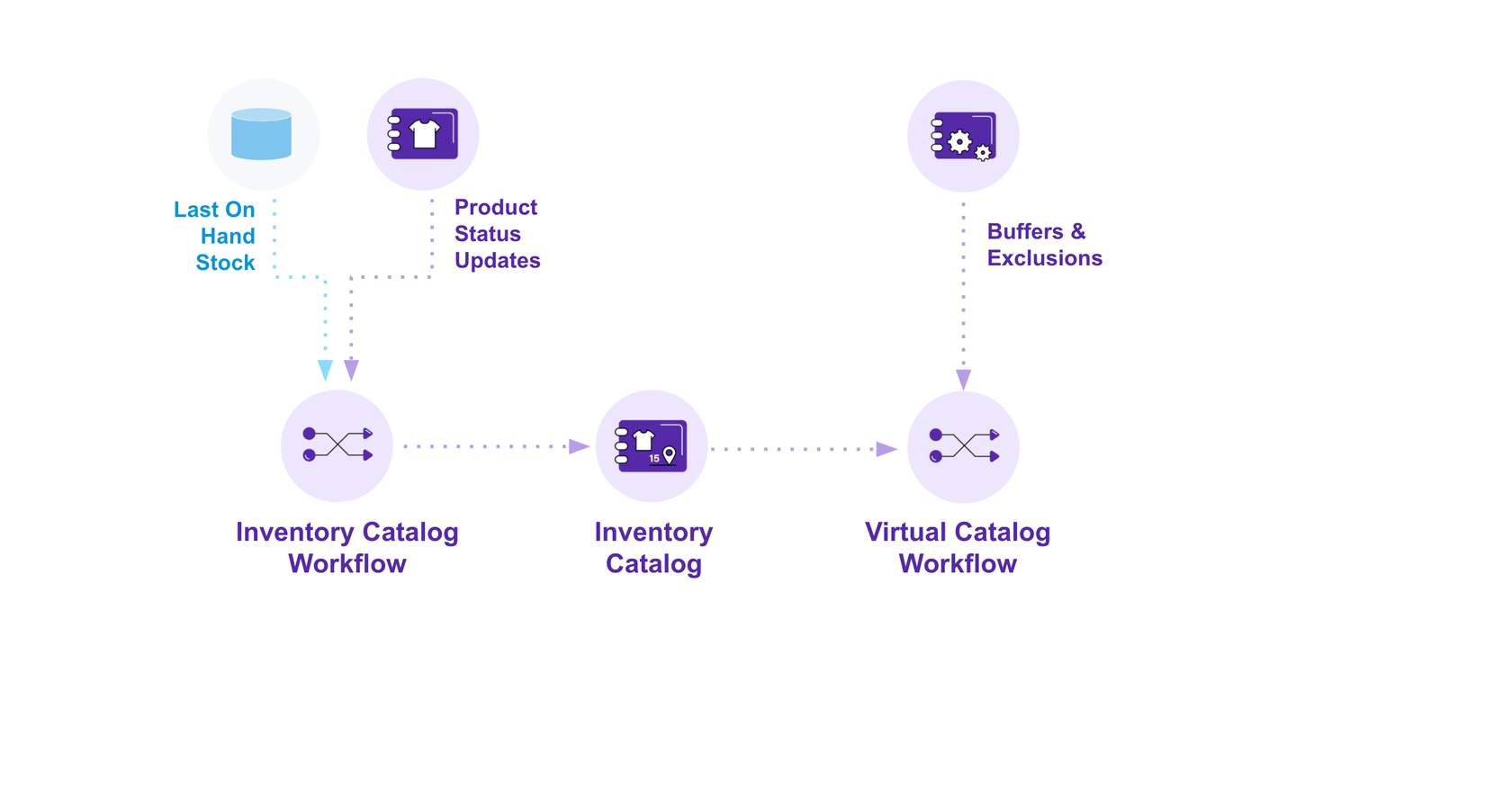
Step 7
This same update process applies to other inventory changes and order updates, such as a return.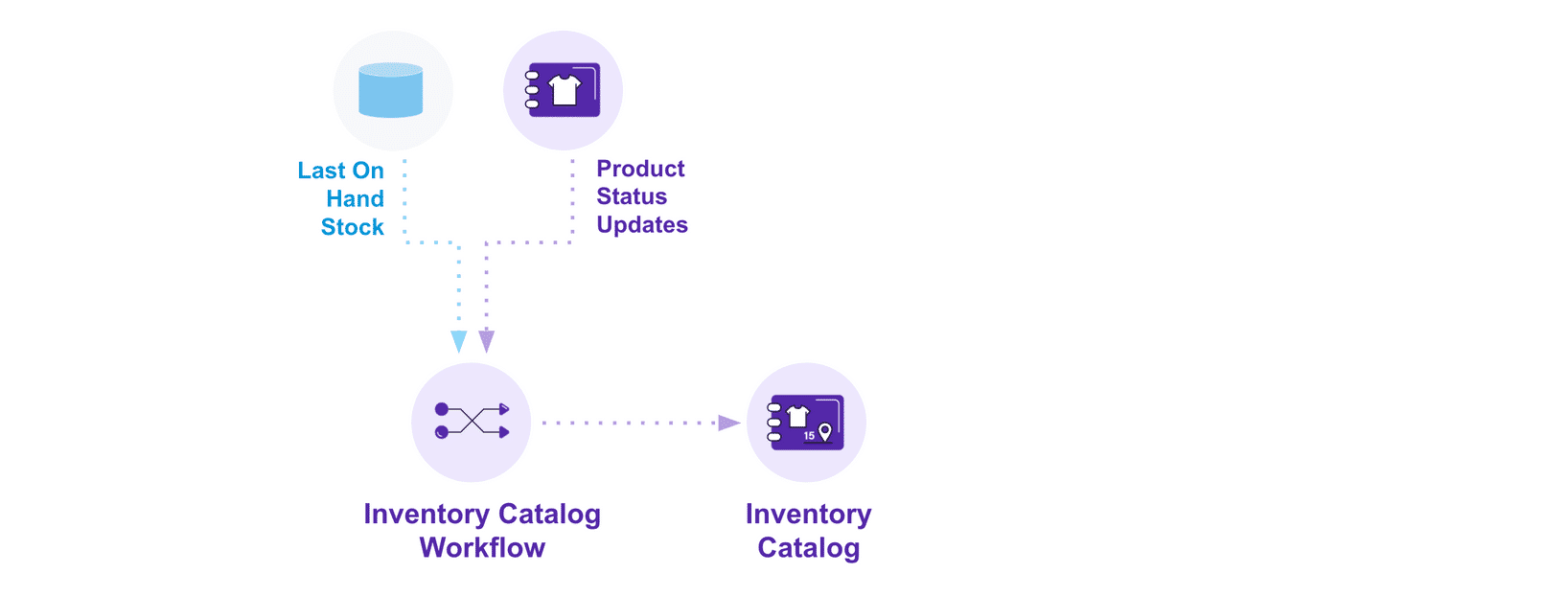
Store Module
The Store Module brings order management capabilities in-store by guiding store staff through the day-to-day processes required for store fulfillment and click-and-collect scenarios.Key Capabilities
- Store Picking
- Store Packing
- Store Dispatch
- Store Consolidation
- Store Arrivals
- Customer Collections
- Carrier Collections
- Ship from Store
- Store Transfers
Benefits
The Store Module benefits Retailers who need to maximise their ability to sell and deliver improved customer experiences in their fulfilment process, while reducing costs, and operating more efficiently.Data Model
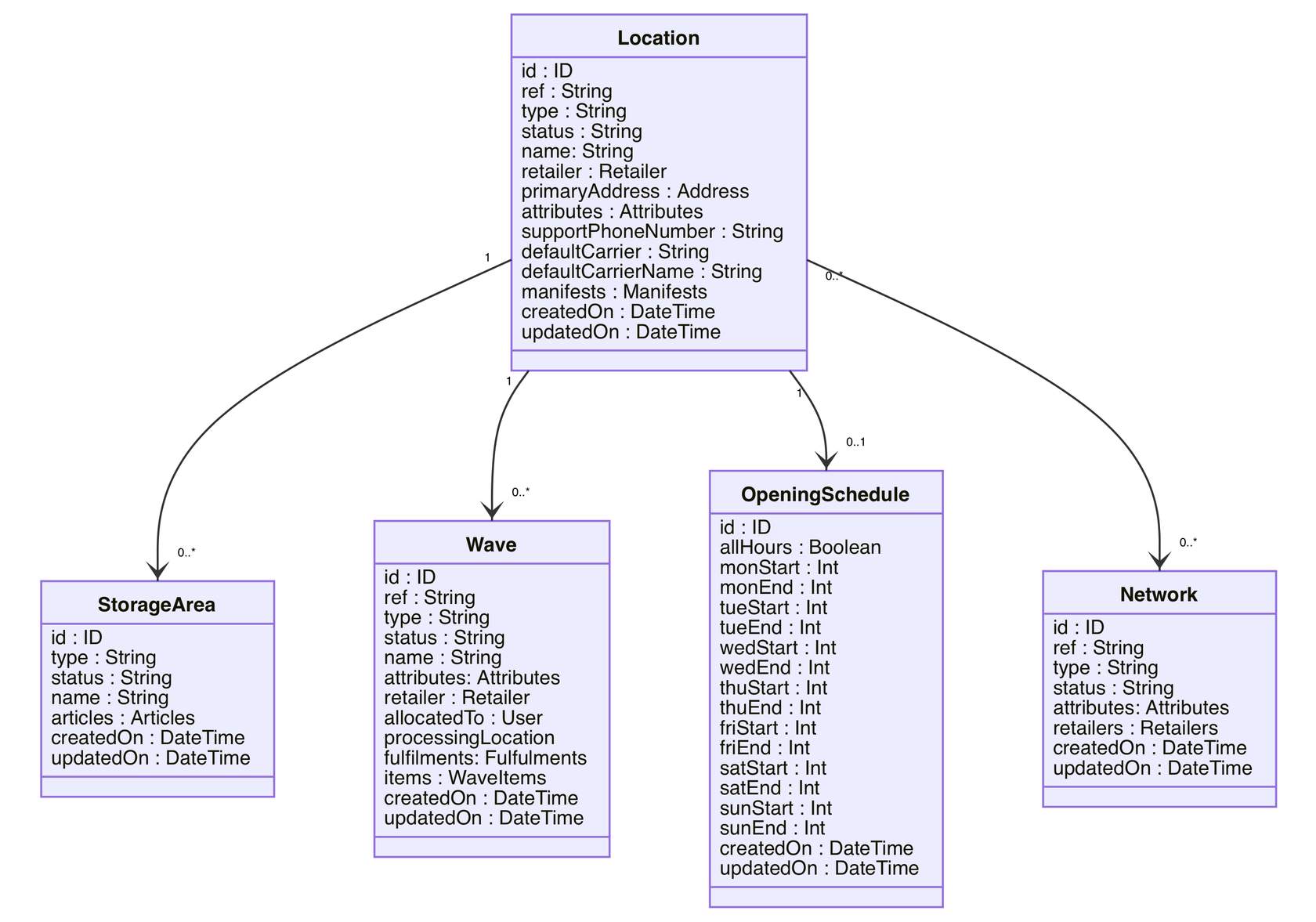
Service Module
Service module's functionality enables retailers to better understand and respond to the way consumers think, act and engage from one end of the buying journey to another.Benefits
For retailers who need to provide customers with quality and convenient customer service, understand what causes your customers pain and remove it, and help reserve positive customer impressions by helping to solve problems quickly and easily.Key Capabilities
- Create or Edit orders
- Cancel Orders
- Replace items in an order
- Add items to an order
- Remove items from an order
- Update quantity of items on an order
- Update delivery address
- Change delivery method or pickup location
- Offer appeasements to customers in the form of a credit/discounts
- Manage returns, exchanges and process refunds
- Send customer detailed order updates, so they don't need to call
- Notify the customer beforehand if the order has been short-picked/backordered.
- Process credit memos in the case of a difference in price created when adding or removing an order item
- Search, view and edit customer billing accounts
Functionality Deep Dive
Returns
The Returns functionality of the Service module is used to process returns and refunds. A return can be initiated either by a customer or by the system when an order cannot be fulfilled, and it also provides exchanges optionsWhen an Order fulfillment is not successful, the returns process is started automatically. If the action of the return does not automatically initiate or the selected order has a split payment, the customer service representative needs to process the return manually via the Fluent Admin Console or Service Module.- Returns - Clicking on the return initiates the return creation, and displays details about each item, the quantity of each item in the selected order.
- Product Attributes Displayed - Product attributes often help to visually match the product with the line item, and show the information such as the size or colour of the item.
 ReturnOrder Data Model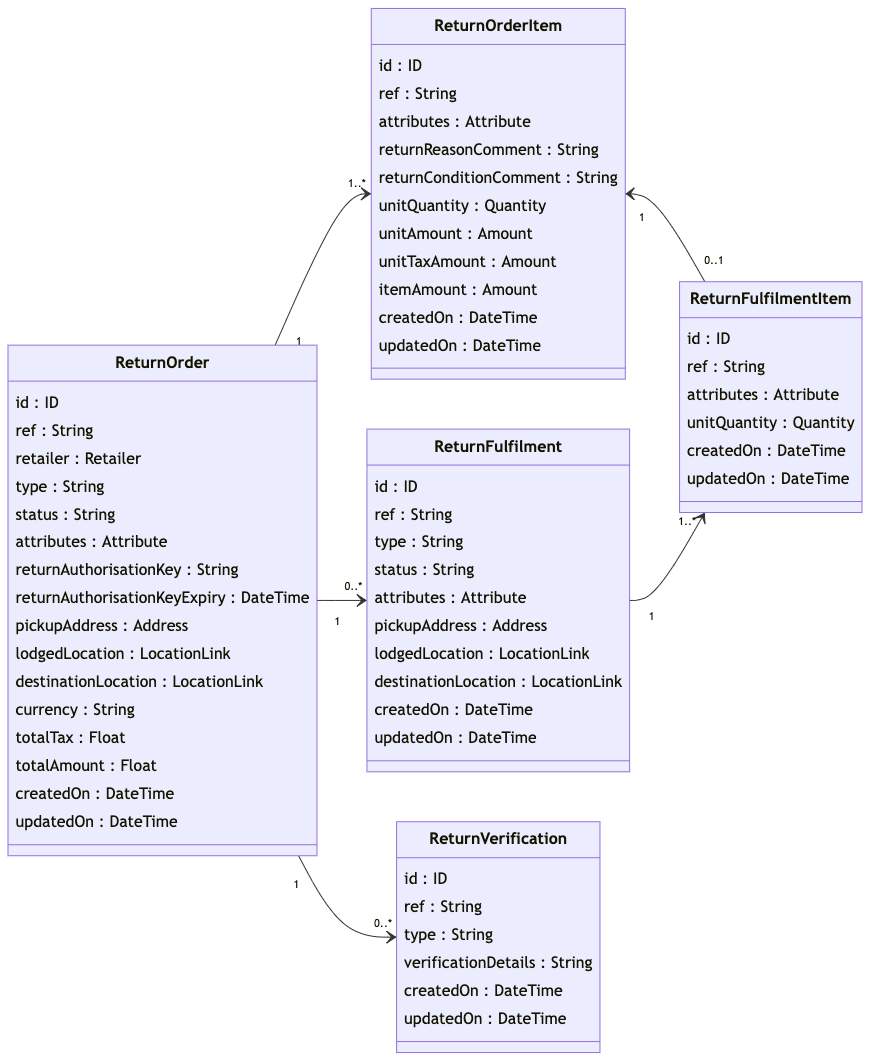
Billing
The core role of this functionality is to provide the capability to search, view, and edit customer billing accounts. A Billing Account contains all information required for billing and is specific to a customer. Using the service module you can update the delivery address, change the delivery method, or pickup location. It can also have an Invoice and Credit Memo (sub-entities) to record the transactions (if necessary) Additionally, the displayed billing accounts can be filtered by using the search box, you can edit the billing account by updating and changing the delivery methods or pickup functions.- Billing info - A billing account contains all information required for billing and is specific to a customer. Billing can also have an Invoice and Credit Memo (sub-entities) to record the transactions( if needed)
- Edit Billing Account - Provides the capability to search, view and edit customer billing accounts.
 BillingAccount Data Model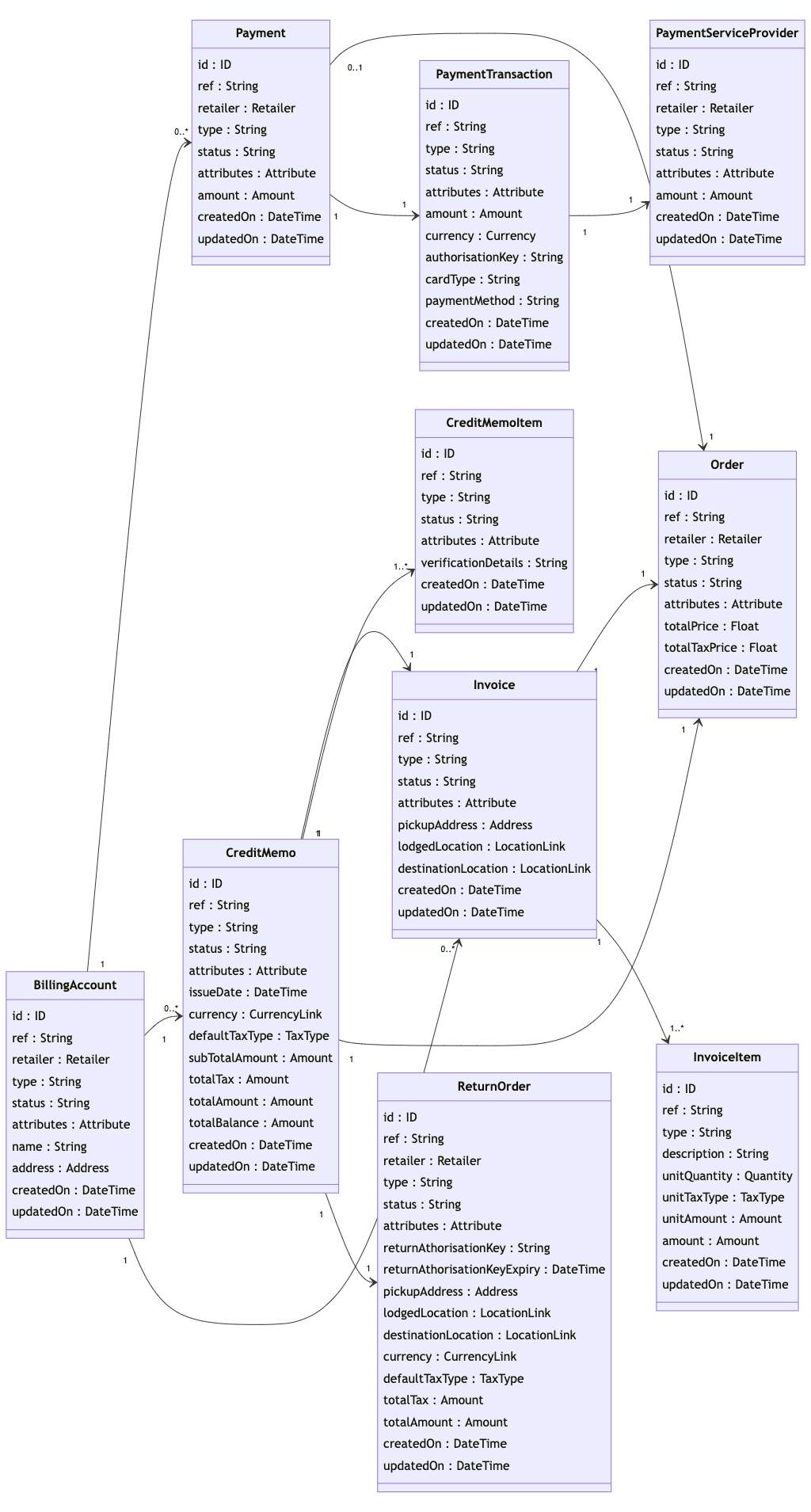
In-Flight Order Revisions
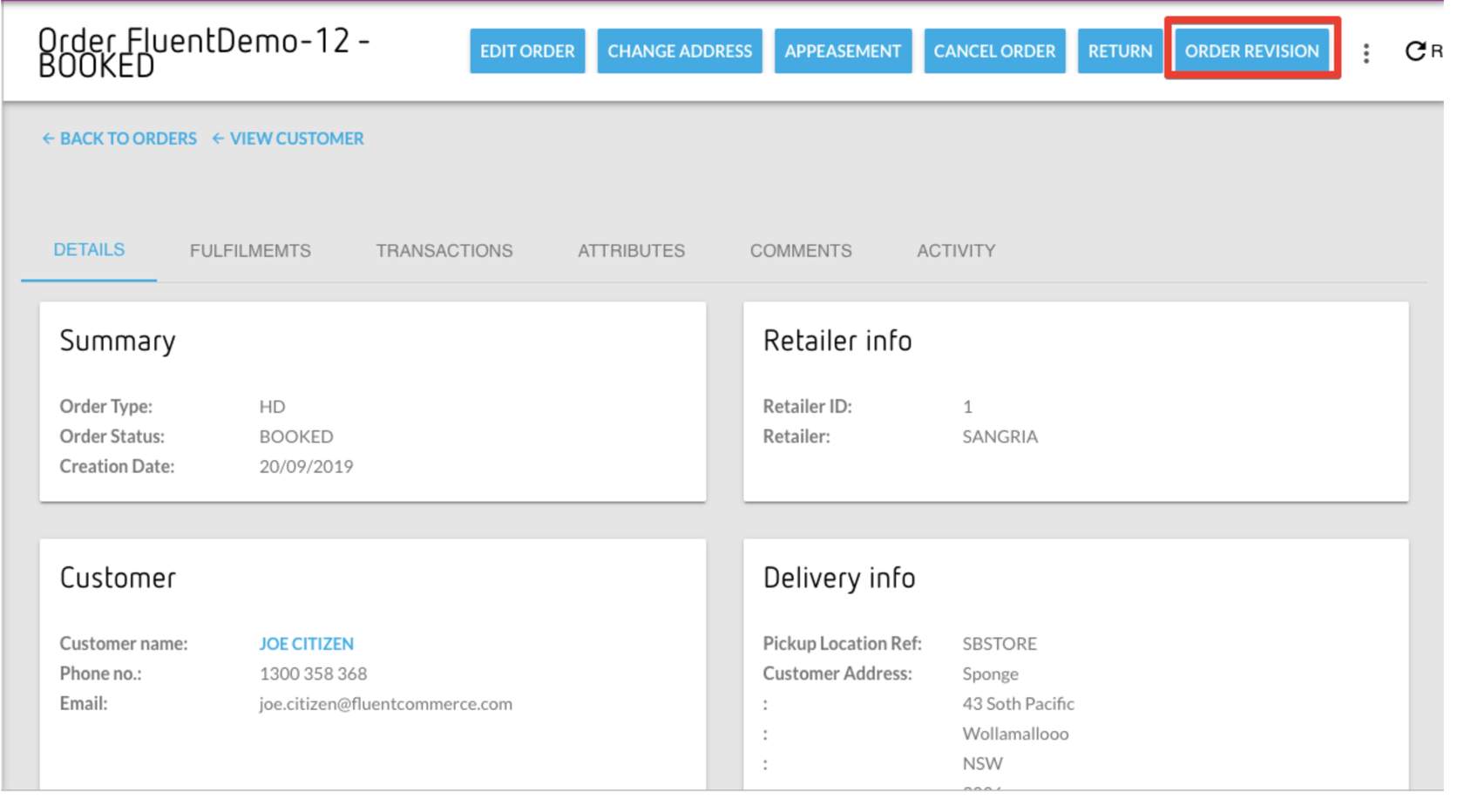
This capability allows retailers to revise an in-flight order by replacing, adding, or removing order items to accommodate customer requests for changes. Also, this capability supports the processing of credit memos in the case of a difference in price created when an order item is added or removed.- Order Revision - Clicking on the Order revision user action displays the order revision dialog which will ask you to update the order quantity with mandatory appropriate reason for the change from the available options
Appeasements
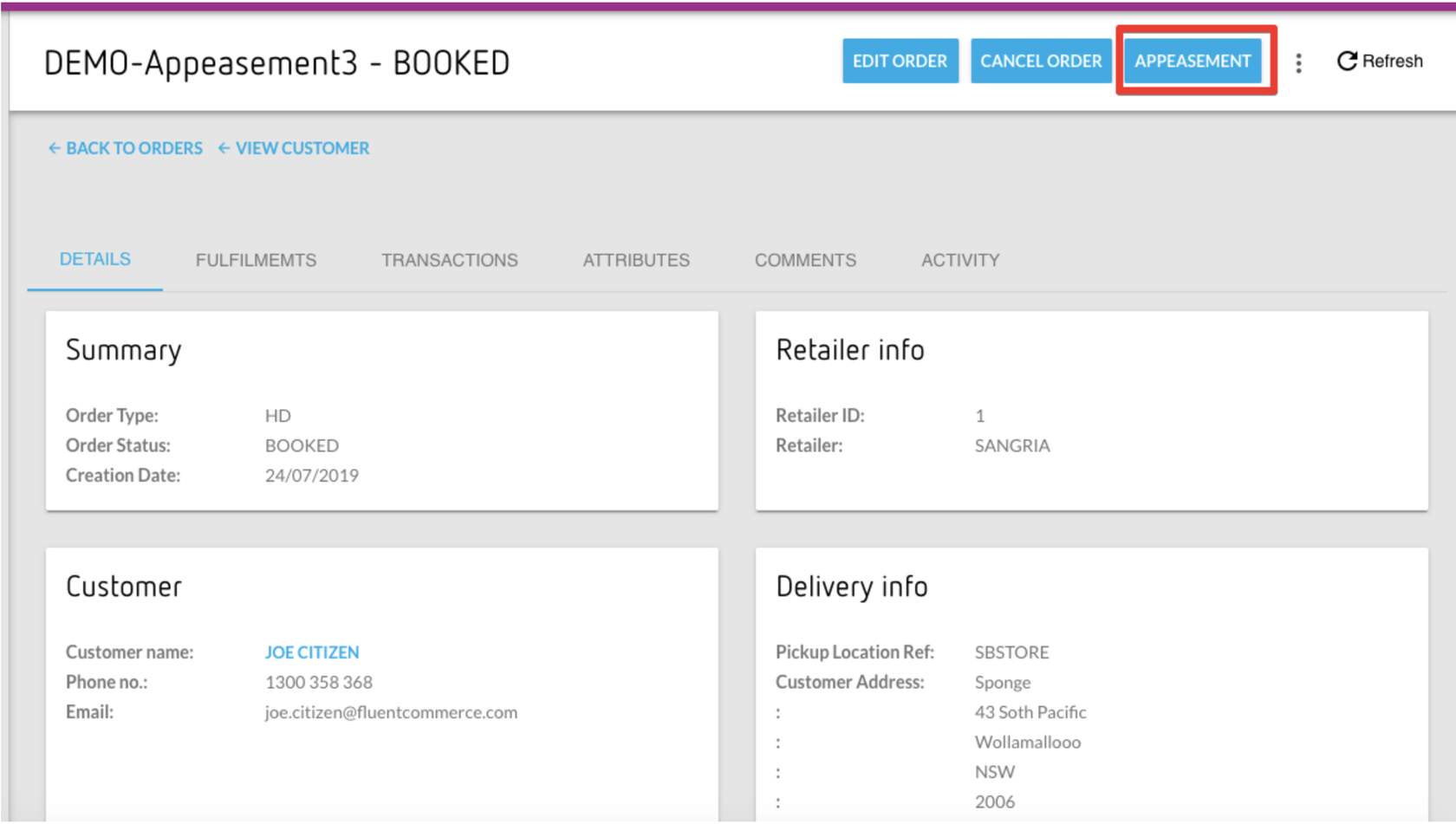
Appeasements functionality is a method of satisfying or relieving a dissatisfied customer. This function allows customer care agents to offer appeasements to customers in the form of credit, discounts, or sending detailed order updates to the customer so they don't need to call or notify the customer beforehand if the order has been short-picked/back-ordered.An ExampleFollowing is an example of where appeasement can be useful to a retailer: A customer informs a customer care agent that their parcel which was dropped off outside their front door was damaged.In the above situation, the customer care agent can create appeasement against the order for an identified amount. The outcome of this appeasement is that the customer walks away happy and the retailer builds greater trust between itself and the customer.Note: Appeasements are available at the order level and not at the order item level.- Appeasement user action - Clicking on the Appeasement User Action displays the Appeasement dialog where you enter the amount of the appeasement also the appropriate reason for the appeasement from the available option.