
Order orchestration
Essential knowledge
Authors:
Fluent Commerce, Esma Tuzovic
Changed on:
19 Nov 2024
Overview
[Warning: empty required content area]Key points
[Warning: empty required content area]Order Orchestration Module Overview
Where the 'Order Orchestration' Module sits within Fluent Order Management
A diagram of the main layers of Fluent Order Management is shown below. As you can see, 'Order Orchestration' is one of the core modules of the platform: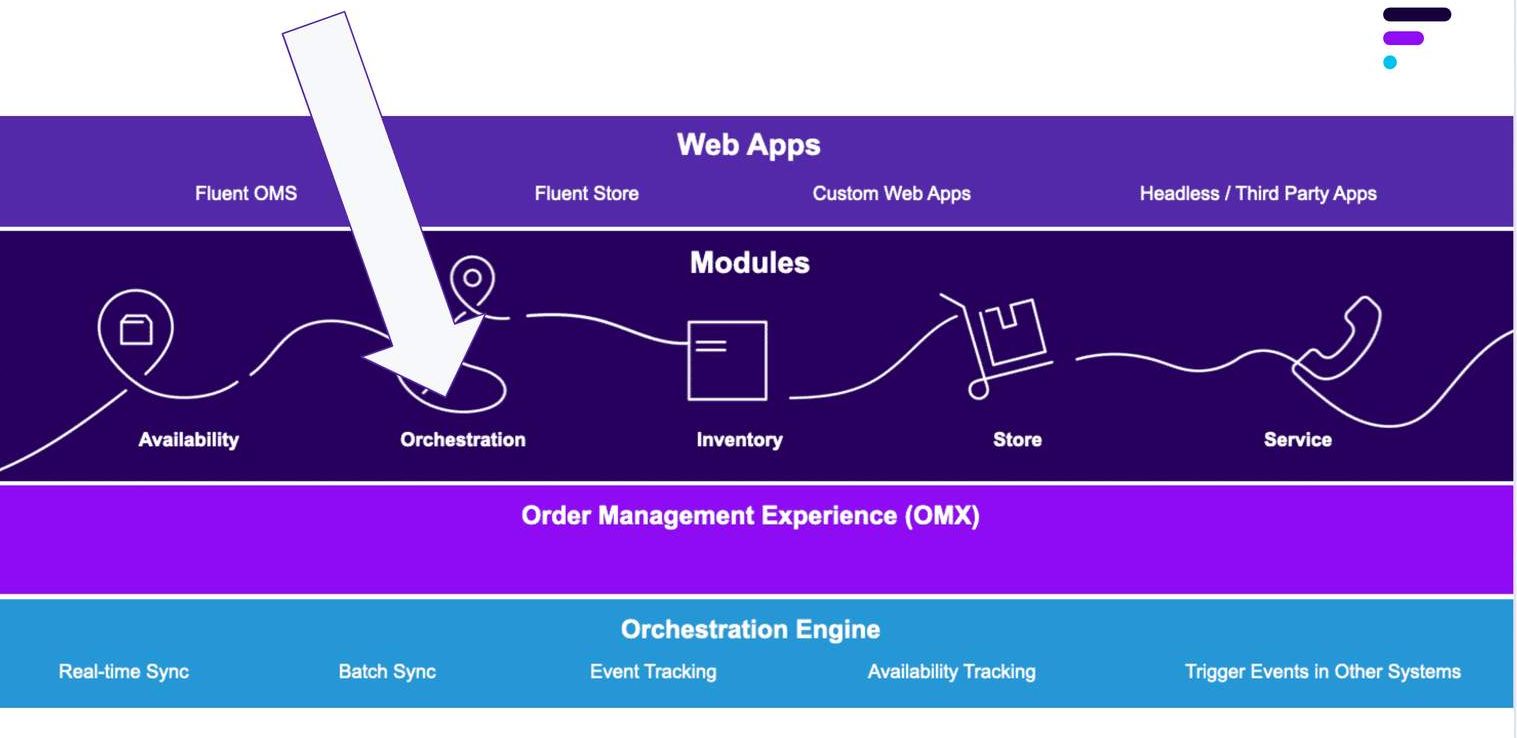
A quick recap of key concepts related to 'Order Orchestration'
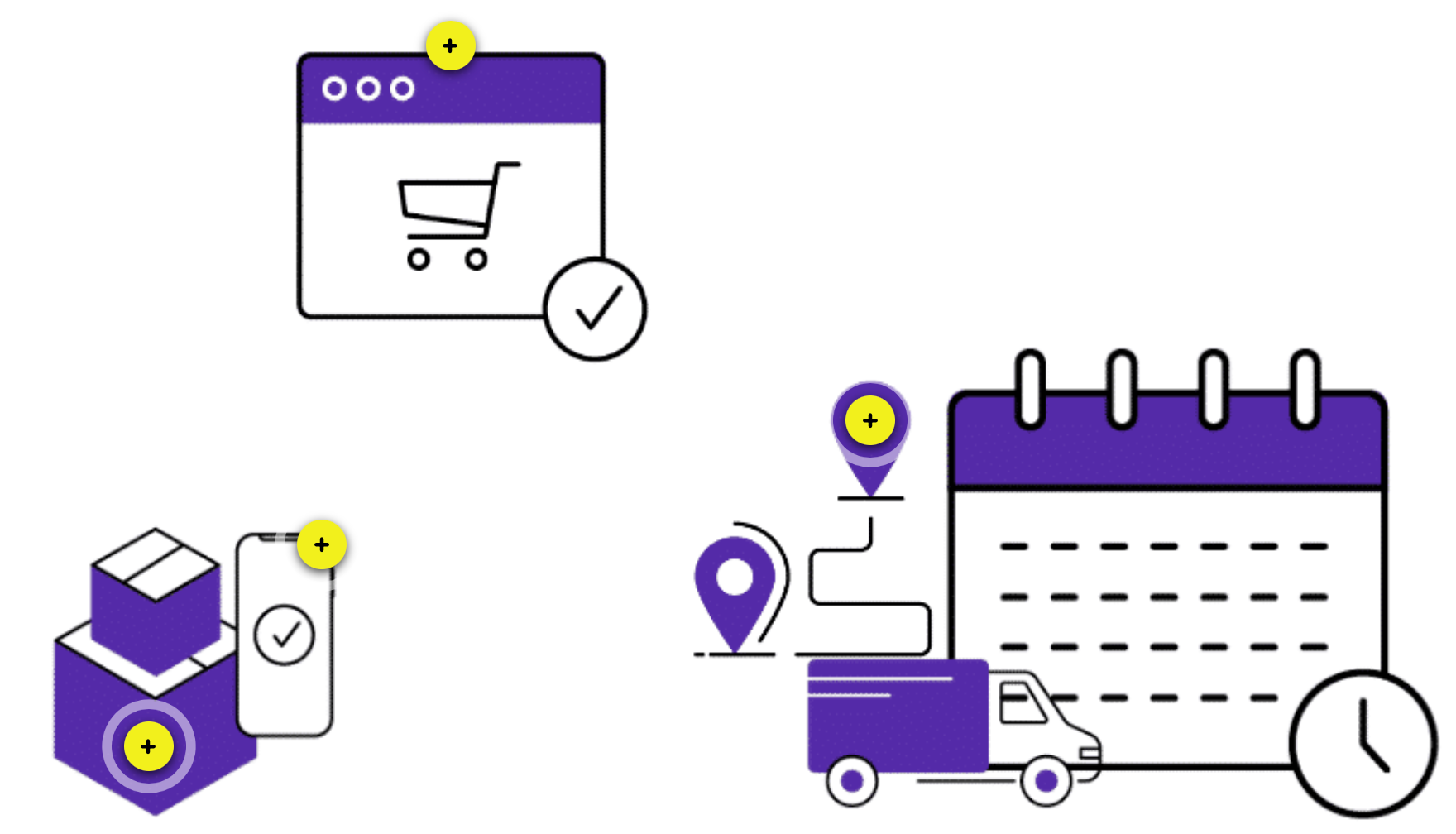
| Order | A Order is created when a customer completes a purchase on any sales channel connected to Fluent OMS. Once the order is created in Fluent OMS, the associated order workflow (determined based on the order.type) will kick in. |
| Fulfilment | A Fulfilment represents a location that is picking and packing one (or more) items of an order for the customer. A fulfilment is assigned to a location based on the available inventory and the sourcing rules. Note: If more than one location is used to fulfil an order, multiple fulfillments will be created against the order |
| Article or Parcel | An Article represents the physical parcel containing order items to be shipped or collected from the location. It's created when one(or more) items are packed into a physical parcel and confirmed. Note: A fulfilment may have more than 1 article, this happens when there may be too many items for one parcel or the items may be too large to fit into the same parcel. It is at the discretion of the Store Assistant to decide how many physical parcels are required to pack all of the items. The number of physical parcels is equal to the number of articles created. |
| Consignment | A Consignment is created when an article needs to be shipped via a carrier service. It's used to track the delivery of an article to the customer's delivery address. The consignment reference matches the carrier consignment including the tracking reference and URL. |
Sourcing, Networks and Split fulfilment are additional concepts you'll need to be familiar with
Sourcing is the ability to search or select the best available location that can fulfil a customer's order.A network refers to a logical grouping of physical locations and can be used when grouping a set of locations together. Networks usually reflect the types or geography of certain locations that you want to use for sourcing.Split Fulfilment is the ability to fulfil a single order from multiple fulfilment locations. Each additional location can be seen as a 'Split'. E.g. if we had 3 locations fulfilling a single order then it would have 3 ‘Splits'.An example of a Network"A retailer may want to group of their store locations into a Click and Collect (CC) Network. When a Click and Collect order is placed, the workflow will do an availability search in the Click and Collect Virtual Catalogue which is linked to a particular set of store locations in the network"Reference features and capabilities of the Order Module.
The Order Reference Module is the foundation for order-related implementations. Fluent Commerce provides three reference workflows - Home Delivery (HD), Click and Collect (CC) and Mixed Baskets. New Order workflows can also be built to support additional Order Types when the reference workflows cannot accommodate your client's (or customer's) needs.Manage multiple fulfilments
- It is possible for a retailer to have a single order with multiple fulfilments. Being able to track this information is key.
- Statuses are available in the standard order workflows. These statuses can be changed to match the terminology of the retailer.
- Status information can be reviewed within the UI under Order Management or when reviewing the Workflow Builder.
Manage different scenarios
Manage scenarios where we are unable to fulfil the whole order from a single location and need to use split, partial and consolidate fulfilment logic.Orchestrate order sourcing and fulfilment from multiple sources
Retailers can orchestrate order sourcing and fulfilment from multiple sources across their networks, based on their unique business requirements resulting in cost optimisation and enhanced customer experienceExamples of sourcing strategies:- Deliver from the closest location to the customer.
- Increase the opportunity to fulfil a customer's order by splitting fulfilments across multiple locations
- Fulfilment from Warehouses, Distribution Centres (DCs) and Stores
- Fulfilment from Drop Ship Vendors (DSVs) and third Party Logistics Companies (3PLs)
- Fulfil a specific order type from a dedicated Network.
Additional possibilities
With the Order Orchestration module, it's also possible to:- Handle Rejected Fulfilment requests
- Manage Fulfilment SLAs
- Handle Fulfilment Exceptions
Benefits to retailers
- Optimally route orders so retailers are able to reduce the cost to serve their customers.
- Ship from the right location every time.
- Optimise sourcing allocation
- Order orchestration allows retailers the flexibility to tailor their Order workflow based on their key priorities and manage specific logic for Home Delivery and Click and Collect Journeys.
How it works - domain model
In this lesson you'll learn about the domains capable of orchestration (orchestrated) and not capable of orchestration (non-orchestrated) — the primary focus will be on Order Domain.Click continue to view the Domain Model
On the right-hand side of the diagram is a key — arrows and lines represent the relationship one entity has with another (this is also known as multiplicity). Order is the Root Entity within the Order Management Domain. Child entities, otherwise known as sub-entities have a relationship with the Order entity:- Fulfilment
- Article
- Consignment
- Return Order
- Consignment
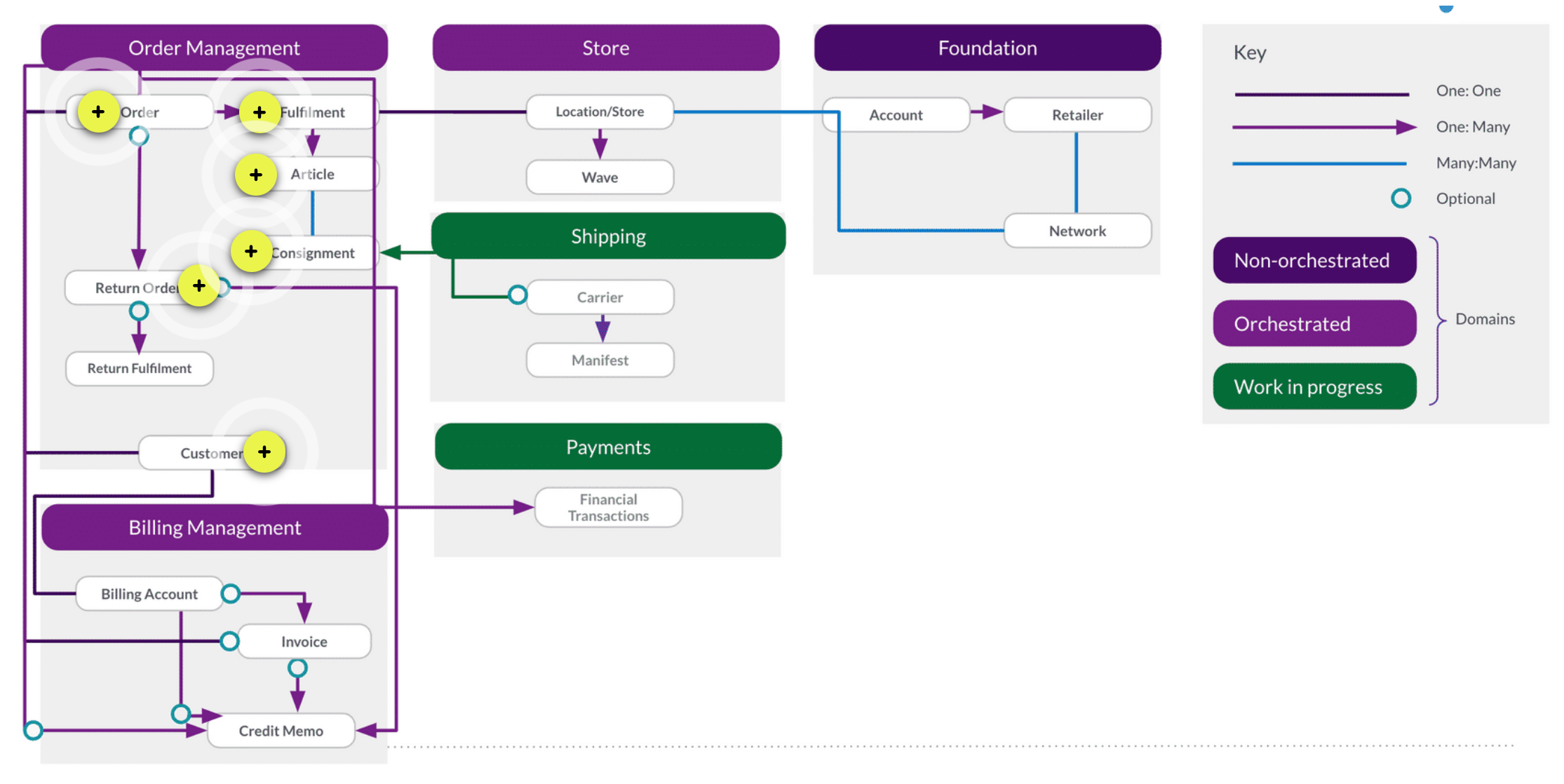
| Order | A one-to-many relationship exists between Order and Fulfilment. A single Order, we may have many Fulfilments, meaning one or many fulfilment locations that are picking specific items within the order. |
| Fulfilment | A one-to-many relationship exists between Fulfilment and Article. For a single Fulfilment, we may pick and pack the items into one or many Articles (also known as a physical parcel). This is because all of the items may not fit into a single Article. |
| Article | A many-to-many relationship exists between Article and Consignment. |
| Consignment | A consignment is the delivery of the Article to the delivery address, usually via a courier network.Consignment ID and Tracking URL can be stored against the Consignment entity to track the Article to its intended destination. |
| Return Order | There is an optional link between Orderand Return Order. This is because using the Return Order feature is optional in Fluent. Return Order is another Root Entity, and has a corresponding workflow called Return Order. |
| Customer | A one-to-one relationship exists between Order and Customer. To create an Order in Fluent, you will require a Customer to exist. The Customer entity is what links the Order Management domain to the Billing Account domain. All aspects of Customer Billing including invoices for payment and credit memos for refunds back to the Customer are found in the Billing Account domain. |
Root Entity for Order has a corresponding workflow — this is split into two types (see order.type) Home Delivery (HD) and Click and Collect (CC).
- Home Delivery (HD) is the ability to pick and pack an order and ship it to a Customers address.
- Click and Collect (CC) is the ability to pick and pack an order, and for a Customer to be able to collect their order from a location (usually a Store).
What is Sourcing?
Sourcing is the ability to search or select the best available location that can fulfil a customers order. You will sometimes hear this referred to as 'routing' or 'fulfilment logic'.Why do retailers want to be able to manage sourcing logic of their Orders?
"Markets are changing more rapidly than ever, and as a result retailers' sourcing strategies must adapt too, and quickly"Sourcing logic is using key business criteria to evaluate the best location to fulfil a particular order — many businesses want to be able to automate this process using Fluent Order Workflows which will remove the reliance on manual intervention to determine where each order should be sourced from. Most businesses will have a typical order flow that they want the majority of orders to follow.Let's take a look at two examples
Businesses with large warehouses: For those businesses that have a large warehouse that is seen as a hub for them, they would like to first try and source from the Warehouse, as it has the most stock holding, and is the cheapest way to pick and pack an order. If the whole order can't be fulfilled from the Warehouse, they may look to their Stores to be able to fulfil the rest of the order.Making changes to sourcing logic for Home Delivery Orders: HD orders may start off only being fulfilled by a single Warehouse. As new Warehouses are set up, the sourcing logic can be changed to reflect this, for example by retailers in the North having their orders fulfilled from one regional Warehouse, while retailers in the South having their orders fulfilled by the southern regional Warehouse.Sourcing logic strategies
In this lesson, we'll identify some basic sourcing strategies that we have implemented based on typical examples from client implementations.Basic sourcing strategies
Proximity : Fulfilling customer orders from the closest location to the customer's address is a common strategy for Order Management. This is also how the standard sourcing logic in Fluent OMS is working today. The standard logic uses longitude and latitude to determine the closest location to the delivery address. Proximity usually means that it's possible to fulfil the customer order quickly, especially if the distance between locations is a consideration, for example in large countries like Australia, where the main warehouse could be thousands of miles away from the end customer. Speed: Although this is often linked to proximity, this is not always the case. Sometimes the nearest location to a customer in proximity is not always the quickest for dispatch. There may be a Warehouse dedicated to online orders that is able to dispatch items quicker than the local stores. It is possible to set a pick and pack time limit per location to give an indication of the time it will take on average for a location to fulfil an order.
 Cost: Fulfilling customer orders with the lowest cost to the business is a common strategy for Order Management. Often businesses measure the 'cost to serve' as a metric for how much it costs for them to fulfil an order to a customer address. For some businesses, their own Warehouse is the cheapest way to pick and dispatch orders to the customer due to the scalability of a warehouse operations in comparison to a retail Store.
Next up, we'll identify some advanced sourcing strategies that have been implemented based on typical examples from client implementations
1- Reduce markdownsTo reduce markdowns, you’ll want to consider several factors that will require prioritisation. Specifically, whether you want to source from the location with the:- Highest in-store markdowns
- Most inventory
- Lowest sell-through rate
- Oldest inventory
type (e.g., seasonal inventory) as well.Seasonal inventory
If the sale of inventory is weather dependent, it’s worth considering replenishing stores via store transfer. This is when stores with low stock in a more favourable climate is replenished from stores with high stock in a less favourable climate where it’s less likely to be sold.2- Protect the 'in-store' experienceSome companies use their flagship stores as fulfilment hubs and have dedicated staff for pick-and-pack activities. But for those who don’t, protecting the in-store experience for customers is important. As a result, some companies choose to:
- Set higher buffer levels for flagship stores
- Source from non-flagship stores
- Store A is a high-volume store. Its ideal quantity for that item is at least 15 units. Whereas the ideal quantity for Store B is 10 units. So if Store A has 12 units and Store B has 11, an order will be sourced from store B.
- Because it is one unit above its ideal stock level whereas Store A is 3 units below. In short, the order will be sourced from the Store with biggest surplus above the ideal stock level for that item.
- However, if Store A had a large replenishment order that was in-transit and would arrive by the time the order had to be shipped (to meet the customer’s desired delivery date), the order might be sourced from in-transit inventory even though it had not yet arrived at Store A.
Manage store capacity:Another key way to protect the in-store experience is store capacity management. This type of sourcing rule lets you limit the number of Click and Collect and/or Ship from Store orders sent to a store based on:
- Total orders per day (e.g., a maximum of 50 orders sent to each store per day)
- Total orders per day by fulfillment type (e.g., a maximum of 20 ship from store orders per day)
- Prioritization of Click and Collect over Ship from Store (e.g., once the store has a certain number of open orders, only send Click and Collect orders to that store, not Ship from Store orders)
- Number of open orders (waiting to be picked and packed) at the store
- Number of orders waiting for pickup by customer
- Number of orders waiting for pickup by carrier. That way stores receive a manageable flow of orders, and staff still have time to service their in-store customers. However, it’s also important that the prioritization of these rules can be changed quickly. For example, it is not uncommon during peak shopping season for a retailer to:
- ‘Turn off’ Ship from Store, or
- ‘Turn off’ Click and Collect
- VIPs Only
- Only VIP customers can order certain products online.
- Larger Inventory Pools For VIPs
- While any customer can order an item while inventory is above a certain level, once it drops below that level, only VIPs can order it.
- Only offer Click & Collect (not Home Delivery)
- This can be especially effective for limited edition items that are highly coveted. And it gives your store staff an opportunity to upsell and cross-sell to increase the value of the sale.
- Fast Track Fulfillment for VIPs
- In addition, you may want to fast track the fulfillment of orders from your most loyal customers to ensure you keep their loyalty and repeat business. Options for this may include:
- Pick and pack orders for VIP customers before other orders (so they’re ready for pickup or delivery faster)
- Fulfill VIP orders from designated ‘VIP service’ stores
- Fulfill VIP orders from locations where expedited shipping is readily available
- Change a sourcing rule
- Change the prioritization of rules
- Add and remove locations from sourcing consideration
- Create new networks of locations that your sourcing rules can access
- Add custom attributes to products or locations that can be used in your sourcing rules
- Adjust safety stock
- Exclude products or categories
- Start selling in a new market or channel
- Start shipping from a new store
How sourcing works for CC and HD Orders
This section will describe the reference sourcing logic in Fluent Order Management. Below you will see a basic flow diagram of the logic steps that are followed. The two swim lanes you can see represent where this activity is happening within the Order workflow.We'll begin by reviewing some of the key concepts related to sourcing :| Swimlane | A 'Swimlane' represents a horizontal lane of a workflow labelled with the Entity it representse.g For Order Entity, all boxes in this swimlane represent activity for this entity. |
| Loop | A 'Loop' refers to when a process will loop back around. |
| Order Items | 'Order items' refer to one (or many) items within an order. |
| Proximity | 'Proximity' refers to the closest in distance to the delivery address. Locations that can fulfil the order are ranked in order of proximity. |
| Maximum number of Splits | 'Maximum Number of Splits' is also known as 'Split Limit', is a parameter that can be configured with a value — by default this is set to 1000 splits which essentially allows unlimited splitting. |
| Partial Fulfilment | 'Partial Fulfilment' refers to when we are unable to fulfil the whole order from a single location. |
| Rejection Location | 'Reject location' is a system location used to assign rejected fulfilments to another location. |
New, we'll look at the reference sourcing logic in Fluent Order Management
 Standard Sourcing Logic in Fluent
 - We start at the Order entity with the first box - Can I fulfil ALL order items from a single location?
- If YES, we Create the Fulfilment and Reserve the Inventory. Note: This is our standard 'happy path scenario'.
- If NO, we're unable to fulfil all order items from a single location because it does not hold all the stock — We now do the following:
- We first check if our Split Limit is reached. If it has, we are unable to create additional fulfilments and so we must reject the unfulfilled items.
- When we do this, we create a Rejected Fulfilment against a Rejection Location for the unfulfilled items. The status of the Fulfilment is updated to ESCALATED.
- If we have not reached the Split Limit, can we fulfil ANY of the order items from our locations within VC and Network combination.
- This will loop around until we reach the split limit, or if there is no available inventory in our locations within our VC and Network combination.
- At this point, we know we cannot fulfil these items, so we follow the Rejected Fulfilment steps. The status of the Fulfilment is updated to ESCALATED
Additional points to note
Maximum split limit- There is a parameter within Fluent Order Management that can be configured to set the number of splits that a business wants to use. Usually, the maximum is set in order to reduce supply chain costs to fulfil a single order — ideally, this would all be from the same location.
- The main difference is the Virtual Catalogues and Networks used to search for the best location to fulfil the order. You can keep these exactly the same for HD and CC flows, or have specific ones for each.
- You might run the sourcing logic and find a location to fulfil the order. However, when the location attempts to pick the order the stock might be unavailable — at this point, this inventory would be recorded as 'short-picked'. Fluent OrderManagement would update the inventory to type CORRECTION.
- At this point, the standard flow would attempt to fulfil the short-picked items from another fulfilment location — this is known as 'reassignment logic' and it re-starts from the Partial Fulfilment part of the flow.
What is happening to Inventory during the Sourcing and Order Process?
Inventory Reservation Process- When an order is sent into Fluent OrderManagement, the reference order workflows run the sourcing logic to determine, for example:
- best location to fulfil the order from, or
- if splits are needed
- Using the 'best location' example:
- After running the sourcing engine, one or more fulfilments are created — these are child entities of the original order we created.
- The Fulfilment is fulfilling specific Product quantity in a Fulfilment location. An event is sent from the Order workflow to the Inventory workflow.
- The standard Inventory Workflow creates an Inventory Reservation for the created Fulfilment.
- The Fulfilment ID is referenced in the Inventory Reservation record which can be seen against a specific Inventory Position in the Inventory Catalogue.
- The Inventory Reservation is for a specific inventory position (PRODUCT/LOCATION/QTY) for the Fulfilment quantity and location we created.
- The Inventory Catalogue workflow decrements the on-hand inventory quantity by the quantity that has been reserved — this is reflected in the SOH figure which is recalculated in addition to the Available-to-sell (ATS) quantity for the corresponding Virtual Catalogue which allows a customer can see as ATS on an e-commerce site for example.
- The TYPE column will show the type = RESERVED at this point.
- When items have been picked at the location, the Order Workflow and Fulfilment Entity will receive an event notification of what Product/Quantity was successfully picked.
- If we assume all items were picked successfully the workflow will change the status of the RESERVATION for the fulfilment to INACTIVE, and then create a new record of type SALE for the same QTY.
- From a SOH balance perspective, this will remain the same except for changing the TYPE to acknowledge that the PICK has finished. There is a slight difference in what triggers the sending of the pick event into Fluent Order Management:
- From a Warehouse (or any other external system) which doesn't use Fluent Store — this will be an event received via middleware usually.
- If this is an In-Store Pick, then the user action in Fluent Store to confirm pick quantity, will trigger the event to update the status of the fulfilment, and then the inventory catalogue workflow. SALE type and qty will always represent the number of items that were picked.
Summary
Inventory CORRECTION type is used in Fluent Order Management to manage 'exception' processes and capture any quantities of inventory that have to be 'short picked' due to unavailability of stock and damaged stock. We want to make sure that the Inventory is:- no longer 'reserved' or 'sale'
- available-to-sell (ATS) is decremented to reflect that this stock is no longer available.
- change the reservation of '3' to INACTIVE state.
- create a SALE record of QTY 2, and then a CORRECTION QTY of 1.
What is Split Fulfilment?
Split fulfilment is a strategy that some retailers adopt when they want to be able to fulfil a single order from multiple fulfilment locations.A typical use case
Split fulfilment usually becomes a requirement for retailers when they've been unable to fulfil a whole order from a single fulfilment location, which is usually the most desirable due to the costs of servicing orders, and the efficiency of picking in a single location.Splits allow the customer to "split" the order to be fulfilled over multiple locations — most typically each location would ship the items separately as soon as they are ready to dispatch, which results in multiple parcels being delivered for the customer.There are many different ways retailers would choose to split a single order, this could be based on proximity, or how to fulfil the greatest number of order lines, from the fewest locations.What is Rejection?
Rejection occurs in exception scenarios where we are unable to fulfil an order fully. Specifically, rejection occurs when:- whole order can't be fulfilled from a single location, and
- split limit is reached, or
- splits not allowed, or
- no inventory is left
- an item is not available to be retrieved in the store or warehouse (e.g. broken)
In-flight Order Revisions
In-flight order revisions provide the ability to add, remove and revise order items, specifically- Add an order item (by quantity or by searching, selecting and adding a different/new order item).
- Remove an order item.
Typical use cases for Escalation status
- For businesses who want to proactively manage the customers expectations, the ESCALATION status is useful for the Customer Services team to know when they need to contact a customer for an issue with their order. Depending on their process a dashboard may also exist for the team to monitor the number of orders in ESCALATED status per day/per week.
- High-end/luxury goods retailers will usually contact the customer directly based on the ESCALATED order status to convey this information and inform of options. e.g. either process the remaining order items or cancel the whole order and receive a refund. This may also lead to appeasement being given to the customer to keep them happy after a disappointing customer experience.
- For businesses with faster moving, lower value goods, if there was no stock, or one of the items in the order is not available, when the fulfilment moved into a status of ESCALATED, some retailers would automatically cancel the fulfilment, trigger a refund (if the payment had been taken) and email the customer to notify them.
Webhooks
All outbound communication to other systems from Fluent workflows is via a webhook. Webhooks are been triggered from a specific workflow at a specific point within the workflow, this is done by adding a webhook rule in the workflow.The benefit of using webhooks is that information is in real time (rather than having to poll the Fluent APIs for information). The Fluent Orchestration Engine posts an event to a configured endpoint, so that a third party system can be notified or react to the provided event.Common webhook scenarios include:- order status updates
- shipping notifications
Standard Fluent Rules
Standard rules involve sending a webhook rule — the design intention is that this webhook rule is reused across all workflows when a webhook is required for outbound communication. E.g. Order Status updates may be sent from Fluent Order Workflow to an outbound ERP system when an Order moves to a status of COMPLETE. When using the standard sendWebhook rule, it is a lightweight webhook that contains very minimal information such as 'entity' and 'status'. It is then up to the external system to use this information to query back to Fluent to retrieve the data that is required.sendWebhook rule can be re-used to trigger a webhook for the following business scenarios
Payment capture: If payment capture is happening after a particular event or status in Fluent, e.g. when an order has been dispatched, then Fluent will trigger a webhook out to a middleware/payment service provider to trigger the payment capture process.Notifications: Often in the customer journey, there will be touch points where we might want to contact the customer to provide them with information about their order when it is in a certain status. A notification webhook could be triggered from the Order Workflow when we know the order is Ready for Collection.Inventory movement: Often if there is an external system ERP, it will likely want to know inventory movements within and out of the company. A webhook could be triggered at the point of order dispatch to reflect this. This system may also want to be notified if any stock is moved from one location to another internally, such as store-to-store transfers, again a webhook could be sent when the arrival process is completed in Store X to acknowledge the transfer has occurred.
Order Cancellation
'Cancellation' is the ability to cancel a whole order that is in progress usually as a result of a customer requesting to cancel their order. There may also be system events that require an order to be cancelled.Understanding the 'standard workflow'
As reference, Fluent Order Management has a ruleset that contains logic for Order Cancellation. When a whole order is cancelled all of the associated fulfilments for the order will be cancelled and the inventory reservations will be reset with available-to-sell (ATS) updated in order to free up the available stock for future orders placed. There will be a status/es that the Order can be in for Cancellation to be allowed. In most businesses, they would allow the customer to cancel the order before the order has been sent down to a location to be picked, however, it is possible to configure the cancellation logic for any specific statuses in the workflow.Fluent Order Management also has the capability to manage partial order cancellation, where one (or more lines) of orders need to be cancelled.
Let's take a look at some business scenarios 1- Fluent has the capability to support businesses that implement cancellation logic in different ways: e.g. The Customer Services team for luxury retailers would often be involved in supporting a customer in cancelling their order. The customer may contact the team who will search for the order within the Fluent Platform, and then cancel the order using the Cancel Order user action. 2- In another scenario, the above process can be automated: e.g. For fast fashion retailers, the customer may have self-service features in the e-commerce system that allow a customer to trigger a cancellation. This event would be sent into the Fluent Order Workflow and the cancellation ruleset would be executed.If payment has already been taken for the order, Fluent has the ability to calculate the refund amount and trigger the payment provider to issue a refund, and trigger an email to the customer to notify them of their cancellation and refund due.Order Revisions
'Order Revision' refers to the ability to make changes to an 'in-flight' order.An example of this is adding or removing of line items before it's been dispatched to the customer.Order Revisions are usually triggered if / when a customer has changed their mind about their order. There is often a cut-off time when a retailer will permit changes to an order — this can be orchestrated within the workflow using statuses.Click 'Continue' to move onto the next lesson, Order Returns
Order Returns
Order Returns is the process of returning items by the customer after they've received the order because of an issue with the item(s) — many reasons exist for customer wanting to returns items but most common issues are:- due to an incorrect product ordered
- damages to product
- product quality issues.
- from an external system sending a return into Fluent OrderManagement via an event into the workflow.
- by Fluent Order Management which can create returns from the Fluent OMS and the Fluent Store Web Apps.
Customer journeys
In this lesson, we'll walkthrough the typical customer journey for Click and Collect (CC)using the Fluent Standard Order Module and CC Order Workflow illustrated below:1-Click and CollectThe customer journey begins with the customer adding products into the shopping cart and checking pick-up location ETAs: Fluent Order Management checks availability and ETAs using the fulfilment option request via the Availability module.Customer selects pick-up location:
- A Click and Collect Order is placed from the e-commerce site to Fluent Order Management and becomes available for viewing on Fluent OMS.
- Fluent checks the inventory availability of all the items in the Order.
- Upon checking that inventory item are available, Fluent creates the relevant fulfilment and subsequently reserve those items at the Store.
- The fulfilment is then able to be viewed in Fluent Store and the store staff is then able to pick, pack and label the order.
- After the labelling process has been completed the customer is notified that their order is now ready for collection.
- The customer can then walk into the store and show their notification to the store staff who can then mark the order as Collected.
- This collection process enables the Order to be marked as Completed.
Click & Collect Customer Journey
The video below illustrates the complete end-to-end customer journey for a Click and Collect order.- Fluent will check the inventory availability of all the items in the Order and creates the relevant Fulfilment(s) and subsequently reserves those items at the Locations (Warehouse and/or Store).
- The store Fulfilments are then able to be viewed in Fluent Store and the store staff is then able to pick, pack and label the Order.
- At the label stage, the relevant courier is booked via integration from within Fluent Store.
- After the labelling process has been completed, the Order is now ready for collection by the courier.
- The Courier collects the Order from the Store and/or Warehouse and the is marked as collected.
- This Collection process enables the Order to be marked as completed and also notifies the customer that the order has been dispatched with the relevant courier tracking number.
Home Delivery Customer Journey
The video below illustrates the complete end-to-end customer journey for a Home Delivery / Ship-from-Store order.Congratulations, you've reached the end of this course!


