
Support & Operations
Essential knowledge
Author:
Fluent Commerce
Changed on:
1 Nov 2024
Overview
[Warning: empty required content area]Key points
[Warning: empty required content area]Welcome to the course Support & Operations. This course consists of 4 sections and a section on practical working called Labs.
 View and Manage Domain Data: The Fluent platform is underpinned by a sophisticated domain model made up of entities that share relationships. The Order Management domain for example represents details about all orders across the Fluent platform. Fluent OMS allows clients to view and manage the domain data, like orders, products, locations etcWorkflow Builder: The Workflow Builder is also knowns as the Orchestration Modeller and is the user interface (UI) of the Rubix Orchestration Engine. It provides visualisation and management of all configured workflows, including rule sets, rules, and user actions. The Workflow Builder is accessible through the Admin Console.Activity: The 'Activity' tab shows the different events and actions triggered during the lifecycle of an Order.
 Events: While 'Activity' is specific to an order, 'Events' can be used to extract any events within the Fluent OMS. You can also add one or more filters to narrow your search of events.
 Settings: Settings is a user interface (UI) in Fluent OMS that's used to create and manage (Custom and Foundational) settings.
 Users: Users is an interface that's used to create and manage users with their respective roles.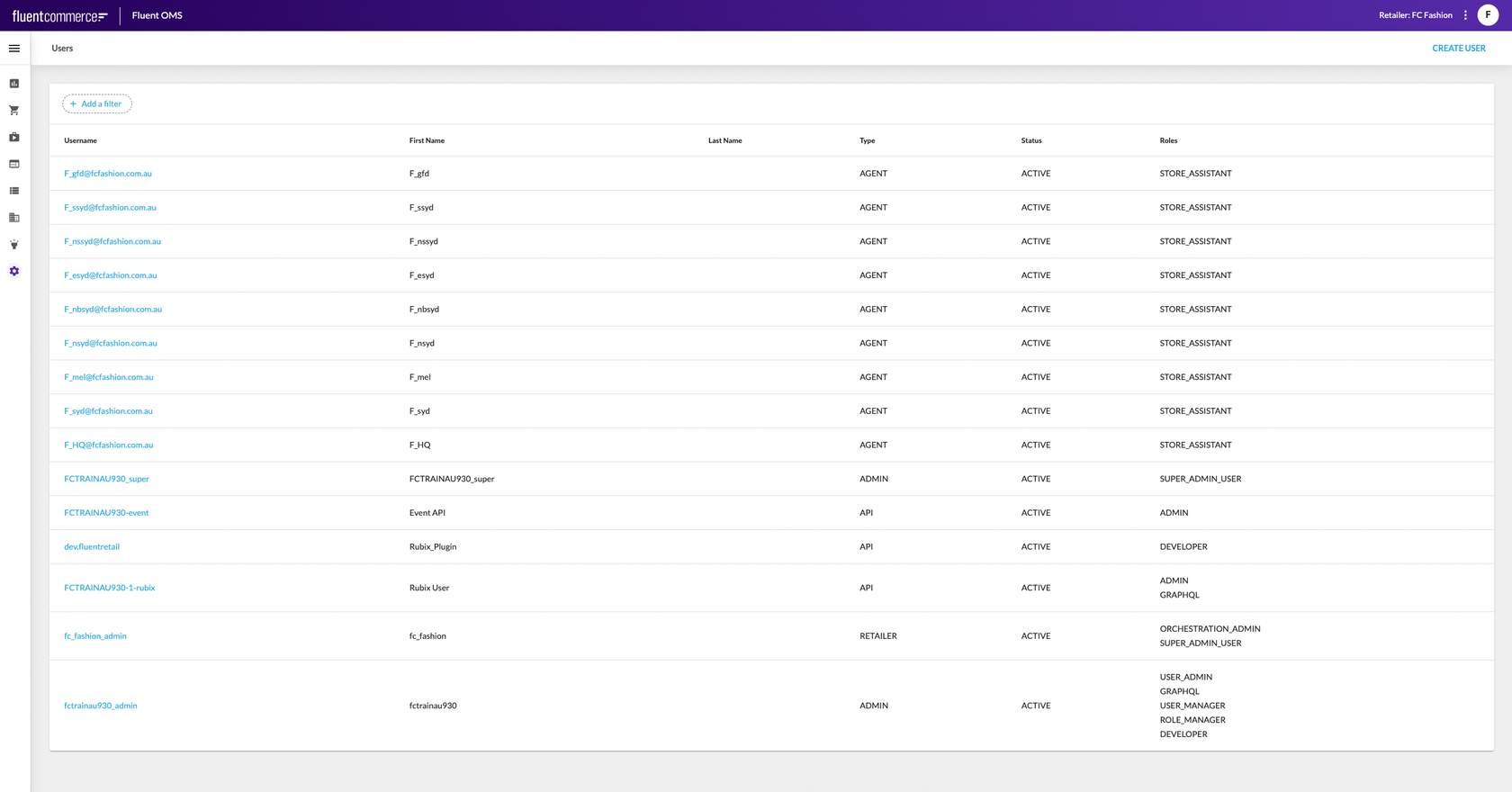

 Option 2: By finding the order under the Order Management tab on the Fluent OMS, and navigating to whatever relevant information you are looking for under that order.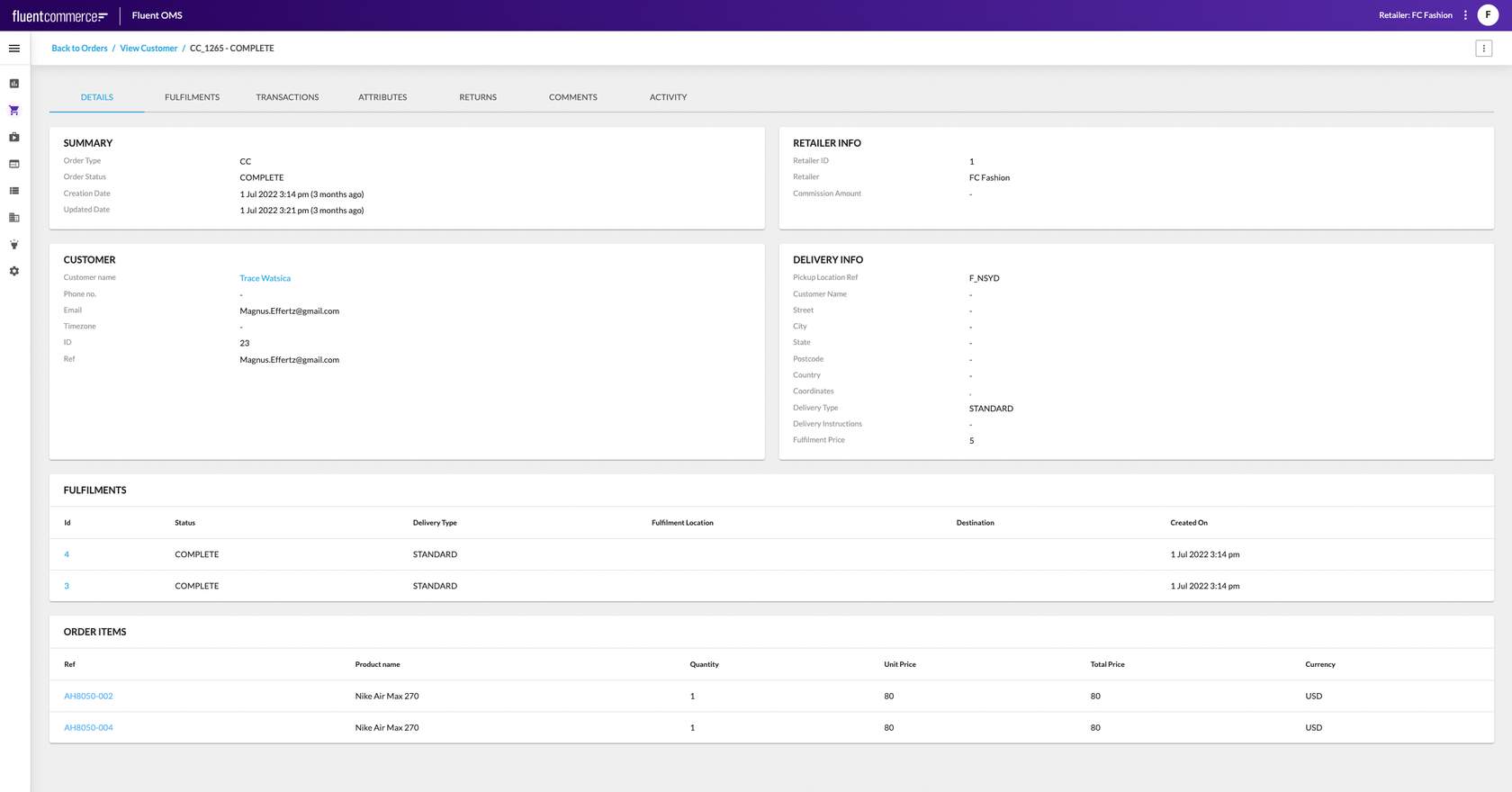
 Next let's look at how to find orders that are stuck in a certain state for longer than expected.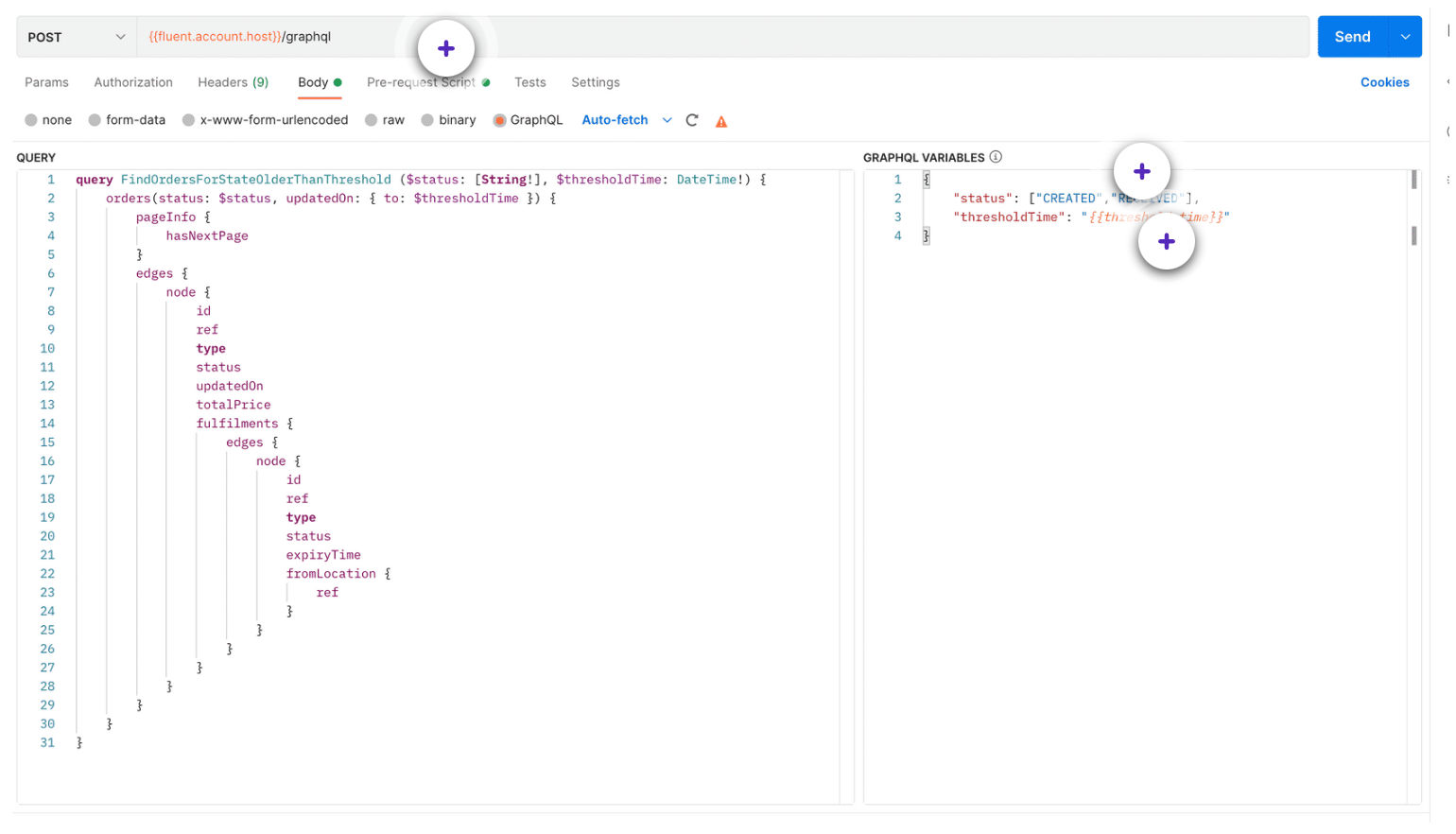
Once you've identified a 'stuck' order, you may need to re-trigger it to get the process moving forward again. Let's look at how you can do that next.
 Using the Plugin APIThe Plugin API provides methods for uploading, installing and viewing Plugins.Here's a quick look at the API:
 Next, we look at the Operations of the Plugin API.
With the Plugin API, you can conduct the following operations:
 Some things to remember about workflow versions.
 Platform Related IssuesIf a partner has conducted their investigations and has discovered a platform-related issue, then they must create a support ticket using the JIRA service desk, along with the details about the account, retailer, workflow, exceptions, event logs, etc.
 Expert ServicesAnother method in which Fluent Commerce can offer expert advice is via the Expert Services team. The Expert Services are a team of consultants, working closely with the client and partner through the discovery, design, implementation and support phase. Before raising a ticket, the implementation partner can also consult their assigned Expert Services Consultant. Especially, for first-time partners where Expert Services can help investigate certain issues, if the partner can't figure out what the problem is. The implementation partner can also reach out to their Customer Success Manager to get more information about how to get help from Expert Services.

An Introduction: Support & Operations
Welcome to this training on Support and Operations! In this course, we will talk about the various Tools and Activities that are used as part of the Support and Operations process, as well as take a closer look at how you can raise a ticket to get support from Fluent Commerce.Let us begin by looking at the Tools that are used at Fluent Commerce.In this lesson, we'll talk about the tools that you can use to troubleshoot problems with the Fluent implementation. We will look at tools such as the Fluent OMS, and Postman, and also look at some common issues, and how to debug them. Topics in this lesson include:- Using tools within the Fluent OMS
- Using Postman for running custom queries
- Identifying a 'stuck' Order
- Re-triggering a 'stuck' order
Tools:
Fluent OMS Web App
There are various tools used at Fluent Commerce, but there are two tools that are used more commonly than others, and they are the Fluent OMS and Postman. Let us begin by looking at the Fluent OMS.The Fluent OMSFluent OMS is a web-based interface, and a central application with rich capabilities that delivers value across many different user journeys, use cases, and business operations. It provides the interface needed to manage orders, product availability, inventory, and order fulfilment. Below are some of the tools/functionalities currently available on Fluent OMS:The Console Dashboard: The Console Dashboard sits within Fluent OMS. It displays information about entities (orders, fulfillments, etc.). The dashboard gives an indication of how many orders are in a particular status or escalated fulfillments etc. — it can provide specific views depending on the status of the order. The image below displays an example of the Console Dashboard, displaying Orders and Alerts.View and Manage Domain Data: The Fluent platform is underpinned by a sophisticated domain model made up of entities that share relationships. The Order Management domain for example represents details about all orders across the Fluent platform. Fluent OMS allows clients to view and manage the domain data, like orders, products, locations etcWorkflow Builder: The Workflow Builder is also knowns as the Orchestration Modeller and is the user interface (UI) of the Rubix Orchestration Engine. It provides visualisation and management of all configured workflows, including rule sets, rules, and user actions. The Workflow Builder is accessible through the Admin Console.Activity: The 'Activity' tab shows the different events and actions triggered during the lifecycle of an Order.Events: While 'Activity' is specific to an order, 'Events' can be used to extract any events within the Fluent OMS. You can also add one or more filters to narrow your search of events.Settings: Settings is a user interface (UI) in Fluent OMS that's used to create and manage (Custom and Foundational) settings.Users: Users is an interface that's used to create and manage users with their respective roles.Postman
Another tool that's heavily used at Fluent is Postman. It is an API platform for developers to design, build, test and iterate their APIs. Additionally, it is also used by the support team to debug and rectify issues by using a combination of GraphQL queries and Events search. Seen below are some of the activities that this tool is used for.- GraphQL Queries Postman is great for querying certain data that might not be visible in your Fluent OMS or for running custom queries using GraphQL.
- GraphQL Mutations If there's any data that needs to be corrected, GraphQL mutations can be run via Postman. For example:
- to change the status of an order
- to create a new setting.
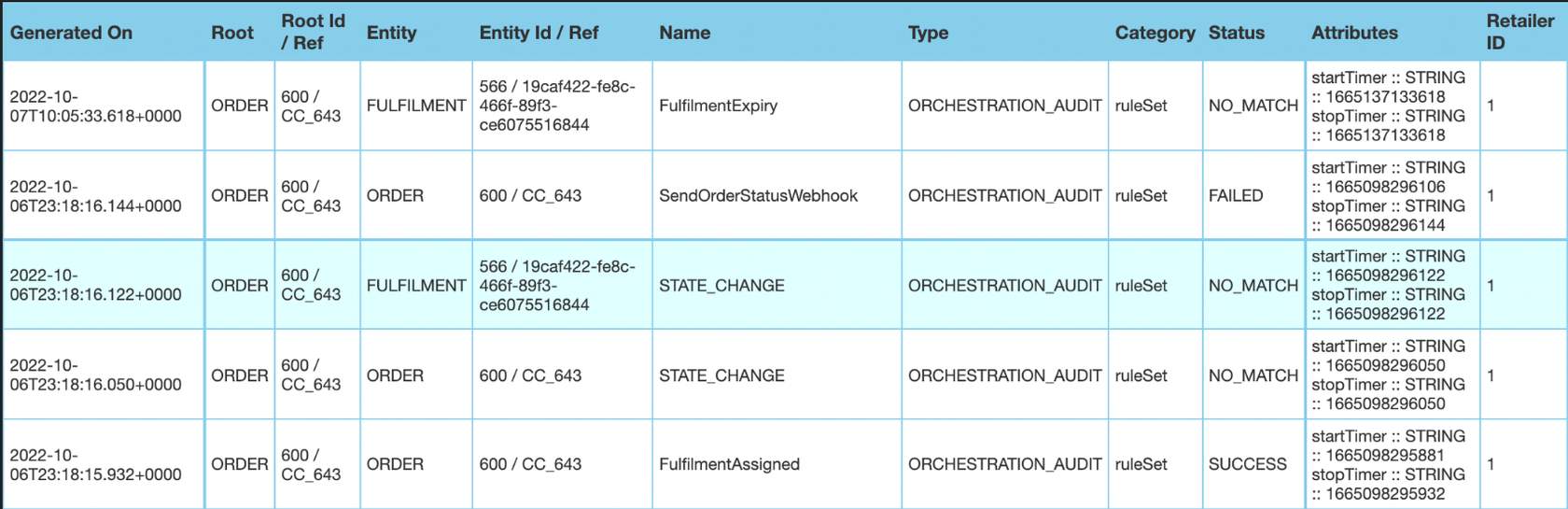
- Event Search In Fluent OMS, an event is logged for every action (including exceptions), and Postman can be used to search these events. There are a number of filters that can be applied to this search to narrow down the results. Sample End point: https://<ACCOUNT_ID>.sandbox.api.fluentretail.com/api/v4.1/event?category=ruleSet&context.rootEntityType=ORDER&context.rootEntityId=600. Sample Response:
1{
2"id": "28056d93-45cd-11ed-98f1-55a8029ca51b",
3"name": "FulfilmentAssigned",
4"type": "ORCHESTRATION_AUDIT",
5"accountId": "<ACCOUNT_ID>",
6"retailerId": "1",
7"category": "ruleSet",
8"context": {
9"sourceEvents": [
10         "27c44644-45cd-11ed-b14f-29b02f225887"
11],
12"entityType": "ORDER",
13"entityId": "600",
14"entityRef": "CC_643",- Visualisation templates: If there's any data that needs to be corrected, GraphQL mutations can be run via Postman. For example:
- Scripting: Postman allows scripting or storing of data in the environment and we use an environment variable. You can also script tests where you have pre-conditions, post-conditions, etc.
- And more... Postman is a very powerful tool. And we highly recommend that you familiarise yourself with it and make use of it. There are also other tools such as Insomnia and GraphiQL, but, we have found Postman to be the best one so far.
Common issues
How to identify what's going-on in an order
To identify issues with an order, you will need all the information that pertains to that particular order. There are two ways to get that information:Option 1 : By using Postman, if you have the order ID (use the GetOrderbyID query) or the order reference number (use the Order query with ref filter). This will display all the information about the order, including the financial transactions associated with the order, the fulfillments, the articles that have been created, information about consignments, and also status etc.Option 2: By finding the order under the Order Management tab on the Fluent OMS, and navigating to whatever relevant information you are looking for under that order.How to identify what's going on in a Wave
A Wave is a concept where multiple fulfillments that have been assigned to a store are all grouped together. It is a way to streamline the Pick-and-Pack process in the Fluent Store.To get all the information about a certain wave, you can use Postman and run a query, like the one shown here. This query will display all the fulfillments that have been assigned to that wave.Next let's look at how to find orders that are stuck in a certain state for longer than expected.How to identify 'Stuck' orders.
As the name suggests, a stuck order is an order that's stuck in a particular state without progressing to the next state, beyond a reasonable period of time.One way to find such orders, is to look for orders that have been in a certain state for more than a specified amount of time. Where, you can specify the value of time.Let's look at an example to understand this better.| Pre-request Script | The threshold time can be specified as a JSON under the pre-request script.This is also where you would specify how much the 'threshold time' should be. |
| Status Filter | Here you can add a status filter.Example: You can choose to view only those orders that are in a "CREATED" or a "RECEIVED" state. |
| Threshold Time | It is the duration of time that can be specified, when looking for orders. Note that this can be a start or an end time.Example, if you set the threshold time as greater than or equal to 30 minutes, then only those orders that have been in a particular state for 30 minutes or more will be displayed. |
How to re-trigger stuck orders
What does it mean to re-trigger a WorkflowRe-triggering or restarting a particular workflow path or parts of your workflow by simulating an event. This can be done by sending an event via the Events API, which matches with the Ruleset of the respective workflow.Why is this neededIf an order is stuck or there are problems with a certain order being moved to an unexpected status, then you could run mutations to reset the status of your order or fulfilment. And then, send an event in order to re-trigger the workflow from that point forward.Activities:
An introduction: Activities
In this lesson, we'll talk about some activities and tasks that may need to be undertaken from an operational point of view. Topics in this lesson include:- Plugin Management
- Workflow Versioning
- Audit Events
Plugins
Plugins are separately built artefacts (can be Fluent or 3rd Party) containing one or more rules that can be uploaded and installed into Rubix for use in workflows.Plugin ManagementSome of the things that you as a Developer or a Technical Lead might do is to manage plugins. Some of the tasks include:- Uploading of plugins
- Activating the plugins
- Viewing the active/inactive version of plugins
- Checking which version of the plugin is active
- Rolling back/forward between the previous and new versions
- Retrieving all the rules that are currently available in an account
- Managing custom rules on custom plugins (that may be in use)
Using the Plugin APIThe Plugin API provides methods for uploading, installing and viewing Plugins.Here's a quick look at the API:Next, we look at the Operations of the Plugin API.With the Plugin API, you can conduct the following operations:
- [GET] / Finds list of Rules Returns the the list of all rules that are active in an ACCOUNT.
- Authentication: Required
- Permissions: PLUGIN_VIEW permission required for the ACCOUNT context.
- Responses: Response Content Type- application/json
- [GET] / {bundleName}/status. Returns the upload/installation status and other metadata of the bundle. Only bundles that belong to the logged in account can be viewed..
- Authentication: Required
- Permissions: PLUGIN_VIEW permission required for the ACCOUNT context.
- Responses: Response Content Type- application/json
Workflow versions
Understanding Workflow VersionsBefore we look at the activities that surround workflow versions, let us understand what Workflow Versions are.Within the Fluent Platform, all workflows are versioned. Any modification of an existing workflow by a Retailer results in the automatic creation of a new version of the workflow.Some things to remember about workflow versions.- A major version represents a major change in the flow such as an addition of a new state transition and new business logic.
- A minor change involves changing parameters such as changing the email template for customer notifications or updating the expiry time of articles.
Okay, now that we've looked at what Workflow versions are, let's talk a little bit about the tasks and activities surrounding Workflow versions.ActivitiesHere are some activities that can be carried out around Workflow Versions:
- Submit a new version of the workflow
- Check what different workflow versions exist
- Get an extract of all the workflows that are currently available
- Go back and retrieve a particular workflow version
Audit events
Orchestration Audit Events
Orchestration Audit Events keep a record of what has happened during orchestration processing — they are essentially a log of all activities for a particular entity and contain information that is valuable for determining what and how an entity was processed through a workflow, and provide the most useful mechanism for debugging orchestration issues.There are 3 different ways to view audit events:- Event API (using Postman)
- Event Search (Insights in Fluent OMS)
- Activity tab (for each order)
- Snapshot — This event prints out a snapshot of the orchestrated entity at the time the event is triggered inside of the Workflow Engine.
- Why is it useful?
- It's useful for seeing the state of the entity before the process is executed.
- Why is it useful?
- Ruleset — For each and every ruleset executed within a process, a Ruleset Audit event is created.
- Why is it useful?
- It's useful for tracing the workflow path taken by the entity during that event or process.
- Why is it useful?
- Rule — For each and every rule executed within a ruleset, a Rule Audit event is created
- Why is it useful?
- It's useful for tracing all rules executed in sequence within a process, and what the last rule executed was in the case of an exception or interruption in processing.
- It can also be used to capture an audit of each entity's status change or webhook sent by filtering to those rules.
- Why is it useful?
- Action — For each and every Action produced from a Rule, an Action Audit event is created.
- Why is it useful?
- It's useful for validating if an expected Action was produced during processing.
- Why is it useful?
- Exception — An Exception Audit event is written whenever an exception is thrown from a Rule, back into the Workflow Engine.
- Why is this useful?
- It's useful for debugging 'what exception has occurred' and 'why'. More importantly, it will log the stack trace of the exception. — therefore it's important for Rule writers to make sure the real source exception is thrown or included as the cause in the exception being thrown from the Rule.
- Why is this useful?
Next up, Audit Event Structure
As with any Event, the Audit Event contains context information such as the Root Entity and Entity type, status, and ID / Ref. It also includes a timestamp, which is useful for reporting and analysing processing and fulfilment times. Additional information is written in the Event Attributes array.Sample Audit Event:1{
2 “id”: “a3f154c0-3e19-11ed-a11c-198b938d27af”,
3 “name”: “Change State”,
4 “type”: “ORCHESTRATION_AUDIT”,
5 “accountId”: “FCTRAINAU1000",
6 “retailerId”: “1",
7 “category”: “ACTION”,
8 “context”: {
9 “sourceEvents”: [
10 “a37c24c0-3e19-11ed-b70a-0f9894474e93”
11 ],
12 “entityType”: “FULFILMENT_OPTIONS”,
13 “entityId”: “5c40405c-d647-4b11-825f-7d53aacc7983”,
14 “entityRef”: “FO_6081”,
15 “rootEntityType”: “FULFILMENT_OPTIONS”,
16 “rootEntityId”: “5c40405c-d647-4b11-825f-7d53aacc7983”,
17 “rootEntityRef”: “FO_6081”
18 },
19 “eventStatus”: “SUCCESS”,
20 “attributes”: [
21 {
22 “name”: “toStatus”,
23 “value”: “OPTIONS_PROVIDED”,
24 “type”: “STRING”
25 },
26 {
27 “name”: “startTimer”,
28 “value”: 1664251536270,
29 “type”: “STRING”
30 },
31 {
32 “name”: “stopTimer”,
33 “value”: 1664251536366,
34 “type”: “STRING”
35 }
36 ],
37 “source”: “94862882.CREATE”,
38 “generatedBy”: “Rubix User”,
39 “generatedOn”: “2022-09-27T04:05:36.366+0000"
40 }Viewing Audit Events
A summary view of an entity's audit events (or Activities) is often used within the Fluent OMS web app. e.g. On the Activities tab in the Order Details view — The Event API can be used to query Audit Events for debugging, reporting and analysis purposes.Support:
Support process: An introduction
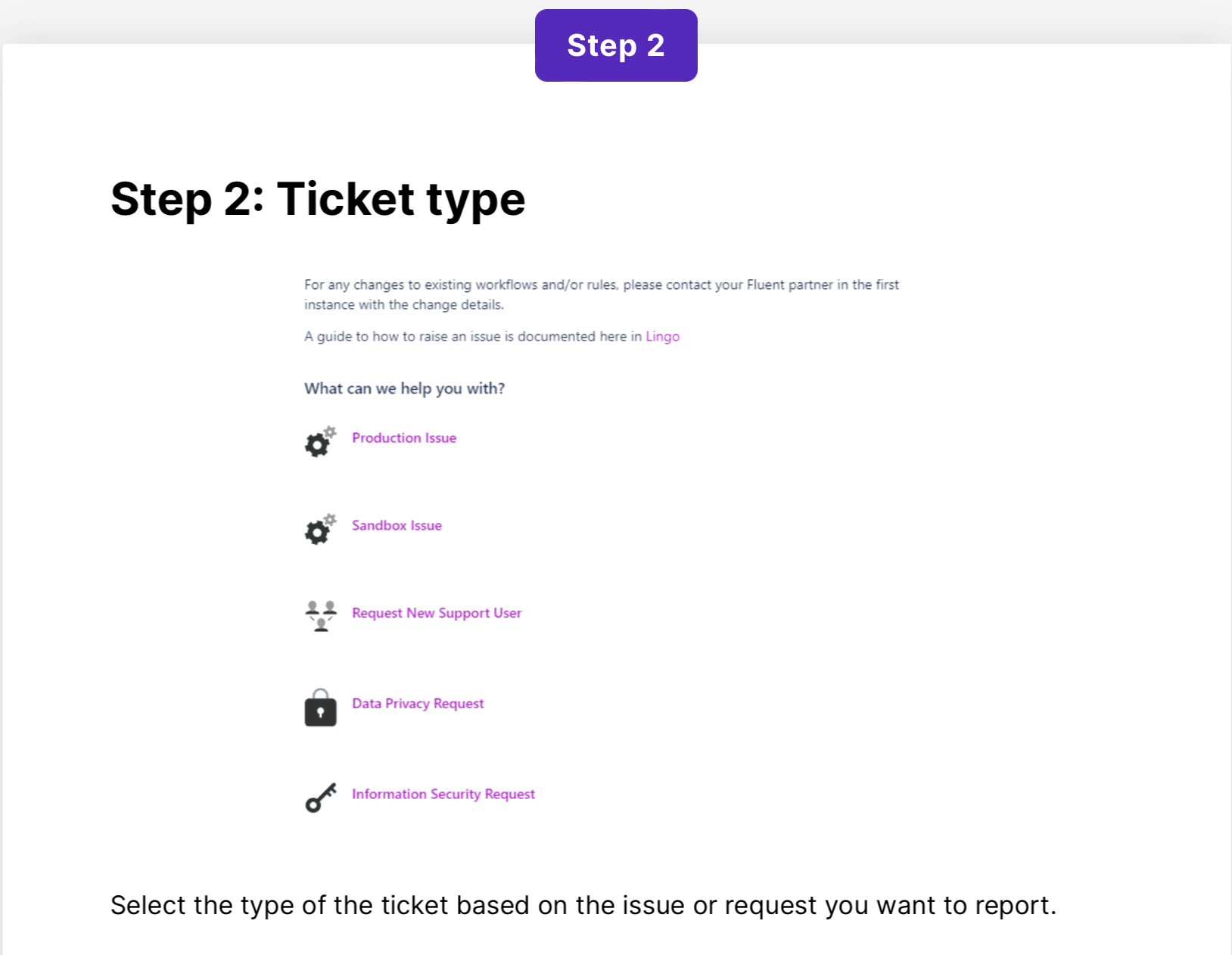
Understanding the Support ProcessFluent Commerce provides Level 1 platform support.For application support, Fluent Commerce has many different integration partners, and since every partner may have different workflows and may be working with custom rules for their implementations, it may not always be practical for Fluent Commerce to provide support for each implementation.So, the initial investigation sits with the partner, and it is their responsibility to deal with issues relating to rules, plugins, workflows, mystique configuration, settings, permissions, etc.Platform Related IssuesIf a partner has conducted their investigations and has discovered a platform-related issue, then they must create a support ticket using the JIRA service desk, along with the details about the account, retailer, workflow, exceptions, event logs, etc.Expert ServicesAnother method in which Fluent Commerce can offer expert advice is via the Expert Services team. The Expert Services are a team of consultants, working closely with the client and partner through the discovery, design, implementation and support phase. Before raising a ticket, the implementation partner can also consult their assigned Expert Services Consultant. Especially, for first-time partners where Expert Services can help investigate certain issues, if the partner can't figure out what the problem is. The implementation partner can also reach out to their Customer Success Manager to get more information about how to get help from Expert Services.Raising a ticket
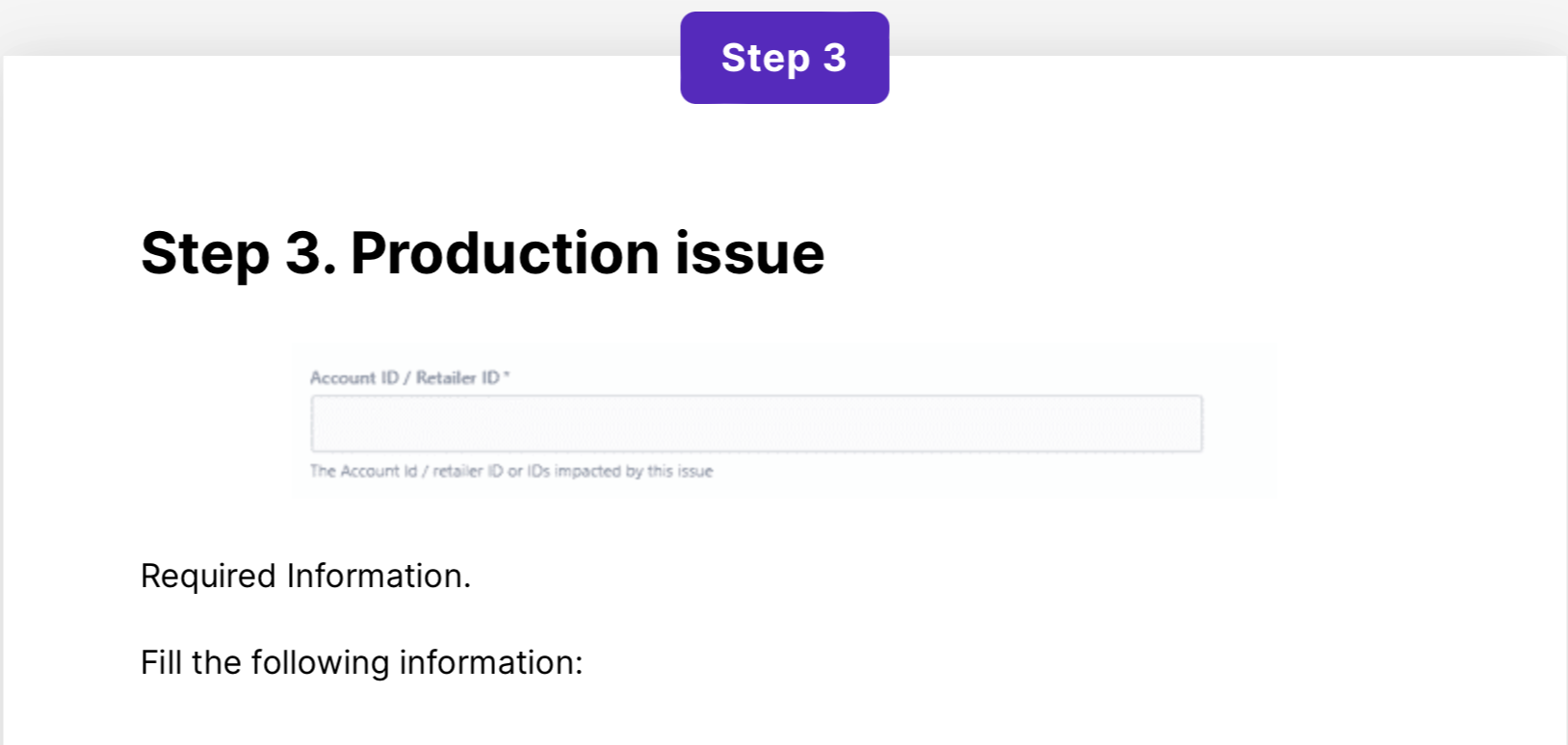
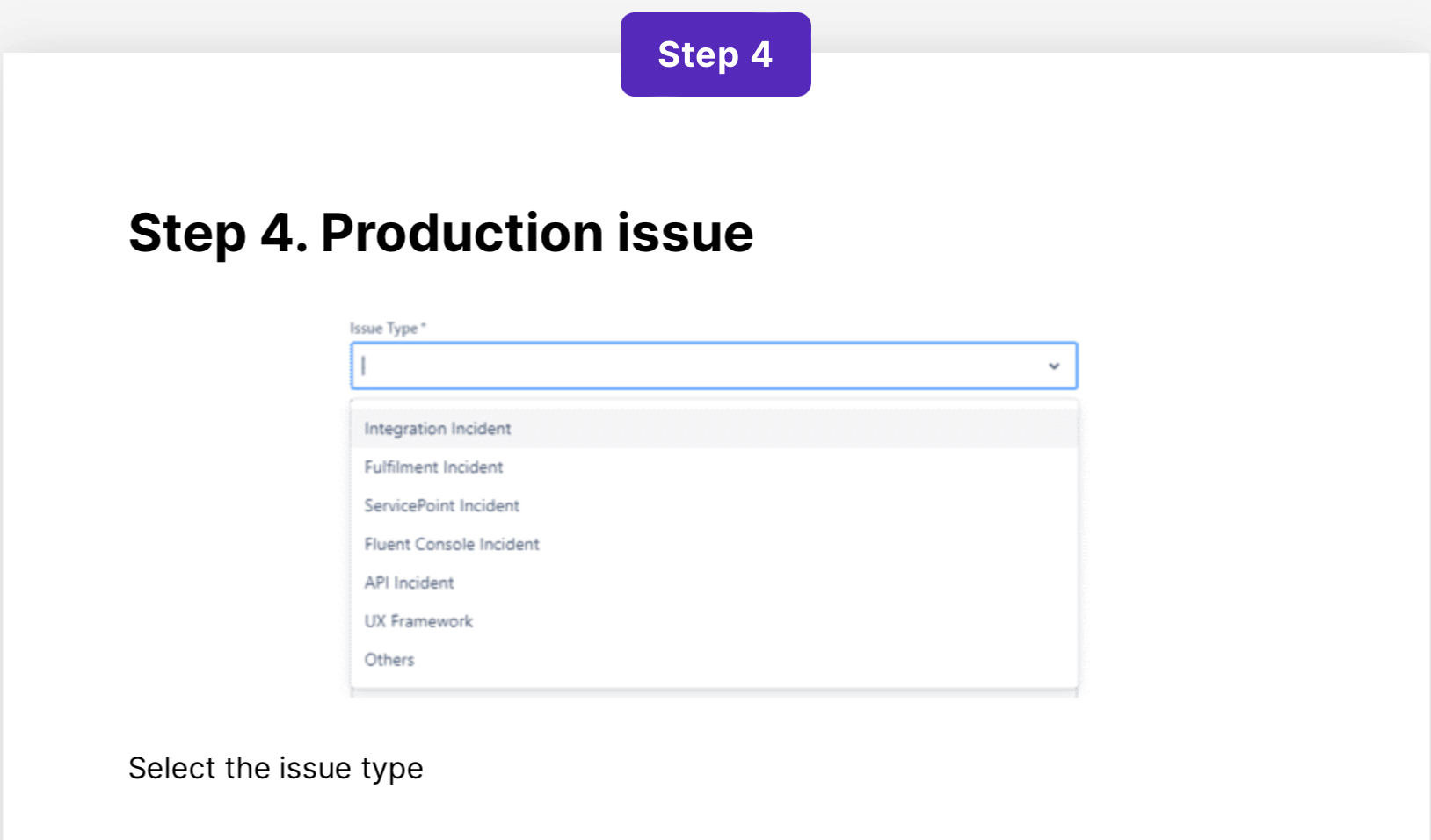
Before raising a ticket, make sure you've collected as much information as possible regarding the issue. Information such as where is the error occurring, is it a sandbox or a production environment, details describing the type of issue faced, when it happened, what were some of the events, if the issue could be reproduced, what orders were impacted etc. Information such as this and more is requested via the form that needs to be filled out, while raising the support ticket. Collecting and providing as much information as possible via the ticket will help the support team provide quick and accurate solutions.
