
UX Framework
Essential knowledge
Changed on:
1 Nov 2024
Overview
[Warning: empty required content area]Key points
[Warning: empty required content area]Workflow Framework - Overview and Key Concepts
So what exactly is a workflow, and how do workflows relate to order management?
A Workflow is a business process or a series of tasks or activities involved in the delivery of products or services to a customer or client. It defines the logical flow or lifecycle of a top-level entity within a domain.Fluent's OMX Workflow Framework (also known as Rubix) executes customised business logic defined within workflows allowing for orchestration automation in a highly scalable, flexible, and efficient way.
OMX Workflow Framework - value proposition for order Management?
Fluent's OMX Workflow Framework allows Retailers to easily orchestrate Orders, Availability, Fulfilment, and Inventory, allowing them to adapt quickly to changing environments and market conditions without incurring expensive development costs.High-Performance Scalable Processing
The OMX Workflow Framework is a highly performant and scalable execution system, which can process thousands of events simultaneously.
Flexible Customisation
The OMX Workflow Framework does not have any business logic. It allows customised solutions to be built by ensuring business logic is not baked into the APIs or Framework.
Low-Code Configuration
Business-friendly tools to create and manage workflows significantly reduces costs and provides efficiencies to business operations.
User Interaction
Enables smart integration of User specific activities with workflow logic.
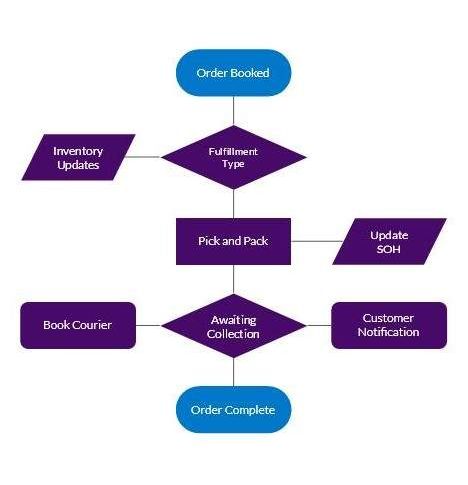
Workflow phases and statesEach workflow has phases that the entity will flow through, from beginning to completion. For example, a default order workflow typically involves 4 phases:Booking, Fulfillment, Delivery, and Done/Complete.Each of these phases can contain one or many statuses. For example:
- Booked, Awaiting Payment, Check Fraud
- Picking, Packing, Fulfilled
- Awaiting Delivery, Delivered
- Complete, Cancel
 Flip the cards below to learn more about the key concepts of a workflow:State: A State represents the point at which the entity is within the workflow's business logic.Event: An Event represents something that has, will, or is happening within the system.Trigger: A Trigger is the exact criteria for which a specific rule set within a workflow will be executed upon a given Event.
An Event is typically used to trigger the system to do something or log activity of what has happened within the system.
Example 1:
A client system creates an Event on Fluent Order Management with details about a status change to an order. The Workflow Framework will match this event to the correct Ruleset in the workflow, and execute the configured business logic for the state change.Note: You will learn more about rules and rulesets in the next lesson.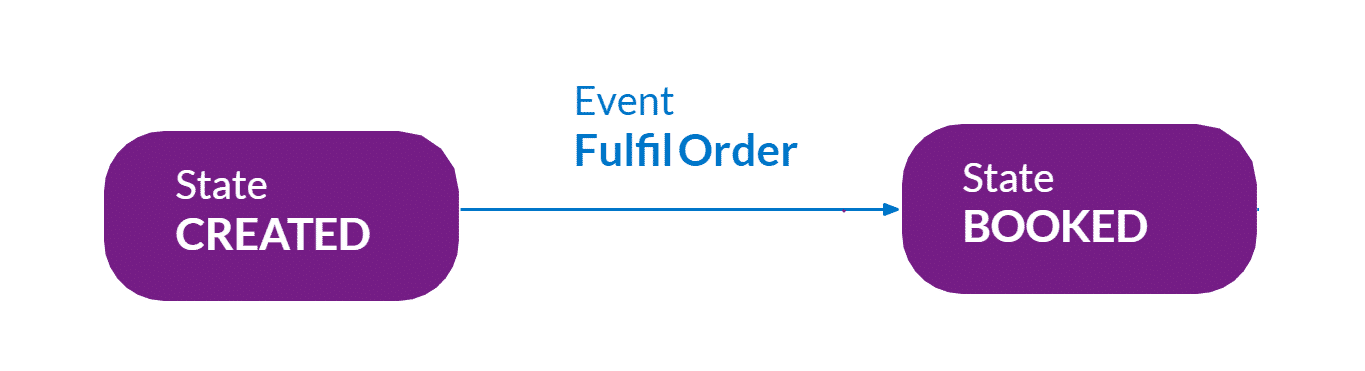
Example 2:
When an entity's state changes, such as the Order entity moves from Created to Booked, an Event is written to log that the activity has taken place. So far we've covered the concepts of Workflow, Events, States, and Triggers. Next up, Rules and Rulesets.
Workflow Framework - Rules and Rulesets
To fuel your business, you need business logic. But what makes business logic in Fluent Order management? ...It's the rules and rulesets
What is a rule?
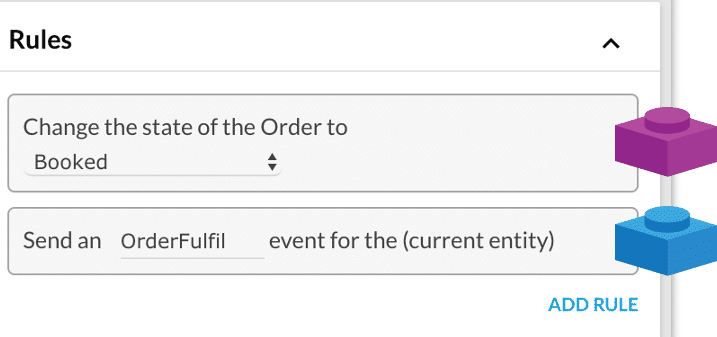
A Rule represents a single piece of business logic that can be configured and reused. Rules:- have a single purpose.
- produce a single Action.
- the outcome is always an action such as sending a new Event or updating data on an Entity
- are combined together to form a Ruleset.
- Change the state of an Entity
- Send an email
- Fulfill Order from the Collection point
- Send a new Event
What is a Rulseset?
A Ruleset is a collection of one or more Rules which get executed upon receiving a matching trigger via an Event. Rulesets are a combination of rules used to deliver a piece of business logic. The execution of a Ruleset can transition the entity through the lifecycle by changing its state, or it may just result in non-transitional actions, such as sending an email to a customer.The contract to trigger an event requires the trigger states, rule parameters, and attributes.All the rules defined in the Ruleset execute in sequence.- Rule/rulesets can have outcomes as Actions.
- Rulesets can also have User Actions configured.
Actions and user actions
An Action represents an outcome of a Rule. Actions from rules executed are applied at the end of the event execution.Listed below are some of the action examples:- Creating a new Event
- Creating or updating an Entity
- Triggering a third-party action. E.g. Sending an email or posting a webhook request.
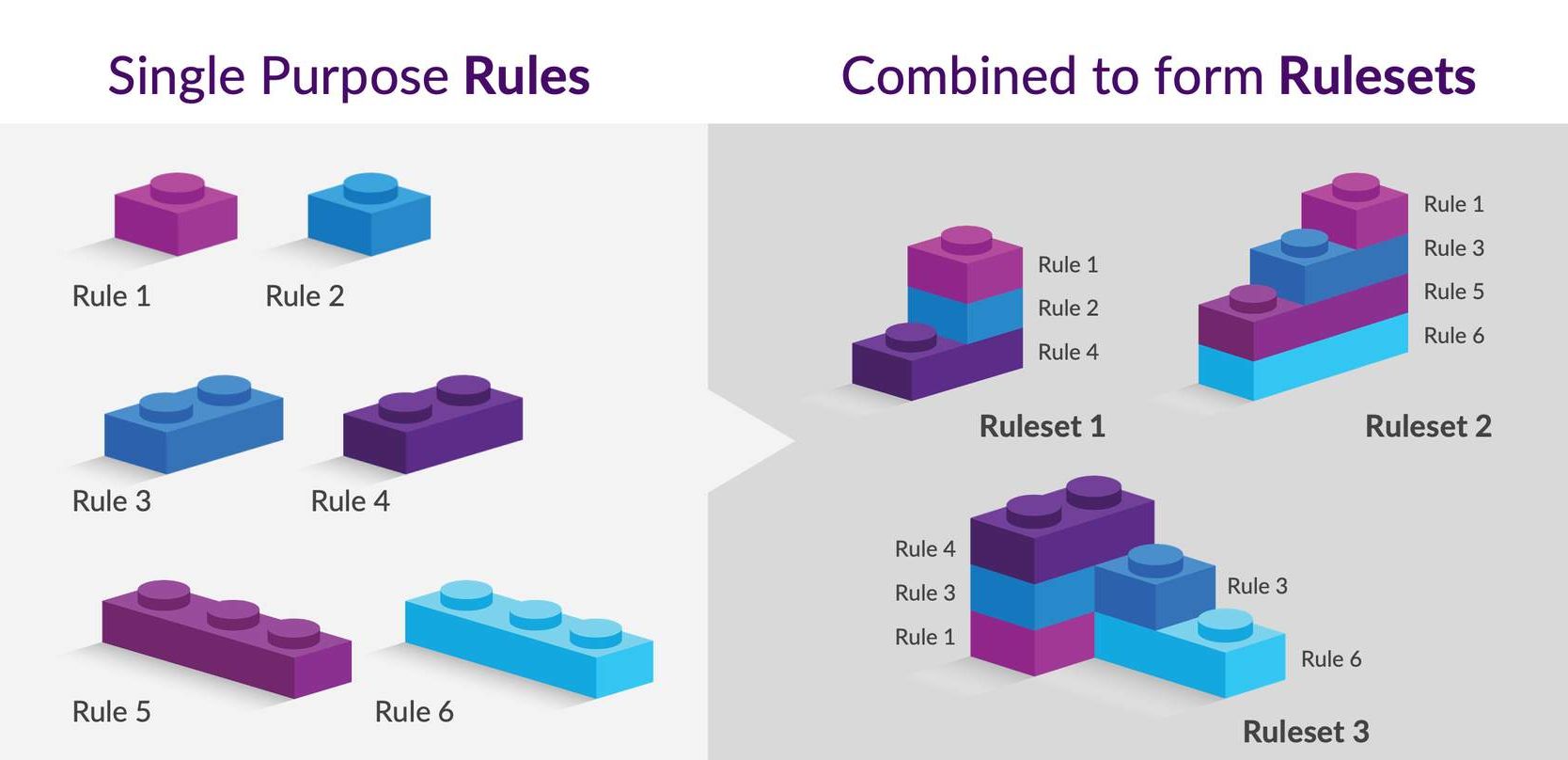
| Single rule | A Rule represents an atomic business logic that can be configured and reused. |
| Rule 1-Example 1 | An example of a single rule: "Send an email " which represents one use case in the business. |
| Rule 2-Example 2 | Another example could be a rule to change the State of Order from booked to fulfilled. |
| Rule 4 – Example 3 | You can have rule to send an event, like the " OrderFulfil" event for the Order entity. |
| Ruleset | Rulesets are a combination of rules to deliver a piece of business logic. |
| Ruleset Example 1 | We can configure Rule1, Rule 2, and Rule 4 together to accomplish the goal of sending order fulfillment events for the Order entity as well as to send an email about confirmation of state changed. |
| Ruleset Example 2 | Similarly, we can reuse and configure rules 1, 3,4 and add more rules to make another ruleset. You can configure one rule multiple times in the same ruleset. |
Workflow Framework - Builder
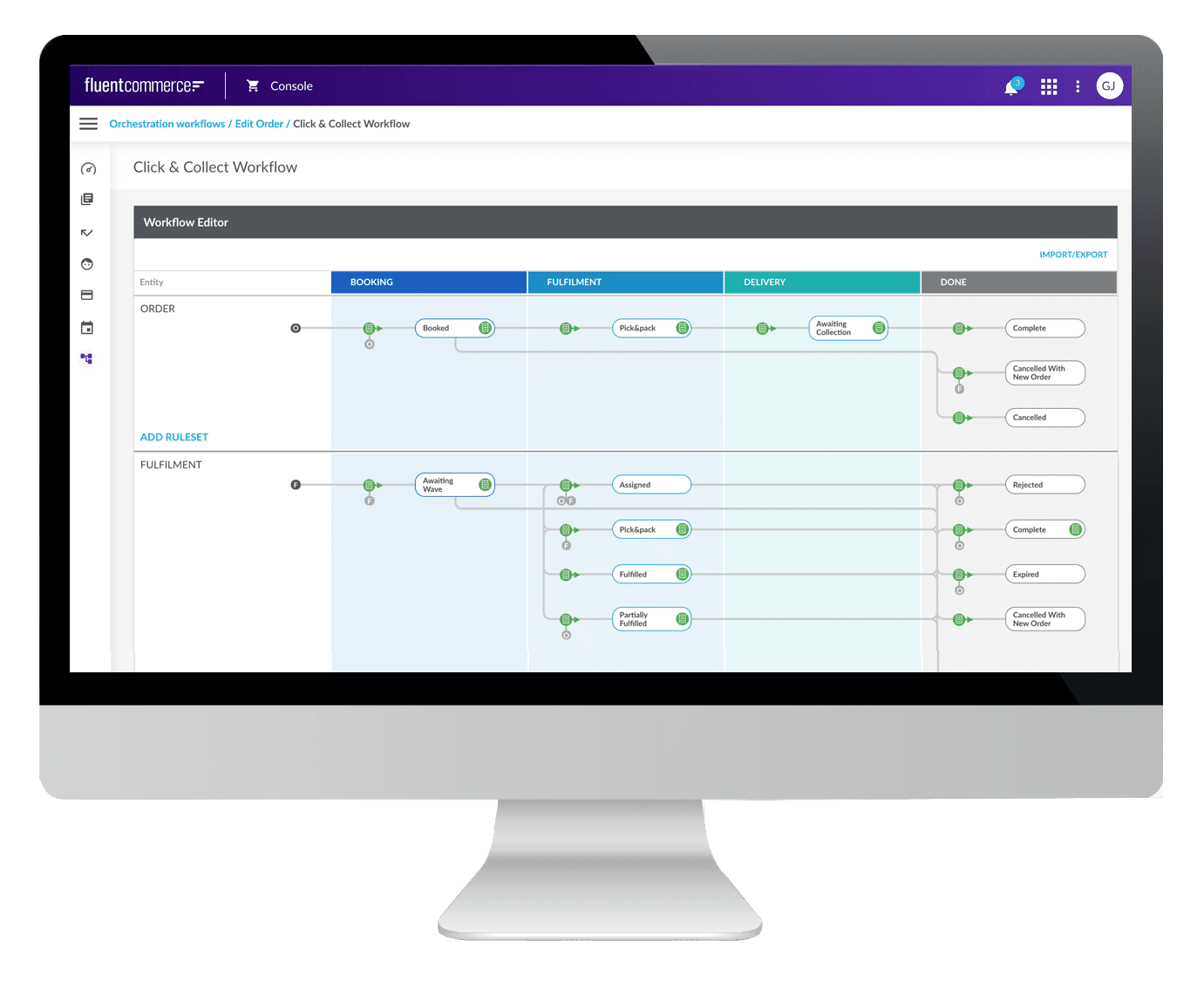
The Workflow Builder is the UI of the OMX Orchestration Engine. It provides visualisation and management of all configured workflows, including rule sets, rules, and user actions.Workflow builder overview
The Workflow Builder (also referred to as 'Workflow Modeler') is the User Interface of the Workflow Framework. It provides visualisation and management of all configured workflows, including rule sets, rules, and user actions.Key functionality:- Provides a way for users to configure workflows.
- Provides a platform to create and integrate user-driven activities with workflows and automation of processes.
- Supports configurations for adding buttons to the web applications. These buttons can be used to trigger automated workflow behaviour.
Workflow builder features
The diagrammatic view of a workflow can be used to configure the rules and rulesets of the selected workflow.This view allows users to:- Add/Configure rules and rulesets.
- Add/Configure triggers.
- Configures states and transitions to match business processes.
- Configure rules at every stage of the workflow.
Workflow Json
The underlying definition of a Workflow is defined in JSON which is an open standard file format. It is a human-readable, structured, and simple text commonly used to define and store data. Workflow definitions can be both imported and exported via the Builder and via the Fluent API.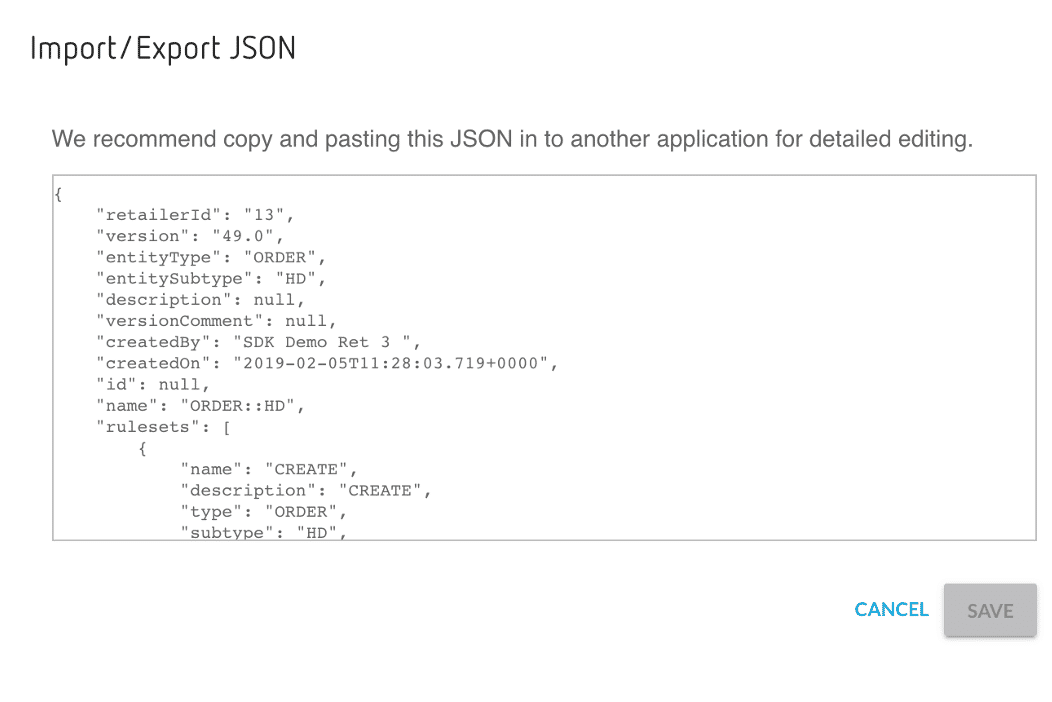
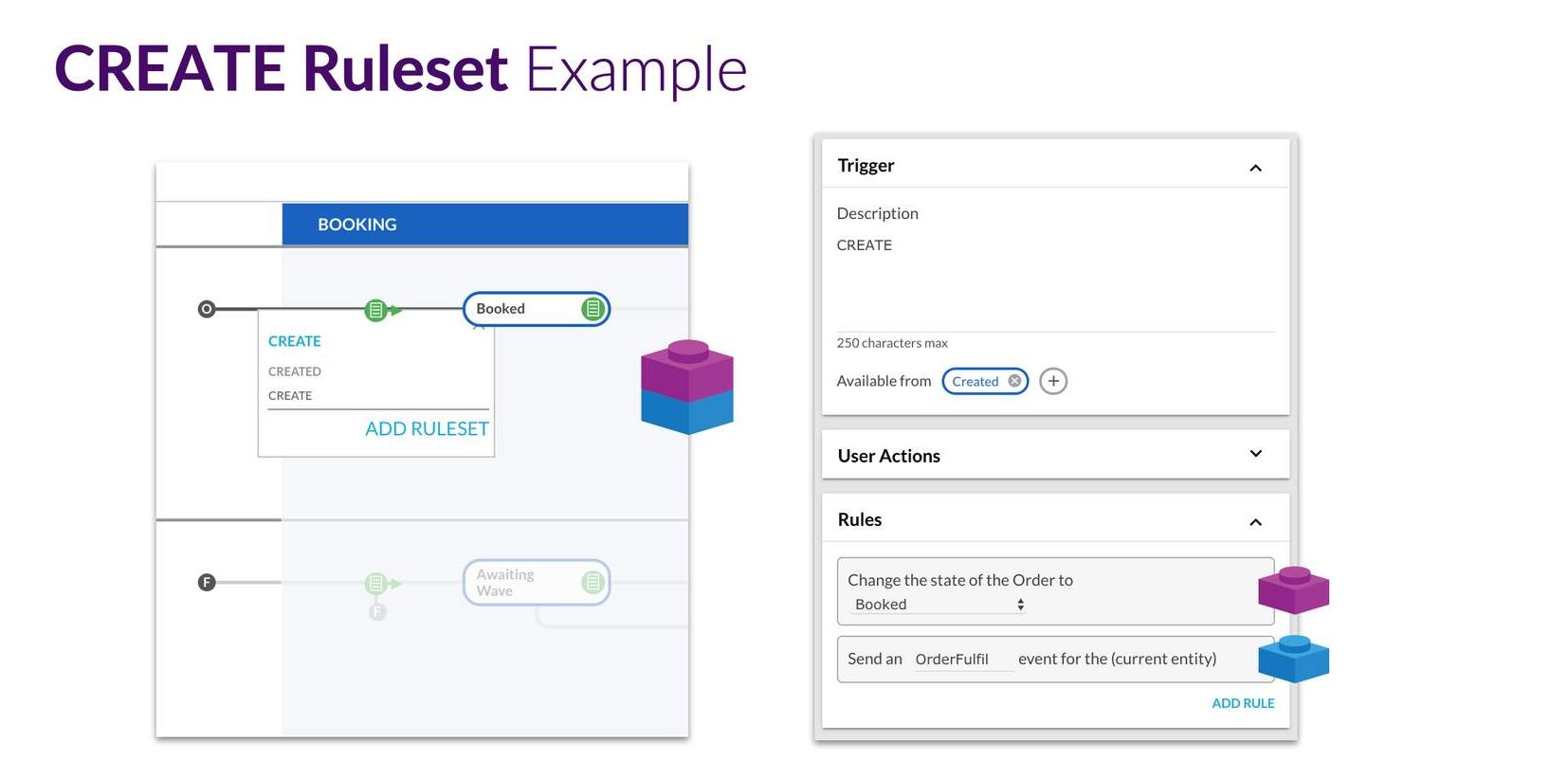
| Create ruleset - example | CREATE is an example of the ruleset. Clicking on this will open the UI to show the details of the RuleSet (Image on the right). |
| Ruleset Menu | The Ruleset Menu is where the ruleset is added. |
| Trigger | A Trigger defines the contract for the Event required to execute its Ruleset.In the example here, a Trigger is created for the ruleset. |
| User Action | User Actions are stated here.A User Action is essentially an external view of a Trigger, along with some additional attributes to represent UI interactions, such as buttons and labels, etc |
| Configure | It is possible to Configure the ruleset with one or more rules. |
You've reached the end of Workflow.Next Up, OMX UX Framework
UX Framework - Overview and Key Concepts
Fluent's OMX UX Framework enables clients' UIs to react to change within the workflows and provide the best-in-class user experience and design.The OMX UX Framework delivers powerful capabilities for configuring fully tailored web apps that understand the Fluent Platform. It enables clients' user interfaces to react to change within the workflows and provides a best-in-class user experience and design. Together with the Workflow and Connect Frameworks, the OMX Platform unlocks the flexibility and adaptability of the Fluent OMS, by providing configuration-based solutions, keeping costs low, and time to market fast. Image: View of Order Management DashboardThe UX Framework includes 3 parts:
- A Component Library provides a library of configuration-ready components for use in Fluent Web Apps.
- A Component SDK for developers to create new custom components to extend the standard library.
- A Design System that provides research-based user experience (UX) advice and guidelines for the omnichannel retail space.
- Admin or Business Analyst - semi-technical users can customise the UI/UX of Fluent apps without needing developer input.
- Developers - can develop new components for places where customisation is not quite flexible enough.
- Retail Support and Store staff - provide the best user experience for retail staff to engage with Fluent order management.
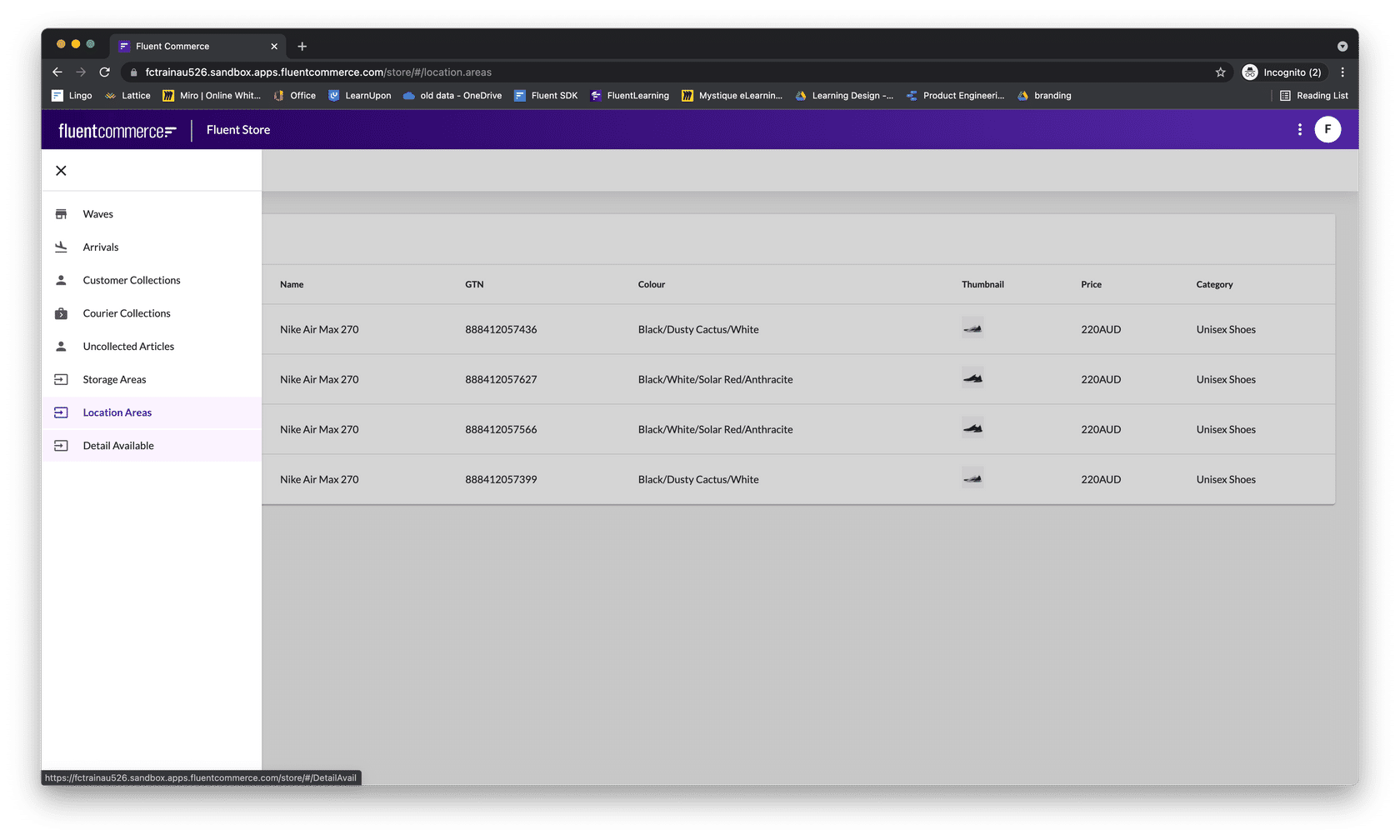
| Component Library | The UX provides a rich Component Librarythat creates Apps that understand the Fluent platform. Clients, therefore, have the flexibility to tailor their UIs to their unique business processes and reduce development costs, |
| A design system | Best in class UI and effective UX design principles which provide flexible customisation and code-free configuration. |
| Component SDK | Component SDK allows clients and partners to develop new components to extend the functionality of the Fluent Web Apps. |
- Navigation
- Screen layouts
- Data sources
- User actions
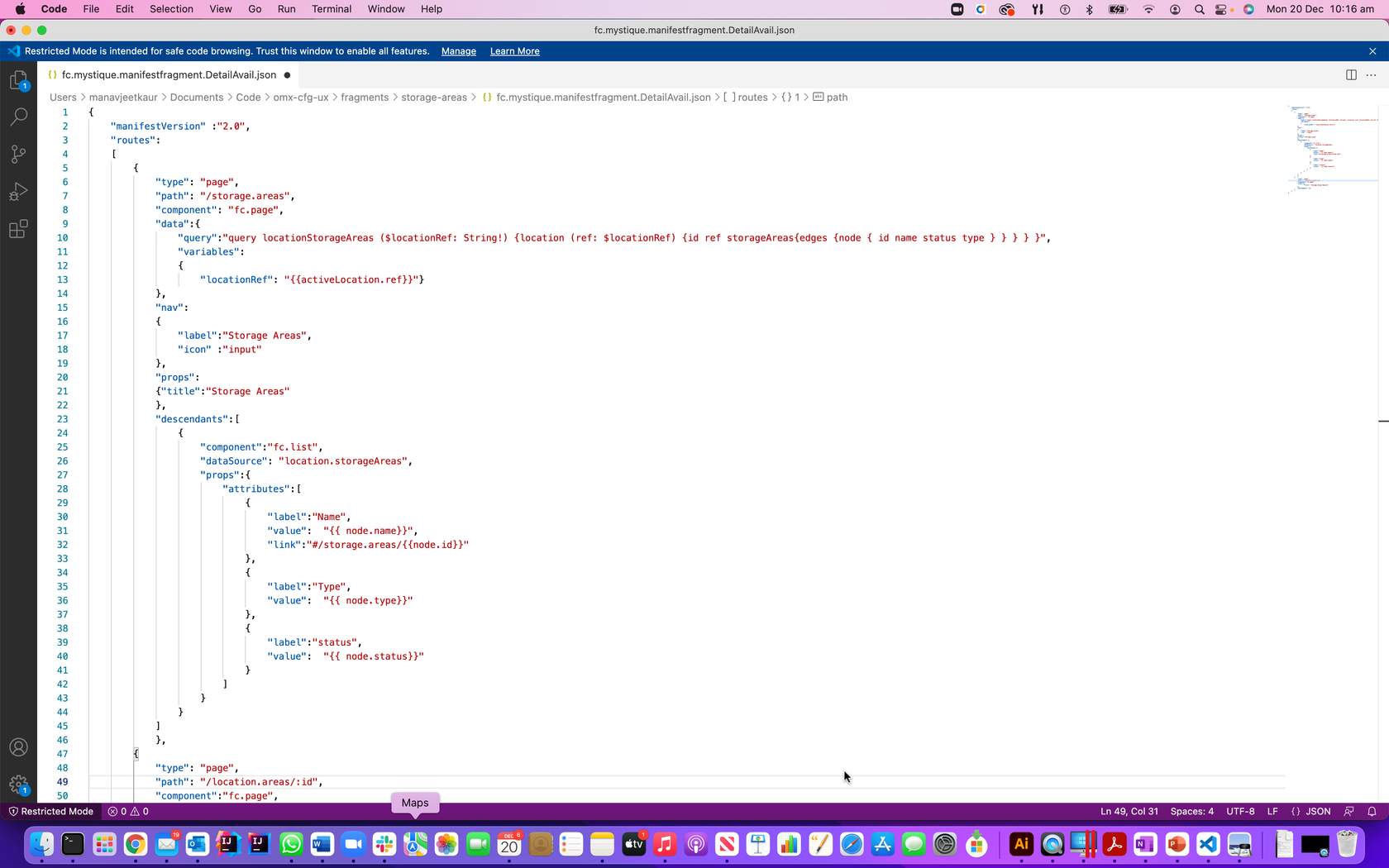
| Manifest file | The manifest file, a JSON file to declare data source, components/screen layout & user actions |
| GraphQL query | Use GraphQL query to get the required data source for customisation. |
| Component library | You can use the built-in component library to create new UI components, like list and page is used in this example |
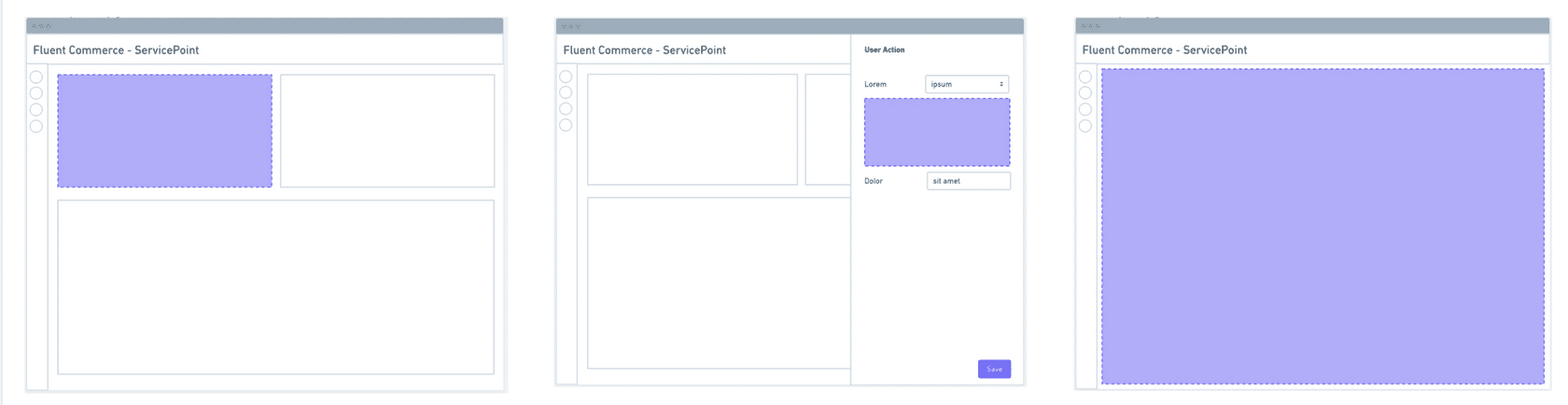
| Area of extension 1 – Left | New cards to display information from Fluent APIs or external sources |
| Area of Extension 2 | New form field types that work with rules to extend user action capability |
| Area of Extension 3 | create entirely new customised pages |
Component SDK features
Custom components are generic React components and the following features of SDK make it configurable via the manifest (which means no-code updates to apps) and also auto-adaptable to the workflows (generating new user action forms when the workflow changes).Hooks: Custom components can easily interact with OMX functionality via the provided hooks.Utility Components: Some utility components are provided to make building custom components easier and more consistent.Registries: Before a custom component can be used in an OMX web app, it must be registered with one of the three registries:- Component Registry - for standard in-page components
- Field Registry - for interactive form field components
- Template Registry - for adding new template helpers
