- Get Started
- Functionality
- Learning
- Extension
- Dev Tooling
- APIs
- Releases

Docs
Authors:
Fluent Commerce, Kirill Gaiduk
Changed on:
5 Nov 2026


| Use Case | Webhook? | Event API? | Examples |
| Real-time Updates | ✅ | ❌ | Webhooks are perfect for individual orchestrated changes such as Order Status Updates, Shipping Notifications, etc. |
| Bulk / High Load Batch Orchestration | ❌ | ✅ | Webhooks must NOT be used under high-load bulk orchestrations such as Inventory Batches. If required, the Event API may be used to query for information. |
| Polling | ❌ | Rarely | Webhooks should not be used to poll any third party or external system, ever! We do not recommend polling the Fluent Platform via the Event API; however, if required, this should be done as optimally as possible and not too frequently. |
`SendWebhook` Rule - see below`SendWebhook` is a reference rule that can be added to any Ruleset in a workflow. The `SendWebhook` is used to post the corresponding event message to any endpoint that is specified.The rule accepts one parameter, `setting` - the name of the Setting that holds the webhook endpoint configuration.The Orchestration Editor can be used to add the rule to the Ruleset in the workflow that is triggered by the specific event that needs to be captured: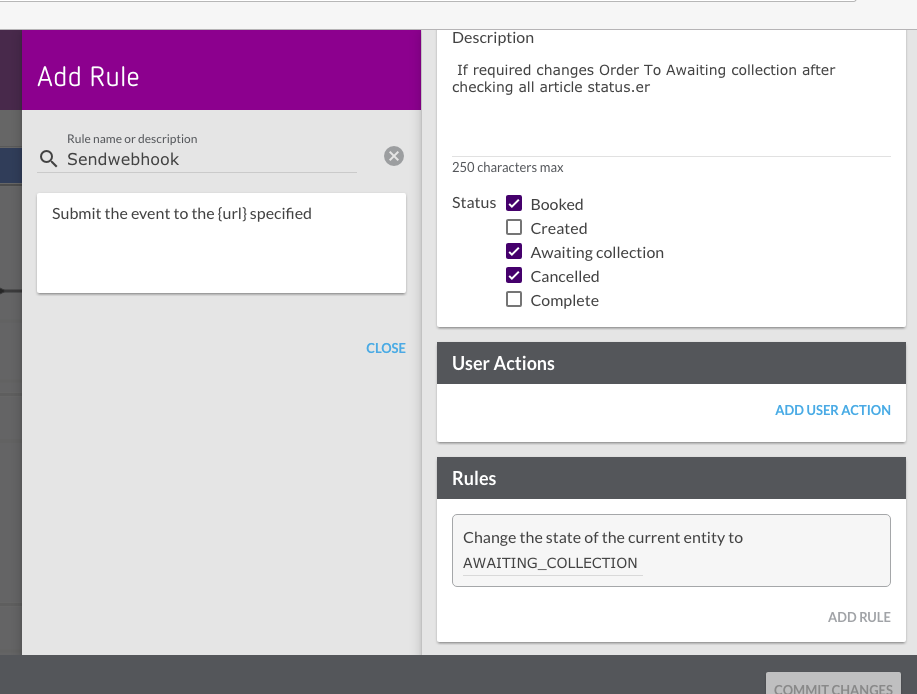
`SendWebhook` rule covers most cases, so a custom webhook rule is rarely needed. Rather, the recommended approach is to add a Ruleset to your workflow, naming the specific webhook action required, and simply add the SendWebhook rule to that Ruleset, configured with the setting that holds the webhook endpoint. This will take the event received by the Ruleset and post it to the target URL.Should you wish to enforce more validation on the Event interface for a particular webhook, you can add rules that define required Event Attributes to be present prior to executing the webhook rule itself.Example Ruleset:| SendOrderStatusUpdateToEcom |
| ValidateEventAttribute |
| ValidateEventAttribute |
| ValidateEventAttribute |
| SendWebhook |
`postWebhook`.For information on Fluent SDK, please check out the pages below.`FLUENTRETAIL.base.SendWebhook`, without the logic of the custom rule.To rerun the custom rule instead, add the following setting to every workflow that contains a custom webhook rule: `"settings": {"fc.rubix.sdk.webhook.retry.method":"preserve-event-details"}``preserve-event-details`, the rule that produced the webhook action runs again on each retry, with its props. See `fc.rubix.sdk.webhook.retry.method``webhook-event`, or from the initial event of the event context with `initial-event`. See `fc.rubix.webhook.retry.event` `SendWebhook` rule. The rule posts the event under the name from its webhook setting, and without `preserve-event-details` the retry is posted under the name of the retry event| HTTP Code | Meaning | Platform Behavior |
| 200 OK | Success (recommended) | Webhook delivery recorded as successful. Response body, headers, response code, and reason are all saved to the orchestration audit log. |
| 202 Accepted | Async acknowledgement | Treated as an asynchronous webhook acknowledgement. The platform does not save the response body, response headers, response code, or response reason. This is by design. |
| 4xx Client Error | Client-side failure | Recorded as delivered. The Send Webhook audit event has the `SUCCESS` status and the response code. No automatic retries are attempted. Monitor using the Event API for Send Webhook audit events and check for non-200 responses. |
| 5xx Server Error | Server-side failure | Recorded as delivered. The Send Webhook audit event has the `SUCCESS` status and the response code. No automatic retries are attempted. Use the Event API or entity status monitoring to detect and manually retry failed deliveries. |
`Send Webhook` audit events and identify any that return responses other than `200` by parsing the JSON (see this sample JSON non-`200` response):`curl --location 'https://{{accountId}}.sandbox.api.fluentretail.com/api/v4.1/event?eventType=ORCHESTRATION_AUDIT&name=Send%20Webhook&category=ACTION&from={{fromDateTime}}&to={{toDateTime}}' --header 'Authorization: bearer {{token}}' --header 'Accept: */*'`| Error / Exception Type | Retries | Connection Timeout | Read Timeout | Retry Interval | Retry Fallback Schedule | Retry Max Attempts |
| Network error (connect or read timeout, connection refused, DNS, TLS) | ✅ | 10 seconds | 10 seconds | Exponential | Immediate, 1 minute, 1 hour, 1 day | 4 |
| HTTP 4xx | ❌ | - | - | - | - | - |
| HTTP 5xx | ❌ | - | - | - | - | - |
| All others | ❌ | - | - | - | - | - |
| Error / Exception Type | Retries | Connection Timeout | Read Timeout | Retry Interval | Retry Fallback Formula | Retry Max Attempts |
| Network error (connect or read timeout, connection refused, DNS, TLS) | ✅ | 10 seconds | 10 seconds | 2 seconds | `Math.pow(2, previousRetriesAmount) * retryInterval` | 3 |
| HTTP 4xx | ❌ | - | - | - | - | - |
| HTTP 5xx | ❌ | - | - | - | - | - |
| All others | ❌ | - | - | - | - | - |
`id` field of the event that is sent as part of the webhook, so that the receiving system can identify each call and recognize a call it has already received. For example, the following code has `randomUUID` set as `id`.`RetriesExceededException` and creates an event named `<RulesetName> Exception` for the ruleset and entity of the retry event. This is the webhook event by default, or the initial event with `initial-event`. Use this event to trigger a custom ruleset in your workflow that acts on the failure, such as sending an email or SMS notification. Add triggers for every status that the entity can be in when the final retry fails.`ActionException` in the orchestration audit events.For more info on Webhook Signing, see Signature Validation.1{
2 "rules": [
3 {
4 "name": "[[account.id]].core.SendWebhook",
5 "props": {
6 "setting": "webhook.payment.capture"
7 }
8 }
9 ]
10}1{
2 "id": "b34281d0-ada4-11e9-a1a7-5da7a83b9sd97cd",
3 "name": "OrderStatusChange",
4 "accountId": "ACME",
5 "retailerId": "1",
6 "rootEntityId": "123",
7 "rootEntityRef": "O_123",
8 "rootEntityType": "ORDER",
9 "entityId": "123",
10 "entityRef": "O_123",
11 "entityType": "ORDER",
12 "entityStatus": "SHIPPED",
13 "type": "NORMAL"
14}1Event event = Event.builder()
2 .id(UUID.randomUUID()) //REQUIRED
3 .name(action)
4 .accountId(incomingEvent.getAccountId())
5 .retailerId(incomingEvent.getRetailerId())
6 .entityId(invoiceId)
7 .entityRef(invoiceRef)
8 .entityType(incomingEvent.getEntityType())
9 .attributes(attributes)
10 .build();
11
12context.action().postWebhook(webhookEndpoint, event);